Source-backed analysis10
Review basis
The AppDuo team prepared this review by analysing product features, official documentation and user feedback to help you understand its strengths, limitations and suitability for your needs.
10 reference sourcesInformation updated Nov 10, 2026
How we review
By AppDuo Editorial Team · Updated
- Windows
- macOS
- iOS
- Android
On this page
Decide at a glance
Our verdict
Foxit PDF Reader suits people who want a free PDF reader with annotations, forms and cloud-storage integration, especially in Windows offices. The trade-offs are no content editing, the Foxit eSign service as an extra purchase, and an installer that once bundled unwanted software.
Best for: Office users who need to read, mark up, comment on and fill PDFs without paying
Skip it if: People who need to edit PDF content, OCR or convert to Office: those belong to the paid Foxit PDF Editor
Pros
- Free, with Windows, macOS, iOS and Android versions
- Annotations, comments, shared review, form filling and SharePoint, OneDrive, Google Drive and Dropbox integration
- Built-in ChatGPT-based AI assistant for summaries, translation, document chat and spelling and grammar fixes
Cons
- No PDF content editing; Wikipedia says PDF creation was removed from Reader in May 2020
- Per Foxit's comparison table, signing through the Foxit eSign service (legally binding, signature requests) is an extra purchase, and Reader has no OCR
All pros and cons · Who is it for?
Pros
- PDF signing, adding and verifying digital signatures, time stamps, Trust Manager and Microsoft Purview integration
Cons
- Wikipedia records the installer once bundling Ask Toolbar and OpenCandy, and the iPhone app sending unencrypted telemetry in 2014
- The company's mobile app scores only 3.9/5 on Google Play
Best for
- Organizations deploying at scale, since Foxit lists Group Policy, XML configuration and a setup customization tool on Windows
Skip it if
- Privacy-sensitive users who do not want data passing through cloud AI services
Experience & key features
What is Foxit PDF Reader?
Foxit PDF Reader, formerly Foxit Reader, is a free PDF reader from Foxit Software, headquartered in Fuzhou, China. Per Wikipedia, Foxit was founded in 2001 and its first product, Foxit Reader, was released in 2004. Foxit's site describes it as a tool to read, annotate and collaborate on PDFs.
Key features
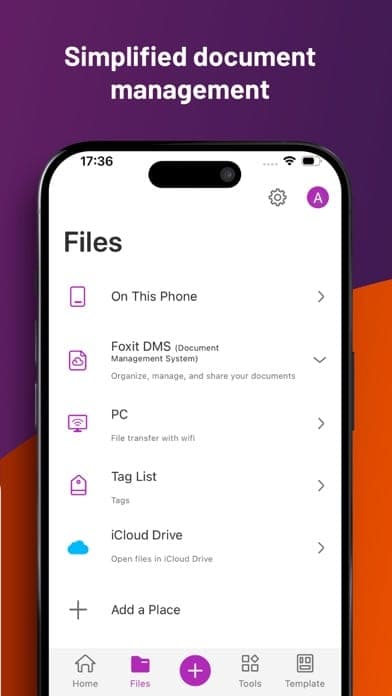
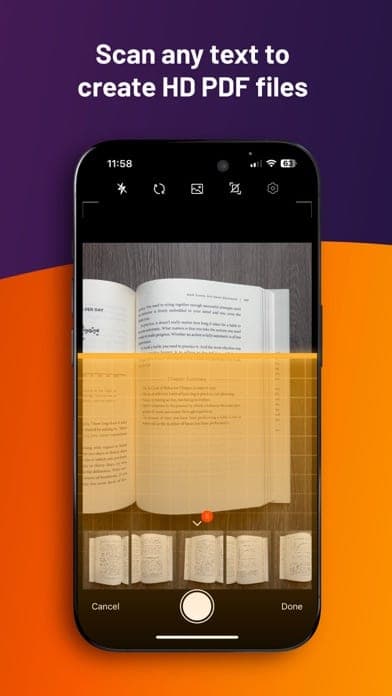
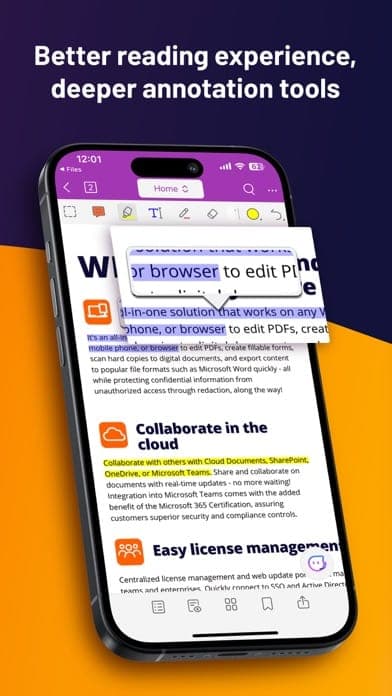
Per Foxit's comparison table, Reader offers form filling, form data import and export, PDF Portfolios, comment tools, shared review and PDF sharing. It connects to SharePoint, OneDrive, Google Drive and Dropbox, signs PDFs, adds and verifies digital signatures, opens password-protected PDFs and supports Microsoft Purview. A ChatGPT-based AI assistant summarizes, translates, answers questions about documents and fixes spelling and grammar; the table notes document chat does not cover documents that need OCR.
Pricing and limits
Reader is free. The comparison table says the Foxit eSign service (legally binding signatures, signature requests, status tracking) requires an additional purchase, while PDF editing and OCR belong to Foxit PDF Editor; the Reader page offers a 14-day PDF Editor trial. On the US App Store, the Foxit PDF Editor mobile app sells PDF Editor at 6.99 USD a month or 39.99 USD a year.
More analysis
Platforms and requirements
Wikipedia lists Reader for Windows 10 and 11, macOS 10.15 or later, iOS 11 or later and Android 4.4 or later, with 2026.2.1.39815 listed as the latest release on 23 September 2026. Foxit's Windows system requirements list 512 MB RAM minimum, 1 GB recommended. The company's mobile app appears under the name Foxit PDF Editor in the app stores.
Compared with alternatives
For reading and annotating only, Foxit PDF Reader competes directly with Adobe Acrobat Reader. For editing, converting or compressing PDFs, Adobe Acrobat, Smallpdf or iLovePDF fit better, or step up to Foxit PDF Editor. Weigh the data policy if you use the AI features.
Screenshots
Plans & pricing
Prices last verified Nov 10, 2026
Free
Free
Free for viewing, annotating, filling forms, signing and collaborating on PDFs. Per Foxit's comparison table, the Foxit eSign service (legally binding signatures, signature requests, status tracking) needs an additional purchase; PDF editing and OCR are not in Reader and belong to the paid Foxit PDF Editor.
- Free plan limits
- Foxit lists Reader as a free product. The company's mobile app is named Foxit PDF Editor and has in-app purchases; on the US App Store, PDF Editor costs 6.99 USD a month or 39.99 USD a year, and Foxit AI Assistant 49.99 USD a year.
- Free trial
- No free trial
Cancellation & refunds
Not applicable to Reader since it is free; the pages read do not state a refund policy for paid products.
Privacy
Foxit's privacy policy says it automatically collects IP address, device and browser details and pages viewed, plus registration and billing details when you buy. Files you upload to cloud services are stored on Foxit servers for processing, are generally deleted after processing, and outputs are typically deleted within a day; the policy does not explicitly say whether documents opened in desktop apps are uploaded. AI and OCR features send content to Microsoft Azure services, with temporary data deleted within 24 hours. Foxit says it does not sell personal information but shares data with many vendors for analytics, advertising and marketing, and says it does not use AI chat histories or uploaded documents to train AI without explicit consent. Servers are in the US, Germany, Canada, Australia and Japan; customers outside those regions are stored in the US. Per Wikipedia, in 2014 the Internet Storm Center reported the iPhone app sent unencrypted telemetry to servers in China, and the installer once bundled unwanted programs.
Foxit PDF Reader alternatives
 7.7/10
iLovePDF
About 30 web PDF tools: merge, split, compress, convert and sign, with a free tier
 7.3/10
Smallpdf
Web-based PDF toolkit: compress, convert, merge, edit and sign
Frequently asked questions
Is Foxit PDF Reader free?
Yes. Foxit lists Reader as free; only the Foxit eSign service needs an additional purchase, and PDF editing belongs to Foxit PDF Editor.
Can Foxit PDF Reader edit PDF content?
No. Foxit's comparison table lists no PDF editing for Reader; for content editing Foxit points to Foxit PDF Editor.
Which operating systems does it run on?
Per Wikipedia: Windows 10 and 11, macOS 10.15 or later, iOS 11 or later and Android 4.4 or later. Foxit's own pages list differing macOS ranges, so check the download page before installing.
Does Foxit use my documents to train AI?
The privacy policy says Foxit does not use AI chat histories or uploaded documents to train AI models without explicit consent.
Review evidence & sources10
Scores
- Ease of use
- 7.4
- Features
- 6.8
- Value for money
- 8.4
- Performance
- 7.0
- Support
- 6.8
- Privacy & security
- 5.6
Why this score
A familiar PDF reader interface with toolbar customization on Windows. Wikipedia cites a 2009 PC World review judging v3.0 comparable to Adobe Reader. No recent independent usability comparison was found.
Why this score
Solid annotation, forms, digital signatures, collaboration and AI, but Foxit's comparison table lists no PDF editing or OCR for Reader, and the Foxit eSign service is an extra purchase.
Why this score
Reading, annotating, form filling and signing are entirely free. Marked down because editing, OCR and Foxit eSign require paid products.
Why this score
Wikipedia says early versions were noted for fast startup and small size, while the current version is around 200 MB. No independent performance measurements were found.
Why this score
A Support Center with help articles and ticket submission, a forum, and 24/7 support chat listed on the mobile app's Google Play page. The pages read name no separate support tier for free Reader users.
Why this score
The policy names server locations, deletion timelines for uploads and a no-AI-training-without-consent commitment, but data is shared with many advertising and marketing vendors. Wikipedia records the 2014 iPhone telemetry sent unencrypted even after opt-out, and an installer that bundled browser-hijacking software.
What users say
- Google Play (US) - Foxit PDF Editor mobile app3.9/5 · 212,000
- App Store (US) - Foxit PDF Editor mobile app4.5/5 · 4,763
- App Store (Vietnam) - Foxit PDF Editor mobile app4.7/5 · 2,092
Sources
- Vendor-providedFoxit PDF Reader product pageNov 10, 2026
- Vendor-providedFoxit PDF Reader feature comparisonNov 10, 2026
- Vendor-providedFoxit downloadsNov 10, 2026
- Vendor-providedFoxit PDF Editor for Windows - system requirementsNov 10, 2026
- Vendor-providedFoxit Privacy PolicyNov 10, 2026
- storeGoogle Play listing (Foxit PDF Editor mobile app)Nov 10, 2026
- storeApp Store listing (US, Foxit PDF Editor mobile app)Nov 10, 2026
- storeApp Store listing (Vietnam, Foxit PDF Editor mobile app)Nov 10, 2026
- Community-reportedWikipedia - Foxit PDF ReaderNov 10, 2026
- Community-reportedWikipedia - Foxit SoftwareNov 10, 2026
Specs & compatibility
- Developer
- Foxit Software
- Headquarters
- China
- Launched
- 2004
- Category
- Productivity
Capabilities
- AI features
- Real-time collaboration
- Integrations
- Mobile app
Platforms
- Windows
- macOS
- iOS
- Android
Interface languages
- English
- Spanish
- French
- German
- Portuguese
- Russian
Integrations
- Microsoft SharePoint
- OneDrive
- Google Drive
- Dropbox
- Microsoft Purview
Support
- Help center
- Live chat
Change history
- Feature.The latest stable release listed on Wikipedia is 2026.2.1.39815.
- Feature.Foxit says Foxit PDF Printer will not return to Reader in the foreseeable future and suggests Foxit PDF Editor for creating PDFs.
- Update.Foxit renames PhantomPDF to Foxit PDF Editor with release 11.0.0.49893.
Full change history (5)
- Feature.Foxit removes Foxit PDF Printer, and with it PDF creation, from later Reader versions.
- Update.The Internet Storm Center reports the iPhone app sending unencrypted telemetry to servers in China even when users opted out.