Source-backed analysis9
Review basis
Research-based review: the AppDuo Editorial Team compiled it from official pages, documentation, app stores, press and user feedback, without hands-on testing. Every claim links to a source with the date it was checked.
9 reference sourcesInformation updated Nov 10, 2026
How we review
iLovePDF Review
About 30 web PDF tools: merge, split, compress, convert and sign, with a free tier
By AppDuo Editorial Team · Updated
- Web
- Windows
- macOS
- iOS
- Android
- API
On this page
Decide at a glance
Our verdict
iLovePDF suits people who need quick, occasional PDF jobs in the browser without installing software, and it is very highly rated by users. The trade-offs are file-count and size caps on Free, and deep editing is still better handled by a full PDF suite.
Best for: People who need to merge, split, compress or convert PDFs quickly without installing software
Skip it if: Users who need deep PDF editing or complex legal workflows, where full PDF suites go further
Pros
- About 30 tools on the homepage: merge, split, compress, OCR, Word/Excel/PowerPoint/JPG conversion, sign, redact, compare, AI Summarizer and PDF translation
- Low price: Premium at $4/month billed annually or $7/month billed monthly
- Files are auto-deleted within two hours; ISO/IEC 27001:2022 certified and GDPR-compliant per its security page
Cons
- Free is limited in file count and size and is web only; Smart Split and Smart Redact are paid-only
- On Trustpilot, reviewers complain about being pushed toward paid plans and unexpected payment issues, and the company hasn't replied to negative reviews
All pros and cons · Who is it for?
Pros
- High ratings: 4.9/5 on Trustpilot (14,113 reviews), 4.9/5 on the Vietnamese App Store and 4.8/5 on the US App Store
- Website in 26 interface languages; apps for iOS, Android, Windows and macOS
Cons
- The pricing page states no refund policy and no clear trial
- The security page doesn't name server locations, and advertising-cookie details sit on a separate page
Best for
- Students and teachers, who can get a free year of Premium according to the pricing page
- Small teams wanting many PDF tools at a modest price (from $4/month billed annually)
Skip it if
- People with highly sensitive documents who want fully offline handling, since files are uploaded to servers on the web version
Problems it solves
Experience & key features
What is iLovePDF?
iLovePDF is an online PDF toolset from ILOVEPDF, S.L., headquartered in Barcelona. According to the company's press page, it has offered its tools since 2010, starting as a website to merge and split PDFs. The company's anniversary post says developer Marco built the first merge tool in his bedroom. Mobile apps launched in 2017 and a desktop app in 2018. Related products include iLoveIMG, iLoveSign and iLoveAPI.
Key features
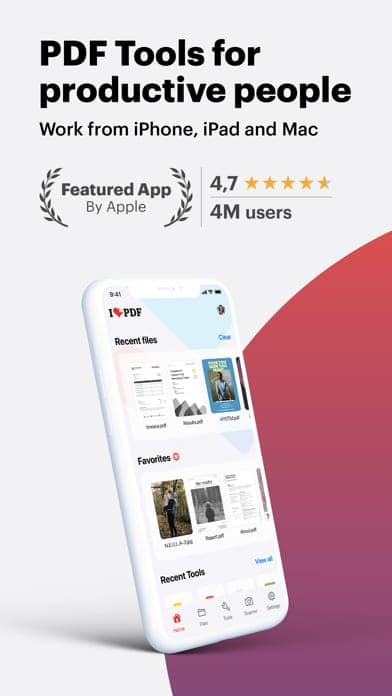
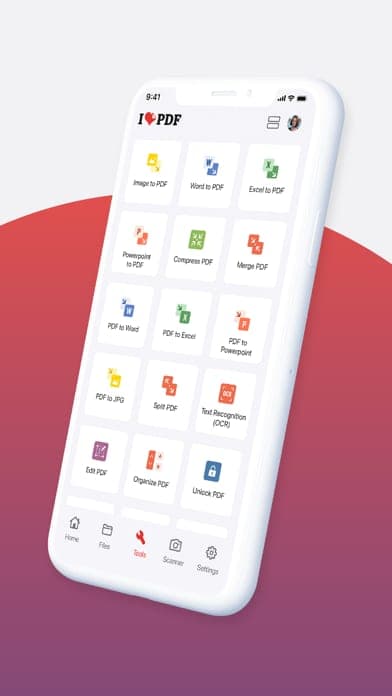
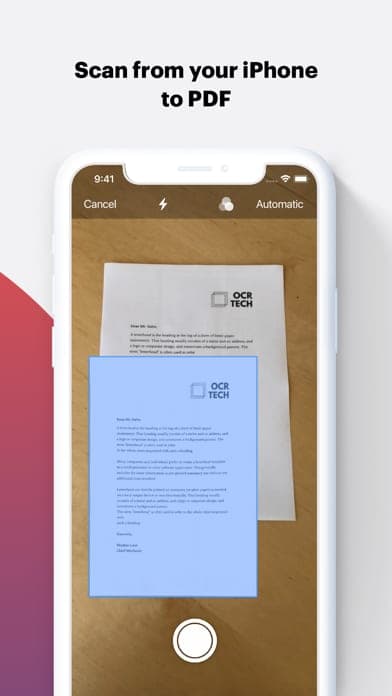
The homepage lists 31 tools: merge, split, organise, scan to PDF, compress, repair, OCR, converting JPG/Word/PowerPoint/Excel/HTML to and from PDF, PDF/A, rotate, page numbers, watermark, crop, edit, forms, unlock, protect, sign, redact and compare. The AI set covers AI Summarizer, Translate PDF and PDF to Markdown. Premium adds advanced e-signatures, workflows, 2,000 AI credits and much higher processing limits. It runs on the web and in Windows, macOS, iOS and Android apps.
Pricing and value
Per the pricing page, Free offers essential tools with per-task caps: merge up to 25 files (100 MB), image to PDF 20 files, compress PDF 200 MB, Office to PDF 15 MB. Premium costs $7/month billed monthly or $4/month ($48/year) billed annually for 1 to 25 users, raising limits to 4 GB for most tools. Business is quote-based from 25 users. The page states no refund policy or trial length. This is low next to full PDF suites, but read the terms before subscribing.
More analysis
Who it's for and how it compares
iLovePDF fits quick browser jobs: submitting paperwork, merging assignments, compressing files to email. Smallpdf is the direct web-tool rival. Adobe Acrobat goes deeper on editing, redaction and signing at a higher price; Foxit PDF Reader is a light reader; CamScanner is strong at scanning paper with a phone; WPS Office bundles PDF tools in an office suite. For sensitive documents, consider offline software.
Screenshots
Plans & pricing
Prices last verified Nov 10, 2026
Free (Basic)
PersonalFree
Essential tools with per-task caps: merge up to 25 files (100 MB), image to PDF 20 files (40 MB), sign PDF 3 files (50 MB), compress PDF 200 MB, Office to PDF 15 MB. Web only, no AI credits, basic support; the pricing page lists only Premium as ad-free.
Premium
Personal$7/mo/user
$4/mo billed yearly
$7/month billed monthly; $4/month billed annually ($48/year). 1 to 25 users. All tools, higher batch limits (e.g. merge up to 500 files), files up to 4 GB for most tools, advanced e-signatures (AES), workflows, teams, no ads, priority support and 2,000 AI credits, on web, mobile and desktop.
Business
BusinessContact sales
Custom pricing for 25+ users. Adds custom contracts, a dedicated account manager, single sign-on (SSO) and volume discounts.
- Free plan limits
- Free caps files and size per task, is web only, and has no teams, workflows, Smart Split or Smart Redact. Students and academic professionals can get a year of Premium free, per the pricing page.
- Free trial
- No free trial
Cancellation & refunds
The pricing page states no refund policy; it only says you can upgrade, downgrade or cancel anytime in account settings. Details sit in the Terms & conditions, which AppDuo could not read.
Privacy
iLovePDF is operated by ILOVEPDF, S.L. (Barcelona, Spain), the controller of personal data under its privacy policy (last revised 19 Feb 2026). The security page says files are protected with HTTPS in transit and at rest and are automatically and permanently deleted within two hours of processing; signed documents are kept for up to 5 years for legal reasons. The company holds ISO/IEC 27001:2022 certification and states GDPR and eIDAS compliance for e-signatures. Processing generally stays within the European Economic Area, sometimes elsewhere under standard contractual clauses. Users have rights to access, correct, erase, restrict and port data. Cookies are consent-based; advertising and analytics details sit in a separate Cookies Policy that AppDuo could not read. The security page does not name server locations.
iLovePDF alternatives
 7.3/10
Smallpdf
Web-based PDF toolkit: compress, convert, merge, edit and sign
 7.2/10
Adobe Acrobat
The industry-standard PDF suite for editing, signing and converting, sold by subscription
Frequently asked questions
Is iLovePDF free?
There is a Free plan with essential tools, but per-task file-count and size limits, and it is web only. Premium starts at $4/month billed annually. Students and academics can get a free year of Premium per the pricing page.
Are files I upload to iLovePDF safe?
Per the security page, files are protected with HTTPS and permanently deleted within two hours of processing; the company is ISO/IEC 27001:2022 certified and GDPR-compliant. For extremely sensitive documents, offline handling is still worth considering.
What file size limits does iLovePDF have?
It depends on the tool. On Free, merging is capped at 100 MB per task, compressing at 200 MB and Office to PDF at 15 MB. Premium raises most tools to 4 GB, except Edit PDF (100 MB), Sign PDF (50 MB) and Redact and Compare (400 MB).
Where can I use Premium?
Per the pricing page, Premium works on web, mobile and desktop, while Free is web only.
Review evidence & sources9
Scores
- Ease of use
- 8.6
- Features
- 7.6
- Value for money
- 8.4
- Performance
- 7.8
- Support
- 6.4
- Privacy & security
- 7.6
Why this score
Very high ratings (Trustpilot 4.9; Vietnamese App Store 4.9; US App Store 4.8) and reviewers praise the clean, easy interface; tools are grouped clearly on the homepage.
Why this score
About 30 tools from merge/split to OCR, signing, comparing, redaction and AI tools, but editing depth is below full suites such as Acrobat.
Why this score
Free covers many small jobs and Premium is just $4/month billed annually, far below full paid PDF suites. Marked down for the Free caps and complaints about upgrade pressure.
Why this score
Trustpilot reviewers praise conversion, merge and redaction speed. No independent benchmarks; Premium raises file limits to 4 GB for most tools.
Why this score
Free gets basic support, Premium priority support and Business a dedicated account manager. Trustpilot notes the company hasn't replied to negative reviews.
Why this score
Two-hour file deletion, ISO/IEC 27001:2022, GDPR compliance, a European controller and clear user rights. Marked down because server locations aren't named, files must still be uploaded, and advertising-cookie details sit on a separate page.
What users say
- App Store (United States)4.8/5 · 52,458
- App Store (Vietnam)4.9/5 · 3,664
- Trustpilot4.9/5 · 14,113
Sources
- Vendor-providediLovePDF homepageNov 10, 2026
- Vendor-providediLovePDF pricing pageNov 10, 2026
- Vendor-providediLovePDF security and data protectionNov 10, 2026
- Vendor-providediLovePDF privacy policyNov 10, 2026
- Vendor-providediLovePDF press pageNov 10, 2026
- Vendor-providediLovePDF blog: happy anniversary (2020-02-24)Nov 10, 2026
- storeiTunes Lookup API: iLovePDF app (US)Nov 10, 2026
- storeiTunes Lookup API: iLovePDF app (Vietnam)Nov 10, 2026
- review-siteTrustpilot: ilovepdf.comNov 10, 2026
Specs & compatibility
- Developer
- ILOVEPDF, S.L.
- Headquarters
- Spain
- Launched
- 2010
- Category
- Productivity
Capabilities
- AI features
- Public API
- Mobile app
Platforms
- Web
- Windows
- macOS
- iOS
- Android
- API
Interface languages
- English
- Vietnamese
- Spanish
- French
- German
- Portuguese
- Japanese
- Russian
- Korean
- Chinese
- Thai
- Indonesian
Integrations
- iLoveSign
- iLoveIMG
- iLoveAPI
Support
- Help center
Change history
- Feature.The homepage lists 31 tools including AI Summarizer, Translate PDF and PDF to Markdown; the press page cites more than 500 million files processed.
- Update.The privacy policy is last revised (19 Feb 2026).
- Launch.Desktop app launches and the website is redesigned, per the company's press page.
Full change history (5)
- Launch.The iLovePDF iOS app appears on the App Store (release date per Apple's API).
- Launch.iLovePDF is born in Barcelona (the 10-year anniversary post dated 24 Feb 2020 refers to 25 Feb as the birthday); it began as a PDF merge tool.
About the author
Reviews & comments
Written by readers with a verified email address.
No reviews yet. Have you used iLovePDF? Share your real experience.
Reader reviews are counted separately and do not affect the Editorial Team’s score.
No comments yet. Be the first to share your experience.
Comments are readers’ opinions, not content from the AppDuo Editorial Team.