Source-backed analysis11
Review basis
The AppDuo team prepared this review by analysing product features, official documentation and user feedback to help you understand its strengths, limitations and suitability for your needs.
11 reference sourcesInformation updated Nov 10, 2026
How we review
By AppDuo Editorial Team · Updated
- macOS
On this page
Decide at a glance
Our verdict
Xcode is close to essential for anyone building for iOS, iPadOS, macOS, watchOS, tvOS or visionOS: it is free, bundles simulators, Instruments and Xcode Cloud, and version 27 supports AI agents from several vendors. The trade-offs are that it runs only on Mac (macOS 26.6 or later, Apple M1 or later), weighs 3.1 GB, and publishing on the App Store costs $99 a year.
Best for: Developers building native apps for iPhone, iPad, Mac, Apple Watch, Apple TV and Vision Pro
Skip it if: People on Windows or Linux only, since Xcode runs only on macOS
Pros
- Free, downloaded straight from the Mac App Store
- Complete toolset: Previews, Device Hub, Swift Testing, Instruments and Organizer
- Supports AI agents from Anthropic, Google and OpenAI, extensible through MCP and the Agent Client Protocol
Cons
- Mac only; version 27.2 requires macOS 26.6 or later and an Apple M1 chip or later
- App Store distribution needs the $99 per year Developer Program plus a 15–30% commission
All pros and cons · Who is it for?
Pros
- The Apple Developer Program includes 25 Xcode Cloud compute hours a month
Cons
- English-only interface, per the App Store listing
Best for
- Teams wanting one toolchain from coding and testing to profiling and TestFlight distribution
Skip it if
- Cross-platform projects that avoid Apple tooling; a general editor such as VS Code with a cross-platform framework may fit better
Experience & key features
Xcode is Apple's integrated development environment, first released in autumn 2003. According to the product page, it is used to develop, test and distribute apps for iOS, iPadOS, macOS, tvOS, visionOS and watchOS. It runs only on macOS and is a free download from the Mac App Store.
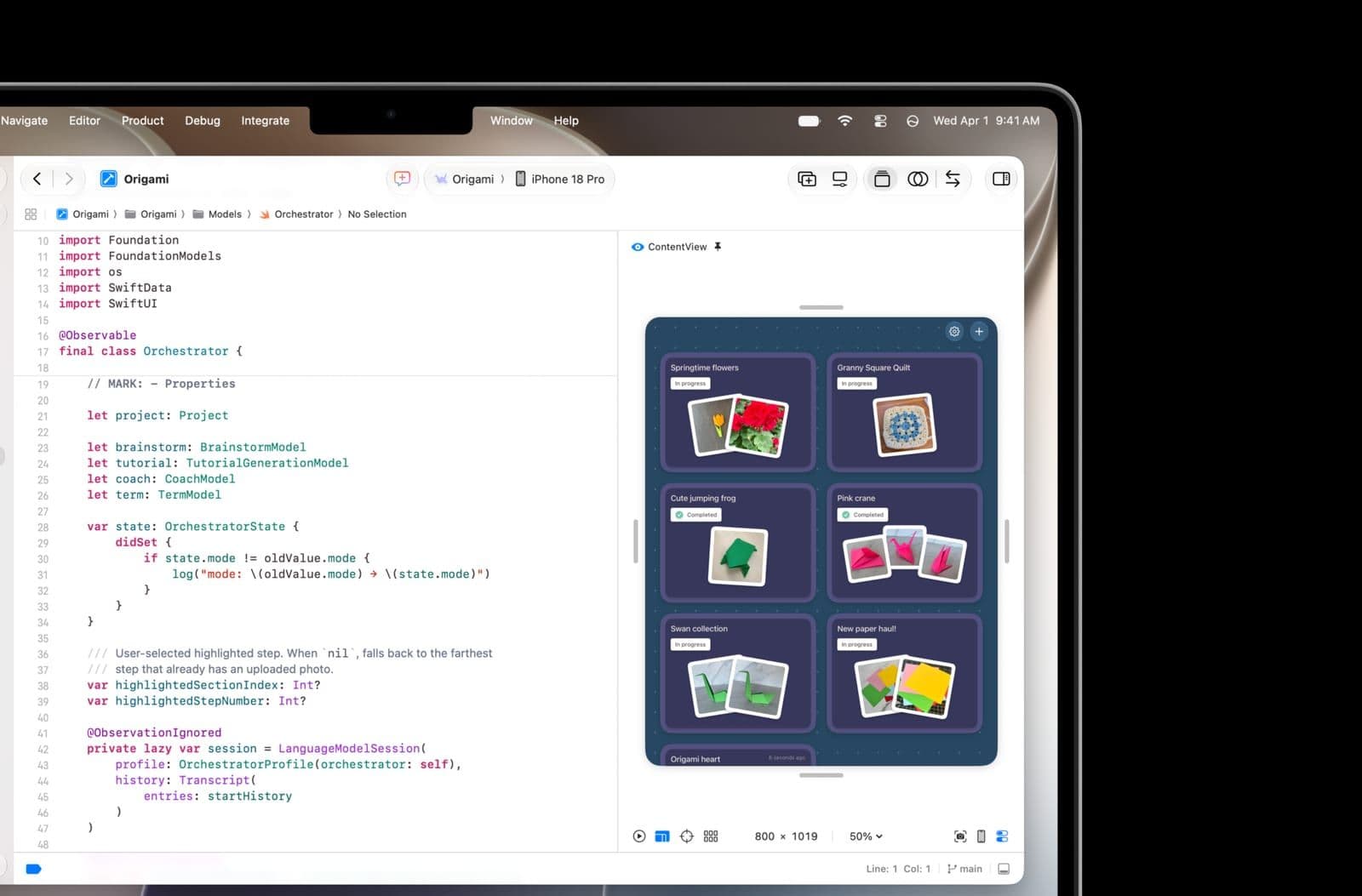
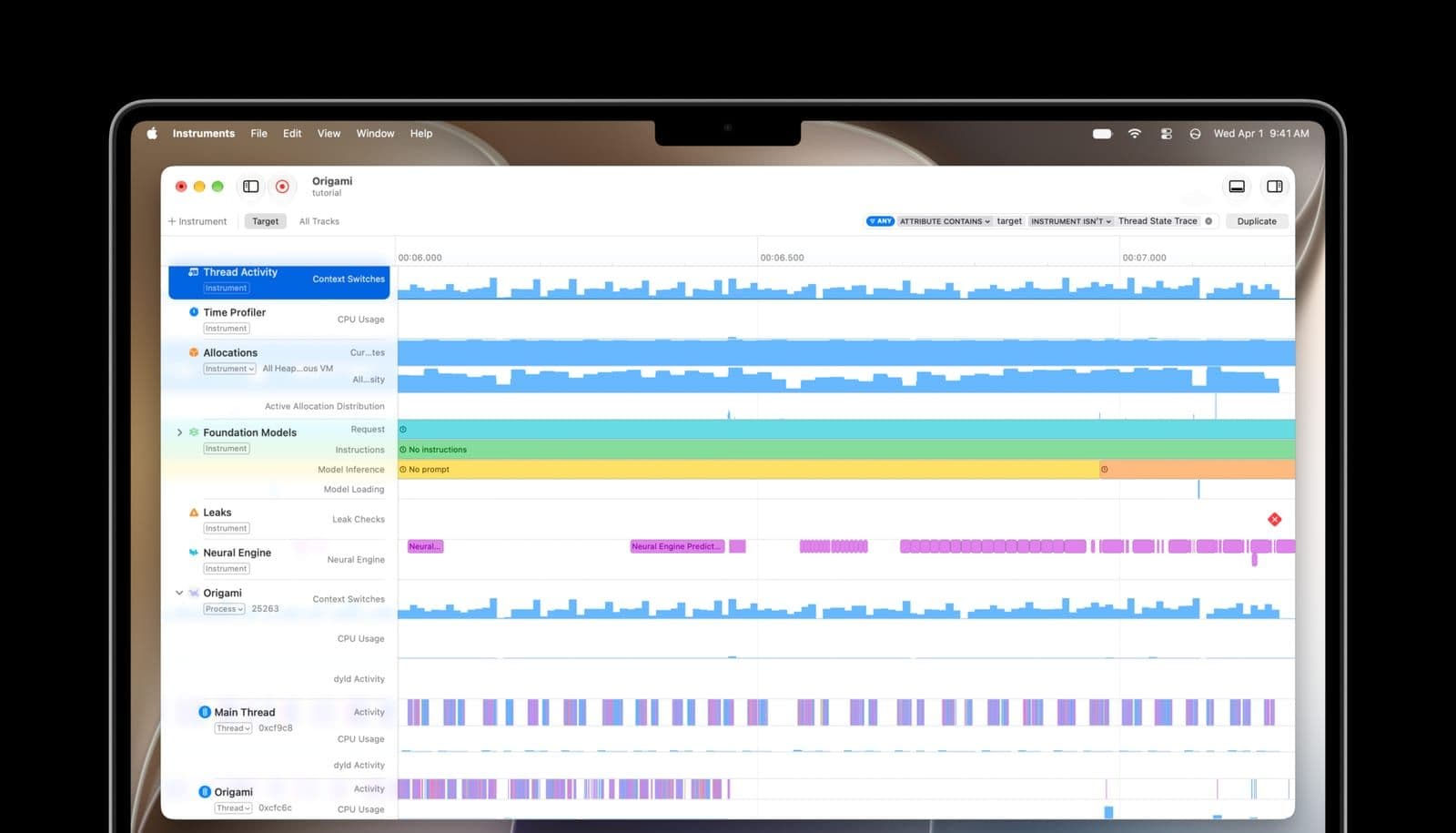
Previews show SwiftUI, UIKit and AppKit views beside the code in live, interactive or snapshot modes. Device Hub brings physical devices and simulators together. Tests can be written with Swift Testing and XCTest side by side, while Instruments charts CPU, disk, memory and GPU and, in version 27, adds a Swift Concurrency instrument. Xcode Cloud is the built-in CI/CD service for builds, parallel tests and delivering builds to testers.
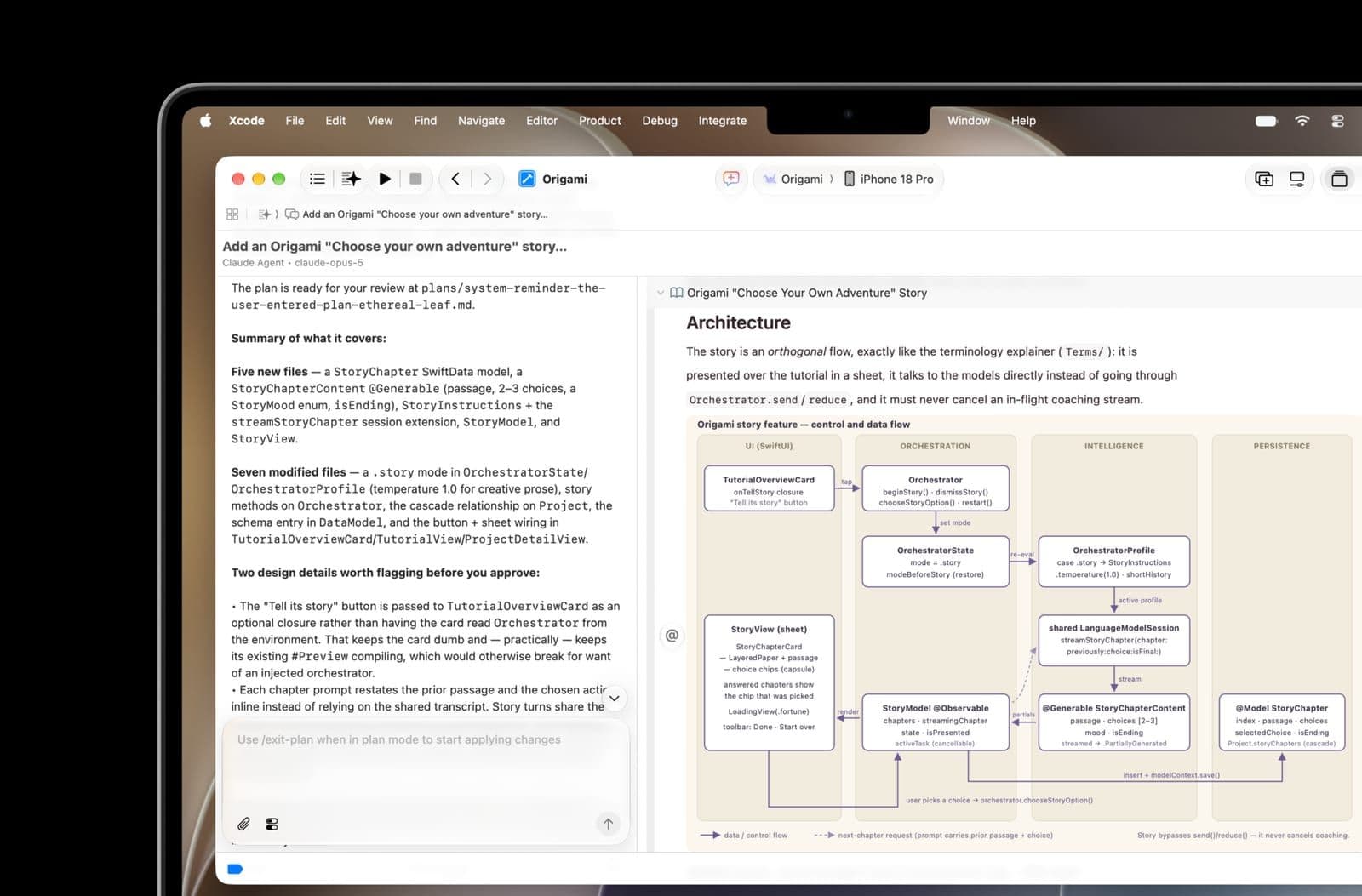
The AI side is moving fast. Xcode 26 (2025) added a coding assistant that uses ChatGPT by default and can be pointed at other local or cloud models via API keys. On 3 February 2026 Apple announced Xcode 26.3 with agents such as Anthropic's Claude Agent and OpenAI's Codex, extensible through the Model Context Protocol. For Xcode 27, the product page lists models and agents from Anthropic, Google and OpenAI, and any agent compatible with the Agent Client Protocol.
The real cost sits in distribution. With a free Apple Account you can only test on your own devices (up to 3, profiles expiring after 7 days). The App Store, TestFlight and Xcode Cloud require the Apple Developer Program at $99 per year. Xcode Cloud includes 25 compute hours a month, with extra tiers from $49.99 per month.
For native Apple apps Xcode has no direct rival, but it is unusable if you work only on Windows or Linux. The 2025 Stack Overflow survey shows 10% of respondents using Xcode versus 75.9% for VS Code, largely because Xcode serves a single ecosystem. Cross-platform projects may look at VS Code, IntelliJ IDEA or Android Studio, depending on the target platforms.
Screenshots
Plans & pricing
Prices last verified Nov 10, 2026
Xcode
Free
Free download from the Mac App Store. A free Apple Account is enough to test apps on your own devices as a Personal Team: up to 3 devices, with provisioning profiles expiring after 7 days.
Apple Developer Program
$99/mo
$99 per membership year. Required to distribute on the App Store and to use TestFlight, App Store Connect and Xcode Cloud (25 compute hours per month included). Eligible nonprofits, accredited educational institutions and government entities can request a fee waiver.
Xcode Cloud
$49.99/mo
Monthly add-on tiers: 100 hours $49.99, 250 hours $99.99, 1,000 hours $399.99, 10,000 hours $3,999.99. The price shown is the 100-hour tier. Tiers can be changed at any time.
- Free plan limits
- Xcode itself is free. Publishing to the App Store requires the Apple Developer Program ($99 per year). The standard App Store commission is 30%, or 15% under the App Store Small Business Program (up to $1 million in proceeds the previous year).
- Free trial
- No free trial
Cancellation & refunds
The official pages consulted do not state a refund policy for the Apple Developer Program or Xcode Cloud.
Privacy
According to its Mac App Store privacy label, Xcode collects some data not linked to the user, for analytics: device ID, product interaction, crash data and performance data. Apple's general privacy policy (updated 30 July 2025) says it does not sell personal data or share it with third parties for their own marketing; users can view, correct and delete data at privacy.apple.com. For third-party AI agents, Apple notes that Anthropic's and OpenAI's terms of service may apply. Beyond the store label and the general policy, AppDuo found no Xcode-specific privacy documentation.
Xcode alternatives
 8.0/10
Visual Studio Code
Microsoft's free code editor, extended by add-ons, with built-in AI agents
 7.6/10
Android Studio
Google's official IDE for Android apps, built on the IntelliJ platform
Frequently asked questions
Is Xcode free?
Yes. Xcode is a free Mac App Store download and a free Apple Account lets you test apps on your own devices. Publishing to the App Store needs the Apple Developer Program at $99 per year.
Can Xcode run on Windows?
No. Per the Mac App Store, Xcode 27.2 requires macOS 26.6 or later and a Mac with an Apple M1 chip or later.
Which AI agents work in Xcode?
The Xcode page lists models and agents from Anthropic, Google and OpenAI, plus any agent compatible with the Agent Client Protocol; tools can be added via MCP. The AI vendor's terms of service may also apply.
How is Xcode Cloud priced?
The Apple Developer Program includes 25 compute hours a month. More can be bought monthly: 100 hours ($49.99), 250 hours ($99.99), 1,000 hours ($399.99) or 10,000 hours ($3,999.99).
Review evidence & sources11
Scores
- Ease of use
- 7.0
- Features
- 8.8
- Value for money
- 8.5
- Performance
- 7.0
- Support
- 7.5
- Privacy & security
- 7.5
Why this score
Previews and Device Hub put UI checks and device testing in one place, but certificates and provisioning profiles remain a hurdle for newcomers. The score rests on Apple's documentation, since the App Store listing has too few ratings to show a score.
Why this score
One app bundles an editor, Previews, simulators, Swift Testing, Instruments, Xcode Cloud and multi-vendor AI agents. It is Apple's official tool for its platforms, but serves only that ecosystem, so it stays below 9.
Why this score
Xcode itself is free; the real costs are $99 per year to publish and the 15–30% commission. Extra Xcode Cloud capacity starts at $49.99 per month for 100 hours.
Why this score
Xcode 27.2 is 3.1 GB and needs an M1 chip or later. The sources consulted contain no build-speed measurements, so the score stays middling and leans on the bundled Instruments profiler.
Why this score
Paid members can file code-level support requests with Apple engineers and get forums, Feedback Assistant and 24/7 account support by email and phone in 9 languages. Free accounts get forums and Feedback Assistant only.
Why this score
The privacy label lists only data not linked to the user, and Apple's policy commits to not selling data. However, there is no Xcode-specific documentation to verify further, and third-party agents carry their own terms.
Sources
- Vendor-providedOfficial Xcode pageNov 10, 2026
- Vendor-providedOfficial What's new in XcodeNov 10, 2026
- Vendor-providedApple Developer membership comparisonNov 10, 2026
- Vendor-providedApple Developer Program: what's includedNov 10, 2026
- Vendor-providedXcode Cloud pricingNov 10, 2026
- storeMac App Store listingNov 10, 2026
- Vendor-providedApple Newsroom: App Store Small Business Program (2020-11)Nov 10, 2026
- Vendor-providedApple Newsroom: Xcode 26.3 (2026-02-03)Nov 10, 2026
- Vendor-providedApple Privacy PolicyNov 10, 2026
- Community-reportedWikipedia: XcodeNov 10, 2026
- Community-reportedStack Overflow Developer Survey 2025: TechnologyNov 10, 2026
Specs & compatibility
- Developer
- Apple
- Headquarters
- United States
- Launched
- 2003
- Category
- Development
Capabilities
- AI features
- Integrations
- Real-time collaboration
Platforms
- macOS
Interface languages
- English
Integrations
- Swift
- SwiftUI
- Xcode Cloud
- TestFlight
- App Store Connect
- Instruments
- Model Context Protocol
- Agent Client Protocol
Support
- Help center
- Community forum
- Phone
Change history
- Feature.Xcode 27 released to the public.
- Feature.Apple announced Xcode 27 at WWDC26.
- Feature.Apple announced Xcode 26.3 with agentic coding support for agents such as Anthropic's Claude Agent and OpenAI's Codex, extensible via MCP.
Full change history (8)
- Feature.Apple announced Xcode 26, adding AI-assisted coding and aligning its version number with Apple's operating systems.
- Feature.Apple announced Xcode 13 at WWDC with Xcode Cloud, Apple's CI/CD service.
- Feature.Apple announced Xcode 11 at WWDC, adding the SwiftUI framework.
- Feature.Apple announced Xcode 6 at WWDC, adding the Swift language and Playgrounds.
- Launch.Xcode 1.0 released, built on Project Builder.