Source-backed analysis11
Review basis
Research-based review: the AppDuo Editorial Team compiled it from official pages, documentation, app stores, press and user feedback, without hands-on testing. Every claim links to a source with the date it was checked.
11 reference sourcesInformation updated Nov 10, 2026
How we review
Wispr Flow Review
Voice dictation for any app that cleans up filler words, plus a meeting Notetaker
By AppDuo Editorial Team · Updated
- macOS
- Windows
- iOS
- Android
On this page
Decide at a glance
Our verdict
Wispr Flow suits people who write a lot on Mac, Windows, iPhone or Android and would rather speak than type, with 100+ languages and Pro at $12/month billed yearly. The trade-offs are cloud-only transcription, a word-limited Free plan, and a compliance verification the company had to redo in March 2026.
Best for: Heavy writers of email, messages and notes who want to speak instead of type in any app with a text field
Skip it if: Anyone needing on-device or offline transcription, since the vendor says transcription always runs in the cloud
Pros
- Mac, Windows, iPhone and Android apps; Android launched on 23 February 2026
- Removes fillers, adds punctuation, learns names, with snippets and per-app tone
- 4.8/5 on the App Store from about 19,400 ratings
Cons
- Transcription always runs in the cloud with no fully local mode
- The Free plan is capped weekly (2,000 words per the homepage)
All pros and cons · Who is it for?
Pros
- Separate switches for training, cloud storage and context reading
Cons
- In March 2026 the company had to reverify SOC 2, HIPAA and ISO 27001, saying its compliance vendor had cut corners
- Notetaker is Mac and Windows only, and unlimited Notetaker costs extra on Growth
Best for
- Teams that need central admin, SSO or HIPAA controls for dictation
Skip it if
- Anyone wanting unlimited use without paying
Problems it solves
Experience & key features
What Wispr Flow is
Wispr Flow is an AI dictation tool from Wispr AI, Inc. (US). You press a shortcut, speak, and Flow types into any app with a text field, with no plugins. It runs on Mac, Windows, iPhone (announced 2 June 2025) and Android (launched 23 February 2026), alongside Wispr Flow Notetaker for meetings. On 17 August 2026 the company announced a $280 million Series B.
Key features
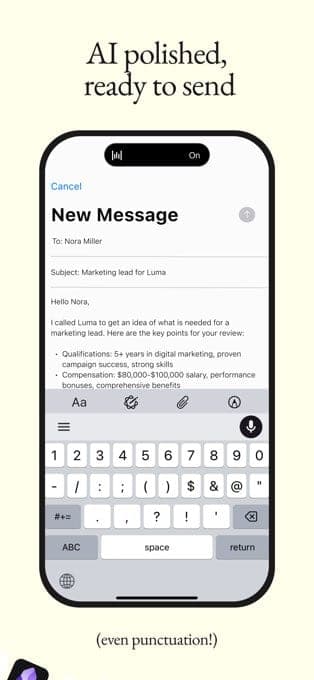
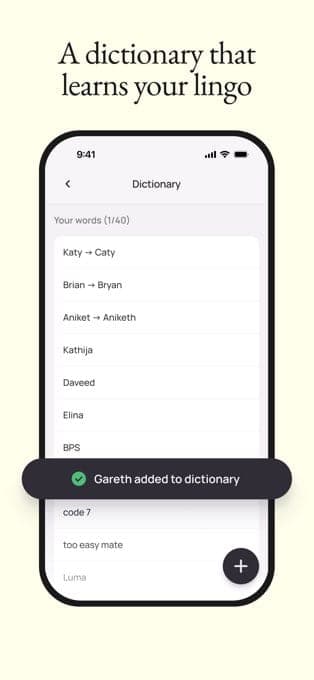
Per the homepage, Flow removes filler words, adds punctuation, applies spoken corrections, learns names and jargon, expands snippets from a spoken keyword and adapts tone per app. It supports 100+ languages and claims to be 4x faster than a keyboard (220 vs 45 wpm), a figure with no independent verification. Notetaker records meetings and produces transcripts, summaries and next steps; the Windows version arrived on 15 September 2026.
Pricing
The pricing page lists four plans. Free costs $0 with a weekly word cap. Pro is $12/user/month billed annually ($15 monthly) with unlimited dictation. Growth is $18/user/month billed annually ($23 monthly) and adds SSO and HIPAA, with unlimited Notetaker as a paid add-on. Enterprise is custom. On the App Store, Pro Annual is $143.99, a weekly Pro plan is $4.49 and a student plan is $7.49/month.
More analysis
Privacy and alternatives
Flow always transcribes in the cloud but lets you turn off training and storage. For comparison, look at Typeless (similar dictation), Gboard (a keyboard with voice input), or Otter.ai and Granola (meeting notes). They differ in price and data handling, so compare directly before choosing.
Screenshots

Plans & pricing
Prices last verified Nov 10, 2026
Free
PersonalFree
Limited words per week (the pricing page gives no figure; the homepage says 2,000 words/week). Includes dictation in 100+ languages on Mac, Windows, iOS and Android, a dictionary, snippets and Notetaker with a weekly meeting limit; recordings under five minutes don't count.
Pro
Personal$15/mo/user
$12/mo billed yearly
$15/user/month billed monthly, $12 billed annually. Unlimited dictation, unlimited Notetaker (subject to abuse limits), shared dictionary and snippets, user management and priority support.
Growth
Business$23/mo/user
$18/mo billed yearly
$18/user/month billed annually, $23 monthly. Adds SAML SSO, org-wide HIPAA enforcement with a signed BAA and admin control of model training. Unlimited Notetaker is an add-on that raises the price to $26 (annual) or $33 (monthly).
Enterprise
BusinessContact sales
Custom pricing via sales, annual only. Adds SCIM, audit logs, MDM, model training locked off, custom contract terms and support with SLAs.
- Free plan limits
- The Free plan has a weekly word limit; the homepage states 2,000 words per week.
- Free trial
- No free trial
Cancellation & refunds
Refund terms were not reviewed here. The pricing page says Free needs no credit card, paid plans have no commitment and can be cancelled anytime; students get 50% off Pro and educators 40%.
Privacy
Wispr Flow's privacy page says transcription always happens in the cloud. Audio is captured only after you press your shortcut, sent over TLS 1.2+ and discarded once transcribed unless Dictation cloud storage is on; stored data is AES-256 encrypted. Four separate settings control training (Improve the model for everyone), cloud storage, in-app context awareness and local history. Growth and Enterprise default training to off and admins can lock it. On 27 March 2026 the company said its previous compliance vendor (Delve) had cut corners on verification, so it moved to Drata and had A-LIGN reverify SOC 2 and HIPAA, with ISO 27001 in progress. The homepage and pricing page now list SOC 2 Type II, ISO 27001 and HIPAA readiness; the audit reports were not reviewed here.
Wispr Flow alternatives
 7.5/10
Gboard
Google's free keyboard with glide typing, voice, translation and emoji on Android and iOS
 7.4/10
Granola
Bot-free AI meeting notepad that blends your own notes with the transcript
Frequently asked questions
Is Wispr Flow free?
Yes, a Free plan on Mac, Windows, iOS and Android with a weekly word cap (2,000 per the homepage). Pro removes it at $12/month billed annually or $15 monthly.
Does Wispr Flow process speech on my device?
No. The privacy page says transcription always happens in the cloud; audio is discarded afterwards unless cloud storage is on.
Can I stop my data being used for training?
Yes, turn off the Improve the model for everyone setting. On Growth and Enterprise it is off by default and admins can lock it.
How many languages does Wispr Flow support?
100+ languages per the homepage, and the vendor recommends selecting only the languages you speak for best accuracy. The App Store lists English as the only interface language.
Review evidence & sources11
Scores
- Ease of use
- 8.0
- Features
- 8.0
- Value for money
- 7.0
- Performance
- 7.4
- Support
- 6.6
- Privacy & security
- 6.0
Why this score
Works in any app with a text field without plugins, with apps on four platforms; the 4.8/5 App Store rating points to satisfied iPhone users. The app interface is English only, though dictation covers 100+ languages.
Why this score
Cleanup, dictionary, snippets, per-app tone and 100+ languages, plus a meeting Notetaker that connects to Claude and ChatGPT via MCP. Notetaker is Mac and Windows only.
Why this score
Free is usable but capped; Pro at $12/month yearly ($15 monthly) is reasonable and includes unlimited Notetaker. Students get 50% off. Growth charges extra for unlimited Notetaker.
Why this score
The vendor claims 4x faster than typing (220 vs 45 wpm) and about 30% faster after an infrastructure rewrite, but these are company figures with no independent measurement; the 4.8/5 App Store rating is indirect evidence.
Why this score
A broad help center (billing, troubleshooting, Notetaker, privacy), a status page, priority support from Pro and SLAs on Enterprise. No chat or phone was found, and Trustpilot has removed the company's profile for breaching its guidelines, so independent feedback is thin.
Why this score
Switches for training, storage, context and history; Growth and Enterprise default training off. Points lost for always-cloud processing, no named third-party processors or processing location, and compliance certifications that had to be reverified from March 2026 after the vendor problem.
What users say
- App Store (US)4.8/5 · 19,391
Sources
- Vendor-providedOfficial homepageNov 10, 2026
- Vendor-providedOfficial pricing pageNov 10, 2026
- Vendor-providedOfficial privacy pageNov 10, 2026
- Vendor-providedHelp centerNov 10, 2026
- Vendor-providedBlog indexNov 10, 2026
- Vendor-providedBlog: Series BNov 10, 2026
- Vendor-providedBlog: new independent auditNov 10, 2026
- Vendor-providedBlog: Flow on iPhoneNov 10, 2026
- Vendor-providedBlog: Flow on AndroidNov 10, 2026
- storeApp Store listingNov 10, 2026
- review-siteTrustpilot: wisprflow.ai (profile removed)Nov 10, 2026
Specs & compatibility
- Developer
- Wispr AI, Inc.
- Headquarters
- United States
- Launched
- 2025
- Category
- AI
Capabilities
- AI features
- Mobile app
- Real-time collaboration
- Integrations
Platforms
- macOS
- Windows
- iOS
- Android
Interface languages
- English
Integrations
- Claude (MCP)
- ChatGPT (MCP)
Support
- Help center
Change history
- Feature.Notetaker arrived on Windows.
- Company.Announced a $280 million Series B at a $2 billion valuation, led by Menlo Ventures.
- Feature.Wispr Flow Notetaker launched.
Full change history (7)
- Update.The company announced it had moved to Drata and engaged A-LIGN to reverify compliance, saying its previous vendor (Delve) had cut corners on verification.
- Feature.Android app launched on Google Play alongside an infrastructure rewrite the company says is about 30% faster.
- Company.Wispr acquired Yapify, per a blog post title.
- Feature.The company announced Flow for iPhone.
About the author
Reviews & comments
Written by readers with a verified email address.
No reviews yet. Have you used Wispr Flow? Share your real experience.
Reader reviews are counted separately and do not affect the Editorial Team’s score.
No comments yet. Be the first to share your experience.
Comments are readers’ opinions, not content from the AppDuo Editorial Team.