Source-backed analysis8
Review basis
Research-based review: the AppDuo Editorial Team compiled it from official pages, documentation, app stores, press and user feedback, without hands-on testing. Every claim links to a source with the date it was checked.
8 reference sourcesInformation updated Nov 10, 2026
How we review
Granola Review
Bot-free AI meeting notepad that blends your own notes with the transcript
By AppDuo Editorial Team · Updated
- macOS
- Windows
- iOS
- Android
- API
On this page
Decide at a glance
Our verdict
Granola suits people in back-to-back meetings who want to jot a few notes and let AI expand them without a bot joining the call, with a free plan and Business at $14/user/month. The trade-offs are a 30-day history on the free plan, cloud-stored data and having to tell participants yourself.
Best for: People in constant meetings on Mac, Windows or phone who like jotting key points and letting AI complete them
Skip it if: Anyone who needs audio recordings to replay, since Granola does not retain audio
Pros
- No bot joins the call; works with Zoom, Google Meet, Microsoft Teams and in-person meetings
- Apps for macOS, Windows, iOS, Android and Apple Watch
- 4.96/5 on the App Store from about 14,700 ratings
Cons
- The Basic plan is limited to 30 days of history with no API and only Slack integration
- Granola trains on anonymized data by default unless you opt out
All pros and cons · Who is it for?
Pros
- Reports SOC 2 Type 2 (July 2025) and offers a training opt-out in Settings
Cons
- No stored audio means nothing to replay, and users must tell participants themselves
- The pricing page lists monthly prices only, with no yearly option shown
Best for
- Teams that want meeting notes in Notion, HubSpot or Slack, or in Claude and ChatGPT via MCP
Skip it if
- Anyone who needs data to stay on-device or away from third-party AI providers
Problems it solves
Experience & key features
What Granola is
Granola is an AI meeting-notes app from Granola, Inc., founded in March 2023 by Chris Pedregal and Sam Stephens. TechCrunch covered the launch on 22 May 2024, when it was Mac-only. It now covers macOS, Windows, iOS, Android (1 July 2026) and Apple Watch (28 July 2026).
How it works
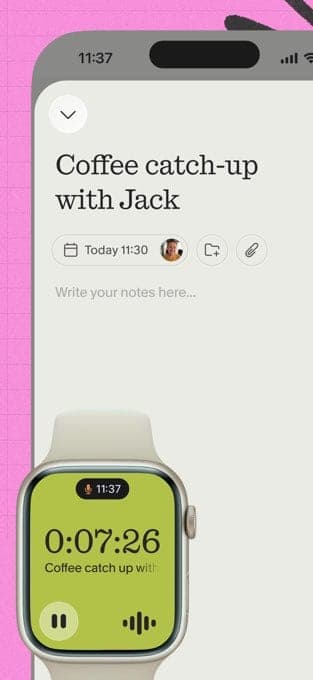
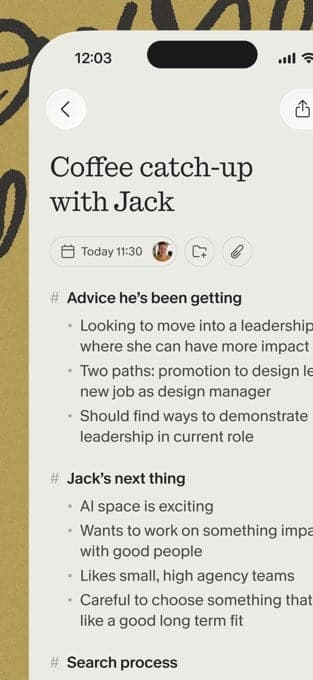
Granola uses the computer's system audio and microphone, so no bot joins the meeting; the company says this is deliberate, so the app feels like a notepad rather than a recorder. You type a few points, AI expands them using the transcript, and notes link back to the transcript for checking. It syncs calendars, produces pre-meeting briefs (Briefs, 20 May 2026), lists action items afterwards and has a Chat feature. Since 4 February 2026, Granola MCP lets Claude, ChatGPT and Cursor read meeting notes.
Pricing
Per the pricing page, Basic is free with a 30-day history, Business is $14/user/month and Enterprise $35/user/month; no yearly price is shown. At launch in 2024 TechCrunch reported free for the first 25 meetings then $10/month, so the pricing model has changed. The Series C post (25 March 2026) says the company raised $125M at a $1.5bn valuation and is building Spaces and APIs for Business and Enterprise.
More analysis
Privacy and alternatives
Granola does not store audio but keeps transcripts in the cloud and trains on anonymized data by default, with an opt-out in Settings. With no bot, users must tell participants themselves. Those preferring a bot or audio replay can look at Otter.ai, Fireflies.ai or Fathom; Wispr Flow focuses on voice typing. They differ in price and data policy, so compare directly before choosing.
Screenshots
Plans & pricing
Prices last verified Nov 10, 2026
Basic
PersonalFree
Free, with unlimited meeting notes but a 30-day history. Includes AI chat (automatic model only), shared folders, templates and voice typing; Slack is the only integration and there is no API.
Business
Business$14/mo/user
$14/user/month. Unlimited history, model selection in chat, integrations with Attio, Notion, HubSpot, Affinity and Zapier, MCP and API access, pre-meeting briefs and follow-up emails.
Enterprise
Business$35/mo/user
$35/user/month. Everything in Business plus SSO (workspaces with 50+ users), SCIM, an Audit API, HIPAA-compliant workspaces, workspace-wide training opt-out, Salesforce integration and dedicated support.
- Free plan limits
- Unlimited notes, but viewing and working with notes older than 30 days requires an upgrade; cross-meeting chat uses the automatic model only.
- Free trial
- No free trial
Cancellation & refunds
Refund terms were not reviewed here. The pricing page shows monthly prices only; yearly pricing and student deals go through sales or the Student program page.
Privacy
Granola's security page says it does not store meeting audio: on macOS and Windows it transcribes in real time, and on mobile it caches audio only until the transcript is made. Transcripts and notes are stored in the cloud (US-hosted AWS) and kept indefinitely unless you delete them. Third-party AI providers such as OpenAI and Anthropic may not train on your data, while Granola itself trains on anonymized data by default, with an opt-out in Settings; Enterprise defaults to off. Named processors include Deepgram, Assembly, OpenAI and Anthropic. The company reports SOC 2 Type 2 compliance since July 2025. Because Granola does not join as a bot, its blog advises telling participants and notes that local law may require consent. These are the vendor's statements; the audit report was not reviewed here.
Granola alternatives

Frequently asked questions
Is Granola free?
Yes, Basic is free with unlimited meeting notes but only a 30-day history. Business at $14/user/month removes that limit.
Does Granola use a meeting bot?
No. It uses your computer audio and microphone, working with Zoom, Google Meet, Microsoft Teams and in-person meetings, so you should tell participants yourself.
Does Granola store meeting audio?
Per its security page, no: desktop transcribes in real time and mobile only caches audio temporarily. Transcripts and notes are still stored in the cloud.
Does Granola train on my data?
By default Granola trains on anonymized data and you can opt out in Settings; Enterprise defaults to off. It says OpenAI and Anthropic may not train on your data.
Review evidence & sources8
Scores
- Ease of use
- 8.4
- Features
- 7.8
- Value for money
- 7.4
- Performance
- 7.5
- Support
- 6.5
- Privacy & security
- 6.6
Why this score
A familiar notepad model with calendar sync and automatic transcription and no bot to set up; the 4.96/5 App Store rating suggests high satisfaction. The interface is English-only.
Why this score
Notes blended with transcripts, AI chat, pre-meeting briefs, templates, shared folders, MCP and API. No audio replay, and the free plan integrates with Slack only.
Why this score
The free plan has unlimited meetings but a 30-day window; Business at $14 is moderate, Enterprise rises to $35 and no yearly price is shown.
Why this score
Very high store rating and steady releases (Briefs, Chat, 32 languages in 2026), but no independent transcription-accuracy measurement was found.
Why this score
Docs, a Trust Center, a security page and a sales email; Basic and Business get standard support and Enterprise dedicated support. No chat or phone was found.
Why this score
No audio stored, SOC 2 Type 2 reported, named processors and a training opt-out. Points lost because transcripts are kept indefinitely in the cloud, data passes through several AI providers and training is on by default below Enterprise.
What users say
- App Store (US)5.0/5 · 14,692
Sources
- Vendor-providedOfficial homepageNov 10, 2026
- Vendor-providedOfficial pricing pageNov 10, 2026
- Vendor-providedOfficial security pageNov 10, 2026
- Vendor-providedBlog indexNov 10, 2026
- Vendor-providedBlog: Series CNov 10, 2026
- Vendor-providedBlog: Why Granola doesn't use a botNov 10, 2026
- storeApp Store listingNov 10, 2026
- pressTechCrunch (2024-05-22)Nov 10, 2026
Specs & compatibility
- Developer
- Granola, Inc.
- Headquarters
- United States
- Launched
- 2024
- Category
- AI
Capabilities
- AI features
- Mobile app
- Public API
- Integrations
- Real-time collaboration
- Templates
Platforms
- macOS
- Windows
- iOS
- Android
- API
Interface languages
- English
Integrations
- Slack
- Notion
- HubSpot
- Attio
- Affinity
- Zapier
- Salesforce
- MCP (Claude, ChatGPT, Cursor, Figma)
Support
- Help center
Change history
- Feature.Support for 32 languages announced.
- Feature.Android app launched.
- Company.Raised a $125M Series C at a $1.5bn valuation.
Full change history (6)
- Feature.Launched Granola MCP for using meeting notes in other AI apps.
- Company.The company reports achieving SOC 2 Type 2.
- Launch.Granola launched on Mac, free for the first 25 meetings then $10/month, per TechCrunch.
About the author
Reviews & comments
Written by readers with a verified email address.
No reviews yet. Have you used Granola? Share your real experience.
Reader reviews are counted separately and do not affect the Editorial Team’s score.
No comments yet. Be the first to share your experience.
Comments are readers’ opinions, not content from the AppDuo Editorial Team.