Source-backed analysis10
Review basis
Research-based review: the AppDuo Editorial Team compiled it from official pages, documentation, app stores, press and user feedback, without hands-on testing. Every claim links to a source with the date it was checked.
10 reference sourcesInformation updated Nov 10, 2026
How we review
IntelliJ IDEA Review
JetBrains' Java and Kotlin IDE, now a single product for Community and Ultimate
By AppDuo Editorial Team · Updated
- Windows
- macOS
- Linux
On this page
Decide at a glance
Our verdict
IntelliJ IDEA suits Java and Kotlin developers who need a deep IDE: code analysis, refactoring and framework tooling for Spring, Quarkus and more. The free core is enough to start, but advanced features require an Ultimate subscription at 19.90 USD a month for individuals and 71.90 USD per user per month for organisations.
Best for: Java and Kotlin developers on large projects who need safe refactoring and deep code analysis
Skip it if: Developers who want a very light, quick-starting editor for many languages
Pros
- A free core that, per JetBrains' FAQ, can be used to build commercial software
- Deep code intelligence: usages, dependencies, types and accurate refactorings, with debugger, test runner and profiling built in
- Yearly subscriptions include a perpetual fallback licence, with lower prices in later years
Cons
- Minimum requirements of 8 GB RAM and 10 GB disk, heavier than a light editor
- Organisation pricing is high at 719 USD per user per year
All pros and cons · Who is it for?
Pros
- Runs on Windows 10/11, macOS and Linux, on both x86_64 and arm64
Cons
- The privacy notice does not say clearly whether JetBrains AI data is used for training
Best for
- Teams using Spring, Jakarta EE, Micronaut or Quarkus
- People who want to run several AI agents and model providers in one IDE, with their own API key or an existing subscription
Skip it if
- Machines with less than 8 GB of RAM, which is the stated minimum
Problems it solves
Experience & key features
What is IntelliJ IDEA?
IntelliJ IDEA is JetBrains' IDE for Java and Kotlin; JetBrains is headquartered in the Czech Republic. Per Wikipedia, the first version appeared in January 2001; in 2009 JetBrains open-sourced the codebase under Apache License 2.0 and released a free Community Edition alongside the paid Ultimate Edition. Since 2025.3, Community and Ultimate are a single product. Wikipedia lists 2026.2.2 as the stable release, while JetBrains' What's New page already covers 2026.3.
Key features
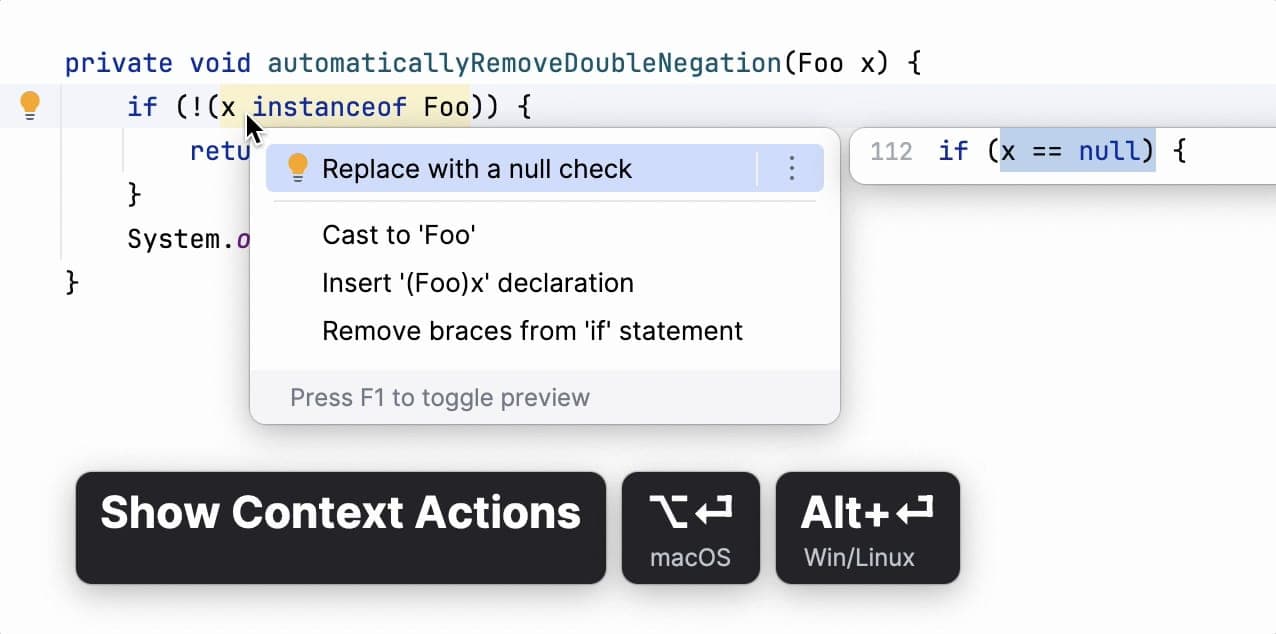
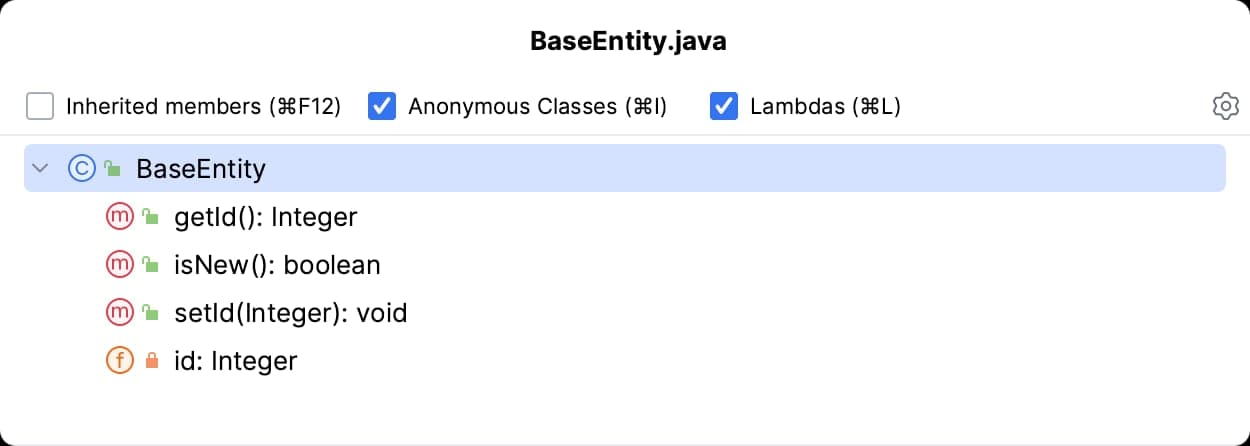
The product page emphasises code intelligence: usages, dependencies and types across the whole project, with accurate refactorings. The IDE includes a debugger, test runner, profiling, database tools and API testing, plus support for Spring (developed with the Spring Framework team), Jakarta EE, Micronaut and Quarkus. On AI, JetBrains Air is a place to run several agents and check their work, there is Junie, and agents can run on your own API key, an existing subscription or JetBrains AI. Per Wikipedia, in September 2025 JetBrains added AI to the IDE, including its Junie agent and support for Anthropic's Claude.
Pricing and value
The pricing page lists Ultimate for individuals at 19.90 USD a month or 199 USD for the first year, 159 USD in year two and 119 USD from year three. For organisations it is 71.90 USD per user per month or 719 USD per user per year. Yearly subscriptions include a perpetual fallback licence; monthly ones earn it after 12 uninterrupted payments. If you only need the free core it costs nothing; the help page says that when a subscription ends you can keep using the IDE and lose only the advanced features. The pricing page notes that prices are approximate, taxes may be added and the final price shows at checkout.
More analysis
Who it's for and how it compares
In the 2025 Stack Overflow survey, 27.1% of respondents used IntelliJ IDEA, ahead of Cursor (17.9%) and Android Studio (15%) but far behind VS Code (75.9%). Android Studio is built on the IntelliJ platform, so it feels familiar if you build Android apps. VS Code and Cursor are lighter and multi-language; IntelliJ IDEA is strongest when a project is mostly Java or Kotlin and you want specialised tooling.
Screenshots

Plans & pricing
Prices last verified Nov 10, 2026
Free
PersonalFree
Core Java and Kotlin features at no cost; a fresh install includes a 30-day Ultimate trial. JetBrains' FAQ says it can be used to build commercial software.
Ultimate (Individual)
Personal$19.90/mo/user
$16.58/mo billed yearly
19.90 USD a month, or 199 USD for the first year (159 USD in year two, 119 USD from year three); monthly billing gets 20% off in year two and 40% off from year three. Yearly subscriptions include a perpetual fallback licence; monthly ones earn it after 12 uninterrupted payments.
Ultimate (Organizations)
Business$71.90/mo/user
$59.92/mo billed yearly
71.90 USD per user per month or 719 USD per user per year. Prices can be frozen for 2 to 3 years; teams can request a 45-day trial for unlimited users.
- Free plan limits
- After an Ultimate subscription ends you can keep using IntelliJ IDEA for free with the core feature set; advanced features stop working.
- Free trial
- 30-day free trial · no credit card
Cancellation & refunds
The pages opened do not state a refund policy; see JetBrains' purchase terms.
Privacy
JetBrains' privacy notice lists the data it collects: identifiers and contact details, account and payment data, product usage data (including AI quota consumption and AI suggestion acceptance rates), and feedback and crash-report content. Data may be shared within the JetBrains group, with data processors and with third-party advertising partners. When you use JetBrains AI, JetBrains or its LLM providers may collect related personal data; the notice does not say whether AI data is used for training and points to a separate AI policy. The product page states SOC 2 Type II attestation and GDPR compliance.
IntelliJ IDEA alternatives
 8.0/10
Visual Studio Code
Microsoft's free code editor, extended by add-ons, with built-in AI agents
 7.6/10
Android Studio
Google's official IDE for Android apps, built on the IntelliJ platform
Frequently asked questions
Is IntelliJ IDEA free?
The core feature set is free, and a fresh install includes a 30-day Ultimate trial. JetBrains' FAQ says the free version can be used to build commercial software. Advanced features need an Ultimate subscription.
Does Community Edition still exist?
From 2025.3 Community and Ultimate are a single product; updating to 2025.3 converts Community automatically. You can stay on Community 2025.2 or earlier, though JetBrains says only the unified product will get updates and new features.
What are the minimum system requirements?
Per the 2026.3 installation guide: 8 GB RAM (3 GB for IDE processes), 10 GB disk, a 4-core x86_64 or arm64 CPU, a 1280 x 720 display; Windows 10 and 11, macOS 26 and 27, or Linux such as Ubuntu 24.04 and 26.04 LTS. The IDE bundles its runtime, but Java development still needs a standalone JDK.
What happens when a subscription ends?
You can keep using IntelliJ IDEA for free with the core features, and features outside the free set stop working. Yearly subscriptions also include a perpetual fallback licence (monthly ones earn it after 12 uninterrupted payments).
Review evidence & sources10
Scores
- Ease of use
- 7.3
- Features
- 8.9
- Value for money
- 7.4
- Performance
- 6.8
- Support
- 7.3
- Privacy & security
- 6.6
Why this score
A full IDE has a steeper learning curve than a light editor, but the installer bundles its own runtime (no separate Java needed to run the IDE), docs are extensive and built-in tools reduce add-on setup. The interface is English-only.
Why this score
Deep code analysis, refactoring, debugger, profiler, database and API tools, Java framework support and an AI agent workspace. 27.1% of respondents in the 2025 Stack Overflow survey use it, fourth behind VS Code (75.9%), Visual Studio (29%) and Notepad++ (27.4%). Held below 9 because its strength is Java/Kotlin rather than every language.
Why this score
A free core, Ultimate for individuals at 19.90 USD a month with price drops in later years, plus a perpetual fallback licence. Marked down because organisations pay 719 USD per user per year while VS Code is free.
Why this score
Minimum requirements are 8 GB RAM (3 GB available to IDE processes) and 10 GB disk. No independent performance benchmarks appeared in the sources opened, so the score is cautious.
Why this score
Detailed versioned official docs, a technical support section and a sales team for organisations. The pages opened do not detail support channels for free-tier users. JetBrains' Trustpilot page, which covers all its products, shows 2.6/5 from 102 reviews.
Why this score
The notice lists collected data clearly, with SOC 2 Type II and GDPR stated. Marked down because data may be shared with advertising partners and the notice does not say whether AI data is used for training.
What users say
- Trustpilot (JetBrains, all products)2.6/5 · 102
Sources
- Vendor-providedOfficial IntelliJ IDEA homepageNov 10, 2026
- Vendor-providedOfficial pricing pageNov 10, 2026
- Vendor-providedOfficial what's new pageNov 10, 2026
- Vendor-providedHelp: IntelliJ IDEA as a unified productNov 10, 2026
- Vendor-providedHelp: installation guide and system requirementsNov 10, 2026
- Vendor-providedJetBrains privacy noticeNov 10, 2026
- Vendor-providedJetBrains sales FAQ: commercial use of free IntelliJ IDEANov 10, 2026
- review-siteTrustpilot: JetBrains reviewsNov 10, 2026
- Community-reportedWikipedia: IntelliJ IDEANov 10, 2026
- pressStack Overflow Developer Survey 2025: TechnologyNov 10, 2026
Specs & compatibility
- Developer
- JetBrains
- Headquarters
- Czechia
- Launched
- 2001
- Category
- Development
Capabilities
- Works offline
- AI features
- Integrations
- Open source
Platforms
- Windows
- macOS
- Linux
Interface languages
- English
Integrations
- Spring
- Jakarta EE
- Micronaut
- Quarkus
- Gradle
- Maven
- Git
- Kubernetes
- Plugin Marketplace
- JetBrains AI
- Junie
Support
- Help center
Change history
- Feature.JetBrains previews Java & Kotlin by IntelliJ IDEA, a Language Server Protocol extension that brings the IDE's analysis, debugging and refactoring to VS Code and its forks via Open VSX, per Wikipedia.
- Update.Version 2025.3 merges Community and Ultimate into one product; the core stays free and advanced features need an Ultimate subscription.
- Feature.JetBrains adds AI features including its Junie agent and support for Anthropic's Claude, per Wikipedia.
Full change history (5)
- Update.Google releases Android Studio 1.0, built on the open-source IntelliJ IDEA Community Edition.
- Launch.JetBrains releases the first version of IntelliJ IDEA, one of the first Java IDEs with advanced code navigation and refactoring.
About the author
Reviews & comments
Written by readers with a verified email address.
No reviews yet. Have you used IntelliJ IDEA? Share your real experience.
Reader reviews are counted separately and do not affect the Editorial Team’s score.
No comments yet. Be the first to share your experience.
Comments are readers’ opinions, not content from the AppDuo Editorial Team.