Source-backed analysis9
Review basis
Research-based review: the AppDuo Editorial Team compiled it from official pages, documentation, app stores, press and user feedback, without hands-on testing. Every claim links to a source with the date it was checked.
9 reference sourcesInformation updated Nov 10, 2026
How we review
Google Keep Review
Google's free card-style notes: quick, light and synced across devices
By AppDuo Editorial Team · Updated
- Web
- Android
- iOS
On this page
Decide at a glance
Our verdict
Google Keep suits people who want fast lists, reminders and short ideas and already live in a Google account. The trade-off is thin text formatting and organization tools, so it is a weaker fit for heavy note-taking.
Best for: Shopping lists, to-dos and short notes synced across phone, computer and watch
Skip it if: People who need long, richly formatted notes, page links or databases
Pros
- Free, with web, Android and iOS apps plus widgets and Wear OS support
- Text, lists, photos, drawings and audio, with labels, colors, reminders and shared editing
- Strong store ratings: 4.7/5 from about 2.66 million on Google Play and 4.7/5 on the Vietnam App Store
Cons
- Cloudwards finds it has fewer features than rivals, with limited organization and rich-text editing
- Wikipedia notes location-based reminders were discontinued in late 2025
All pros and cons · Who is it for?
Pros
- Notes can be sent to Google Docs, and all data exported with Google Takeout
Cons
- No documentation of end-to-end encryption was found, and Cloudwards advises against storing sensitive information
Best for
- Android and Google Workspace users who want notes built into the Google ecosystem
Skip it if
- Anyone who needs end-to-end encryption or does not want data on Google's servers
Problems it solves
Experience & key features
What is Google Keep?
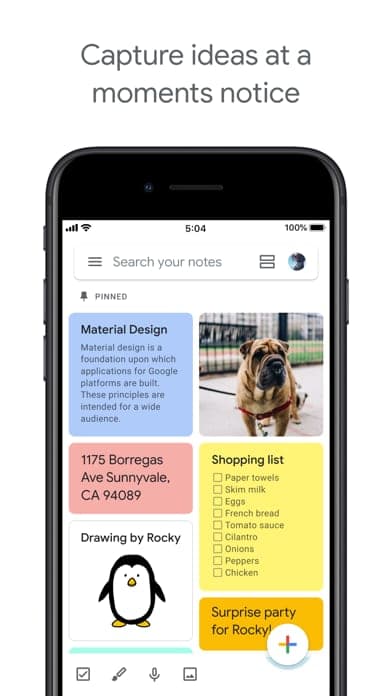
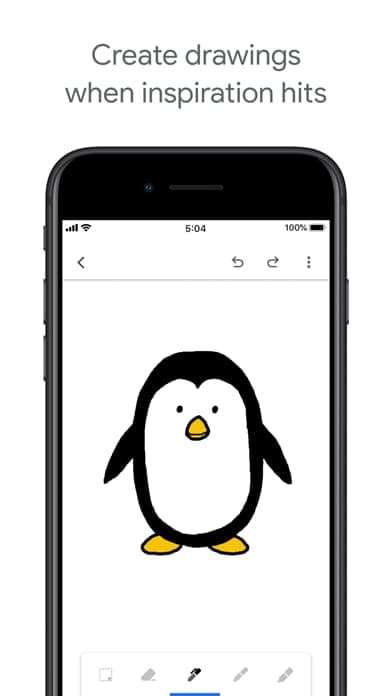
Google Keep is Google's note-taking app. Per Wikipedia it launched on 20 March 2013 for Android and the web, with an iOS app arriving on 24 September 2015. Users capture text, lists, photos, drawings or voice memos and organize them with colors and labels.
Key features
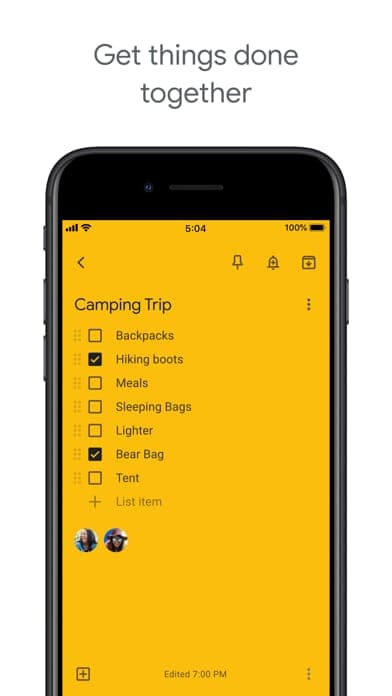
The Google Play listing describes widgets for phones and tablets, tiles for Wear OS, reminders and shared notes for collaboration such as grocery lists. The Google Workspace page adds real-time sync, offline use and exporting notes to Google Docs. On editing, Cloudwards finds Keep fairly basic.
Pricing and value
Keep is free with a Google account and has no paid tier of its own. The Google One page lists 15 GB free shared across Photos, Drive and Gmail, with Google One plans starting at 19,000 VND per month for 30 GB on its Vietnam page. Cloudwards describes Keep as free with an unlimited number of notes.
More analysis
Compared with alternatives
Keep fits quick capture for people already in the Google ecosystem. For linked pages, databases or team wikis, Notion sits at the other end of the complexity range; Microsoft OneNote and Evernote lean toward richer notebooks. History also shows Google has dropped parts of Keep, such as the Chrome app (2021) and location-based reminders (late 2025).
Screenshots
Plans & pricing
Prices last verified Nov 10, 2026
Free
PersonalFree
Free with a Google account. Cloudwards says the number of notes is unlimited. The Google One page lists 15 GB free, shared across Google Photos, Drive and Gmail.
- Free plan limits
- The app has no paid tier of its own. Google Workspace customers get Keep as part of their Workspace plan.
- Free trial
- No free trial
Cancellation & refunds
Not applicable, since the app is free.
Privacy
The Google Play listing says the developer declares no data is shared with third parties, data is encrypted in transit and users can request deletion; the app may collect location, personal info and other data types. On the App Store the developer declares data linked to you, including user content, search history, identifiers and usage data, for analytics, personalization and app functionality. Google's privacy policy says it does not use Drive, Gmail or Google Photos content for ad personalization unless you choose to share it, that you can export data with Takeout and delete individual products or the whole account. The policy also says Google may use publicly accessible information to train AI models. Cloudwards advises against storing sensitive information in Keep because of Google's security and privacy policies. The pages consulted do not mention end-to-end encryption for notes.
Google Keep alternatives
Frequently asked questions
Is Google Keep free?
Yes. The app is free with a Google account, and Cloudwards says the number of notes is unlimited.
Which devices does Google Keep run on?
On the web, Android, iOS and Wear OS watches, per the Google Play and App Store pages. Content syncs across devices.
Can I export notes from Keep?
Google's policy says you can export account data with Takeout, and the Workspace page says notes can be exported to Google Docs.
Are Keep notes end-to-end encrypted?
The pages consulted do not mention end-to-end encryption; Google Play only states data is encrypted in transit.
Review evidence & sources9
Scores
- Ease of use
- 8.8
- Features
- 6.2
- Value for money
- 9.0
- Performance
- 8.0
- Support
- 6.0
- Privacy & security
- 5.8
Why this score
Simple card notes, search, labels and colors; Wikipedia quotes Lifehacker (2013) calling the interface colorful and easy to use. Rated 4.7/5 on Google Play and the Vietnam App Store.
Why this score
Lists, photos, drawings, voice memos, reminders, sharing and Docs integration. Cloudwards says it lacks advanced organization and text formatting compared with rivals; Wikipedia cites PC Magazine (2016) also criticizing the lack of formatting.
Why this score
Entirely free with a Google account, with unlimited notes per Cloudwards; the pages consulted mention no ads or paid tier.
Why this score
Google says content syncs in real time across phone, computer and watch, with offline use. No independent performance measurements were found.
Why this score
A Keep Help Center covers sharing, reminders and exporting data. The pages consulted list no direct contact channel for free users, which puts it below apps that offer email support.
Why this score
Data is encrypted in transit and exportable via Takeout, but no end-to-end encryption was found; the App Store lists many data types linked to the user and Google's policy says public information may train AI. Cloudwards advises avoiding sensitive information.
What users say
- Google Play (US)4.7/5 · 2,660,000
- App Store (US)4.6/5 · 29,029
- App Store (Vietnam)4.7/5 · 2,704
Sources
- storeGoogle Play listingNov 10, 2026
- storeApp Store listing (US)Nov 10, 2026
- storeApp Store listing (Vietnam)Nov 10, 2026
- Vendor-providedGoogle Workspace - KeepNov 10, 2026
- Vendor-providedGoogle Privacy PolicyNov 10, 2026
- Vendor-providedGoogle One plansNov 10, 2026
- Vendor-providedGoogle Keep Help CenterNov 10, 2026
- Community-reportedWikipedia - Google KeepNov 10, 2026
- review-siteCloudwards - Google Keep Review (updated 2026-06-29)Nov 10, 2026
Specs & compatibility
- Developer
- Google LLC
- Headquarters
- United States
- Launched
- 2013
- Category
- Productivity
Capabilities
- Real-time collaboration
- Works offline
- Integrations
- Mobile app
Platforms
- Web
- Android
- iOS
Interface languages
- Vietnamese
- English
- Japanese
- Chinese
- Spanish
- French
- Korean
- German
- Portuguese
- Russian
- Thai
- Indonesian
Integrations
- Google Docs
- Google Workspace
- Wear OS
Support
- Help center
- Community forum
Change history
- Update.Support for the Keep Chrome app ends; Keep remains available in web browsers.
- Feature.Integrates with Google Docs, giving access to notes while using Docs on the web.
- Launch.Releases the iOS app.
Full change history (5)
- Feature.Adds real-time collaboration between users and attribute-based search (color, sharing status, content type).
- Launch.Google launches Keep on Android and the web.
About the author
Reviews & comments
Written by readers with a verified email address.
No reviews yet. Have you used Google Keep? Share your real experience.
Reader reviews are counted separately and do not affect the Editorial Team’s score.
No comments yet. Be the first to share your experience.
Comments are readers’ opinions, not content from the AppDuo Editorial Team.