Source-backed analysis12
Review basis
Research-based review: the AppDuo Editorial Team compiled it from official pages, documentation, app stores, press and user feedback, without hands-on testing. Every claim links to a source with the date it was checked.
12 reference sourcesInformation updated Nov 10, 2026
How we review
Google Calendar Review
A free, cross-device calendar tightly wired into Gmail, Meet and Tasks
By AppDuo Editorial Team · Updated
- Web
- iOS
- Android
On this page
Decide at a glance
Our verdict
Google Calendar suits people already in the Google ecosystem who want a free, easily shared personal or team calendar. The trade-off is that advanced appointment booking and Gemini need a Workspace or Google One plan, and your data falls under Google's company-wide privacy policy.
Best for: Gmail, Meet and Android users who want one calendar synced across web, phone and watch
Skip it if: People who need deep task or project management: Calendar only surfaces dated items from Tasks
Pros
- Free with a Google Account, available on web, Android, iOS, Wear OS and Apple Watch
- Calendar sharing with five permission levels, from free/busy only to full control
- Automatically adds flight, hotel and restaurant bookings from Gmail and shows dated tasks from Tasks
Cons
- Booking pages can't be created in the mobile app, only in a desktop browser, and advanced options need a paid plan
- Gemini scheduling help requires an active Workspace plan
All pros and cons · Who is it for?
Pros
- Adds a Google Meet link to an event in one step
- 4.5/5 on the US App Store from more than 132,000 ratings
Cons
- The App Store privacy label lists many data types linked to the user, including use for the developer's advertising
- Wikipedia records criticism in 2025 that default calendars were narrowed to public holidays and national observances
Best for
- Small teams, classes and families that need to share calendars with different permission levels
- Freelancers who want a simple booking page without adding another service
Skip it if
- Anyone who wants to limit how much data is tied to a Google account
Problems it solves
Experience & key features
What is Google Calendar?
Google Calendar is Google's online calendar service. According to Wikipedia it opened as a limited beta on 13 April 2006 and left beta in July 2009. It now runs on the web, Android, iOS, Wear OS and Apple Watch, syncing automatically between devices. Individuals use it free with a Google Account; businesses get it through Google Workspace.
Key features
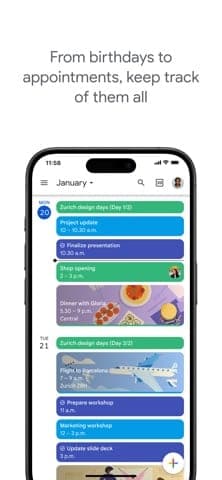
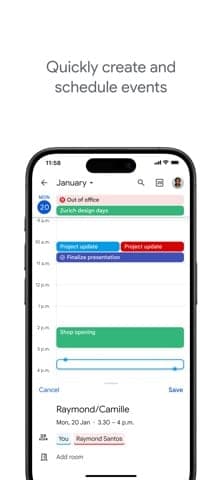
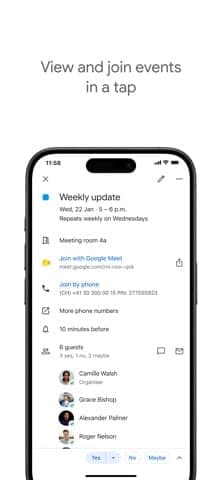
Google's product page lists overlaid calendars, colour coding, shared group calendars, file attachments, working-location settings, focus time that declines meetings, and time insights. Flight, hotel and restaurant bookings in Gmail are added automatically, and dated tasks from Tasks appear on the calendar. Sharing has five permission levels, and a calendar can be made public for others to subscribe to. Booking pages let guests pick open slots and can collect payments through Stripe. On Workspace plans, Gemini in Gmail suggests meeting times from email context and your calendar.
Pricing and value
Google Calendar has no price of its own. Personal accounts are free; according to 9to5Google (2023), the free tier is limited to one booking page. For business features, Workspace's pricing page lists Business Starter at $7, Business Standard at $14 and Business Plus at $22 per user per month on a 1-year commitment (before tax); Google's help centre puts the no-commitment Flexible Plan at $8.40, $16.80 and $26.40. New customers get a 12-month discount for the first 20 users on the two lower tiers, and every plan has a 14-day trial. Google One starts at 19,000 ₫/month (30 GB) on the Vietnam pricing page, though that page doesn't mention booking pages. For ordinary calendar needs, you effectively pay nothing.
More analysis
Who it's for and how it compares
Google Calendar fits people who already have a Google Account and want fast sync and easy sharing. For more specialised appointment booking, Calendly is a dedicated option. Microsoft-ecosystem users may look at the calendar in Microsoft 365. For task-driven planning, TickTick or Todoist go deeper on to-dos. Privacy is worth weighing before consolidating everything under one account.
Screenshots
Plans & pricing
Prices last verified Nov 10, 2026
Free
PersonalFree
Free with a personal Google Account: multiple calendars, calendar sharing and a booking page. Some advanced appointment features need an eligible Google One or Workspace plan.
Business Starter
Business$8.40/mo/user
$7/mo billed yearly
$8.40/user/month on the Flexible Plan or $7/user/month with a 1-year commitment, before tax. New customers get $3.50/user/month for the first 20 users for 12 months. 14-day trial.
Business Standard
Business$16.80/mo/user
$14/mo billed yearly
$16.80/user/month on the Flexible Plan or $14/user/month with a 1-year commitment, before tax. New customers get $8.40/user/month for the first 20 users for 12 months. 14-day trial.
Business Plus
Business$26.40/mo/user
$22/mo billed yearly
$26.40/user/month on the Flexible Plan or $22/user/month with a 1-year commitment, before tax. 14-day trial.
- Free plan limits
- According to 9to5Google (June 2023), personal accounts are limited to one booking page; unlimited pages, automatic reminder emails and checking availability across calendars need a paid plan. Google's product page says Workspace subscribers can create unlimited booking pages. The help page states appointment schedules can't be created in the Android or iPhone/iPad app and need a desktop browser.
- Free trial
- 14-day free trial · no credit card
Cancellation & refunds
Google Calendar isn't sold separately. The pages reviewed don't state refund terms for Workspace or Google One.
Privacy
Google Calendar falls under Google's general Privacy Policy (effective 16 Oct 2026). It says Google collects account details, content you create, device data such as IP address and crash reports, activity logs and location data. Depending on settings, ads may be personalised by interest, though Google says it does not use Drive, Gmail or Google Photos content for ad personalisation unless you opt in. Controls include Privacy Checkup, My Activity, My Ad Center, auto-delete for activity, and data export and deletion. The App Store privacy label lists many data types linked to the user, such as location, contacts, contact info, user content and search history, used for app functionality, analytics, personalisation and the developer's advertising or marketing. On work or school accounts, administrators may be able to see calendars and event details even if you haven't shared them.
Google Calendar alternatives

Frequently asked questions
Is Google Calendar free?
Yes, with a personal Google Account. Some advanced scheduling features and Gemini need an eligible Google One or Workspace plan.
Can I create a booking page on my phone?
No. Google's help page says appointment schedules can't be created in the Android or iPhone/iPad app; use a desktop browser.
How do I share my calendar?
Open the calendar's settings, go to Shared with, add an email address and pick one of five permission levels. The recipient has to click the link in the email to add it.
Can my company admin see my calendar?
According to the help page, administrators may see calendar and event details on work or school accounts even if you haven't shared them.
Review evidence & sources12
Scores
- Ease of use
- 8.6
- Features
- 8.0
- Value for money
- 9.0
- Performance
- 8.0
- Support
- 6.5
- Privacy & security
- 6.2
Why this score
App Store scores of 4.5 (US) and 4.6 (Vietnam), and the help pages show sharing a calendar or adding a Meet link takes only a few steps. Marked down because booking pages must be created on a desktop.
Why this score
Overlaid calendars, focus time, time zones, Gmail and Tasks sync and booking pages with Stripe payments. It is not a project manager, and AI features depend on a Workspace plan.
Why this score
Free with a personal Google Account and enough for most everyday calendar needs; cost only arises with Workspace (from $7/user/month on an annual commitment, $8.40 on the Flexible Plan).
Why this score
Updated frequently (iOS 26.43.0 and Android 2026.42.1 near the research date) with Wear OS and watchOS support. There is no independent speed or reliability data, so the score stays moderate.
Why this score
A detailed help centre with step-by-step guides and a community forum. The pages reviewed show no direct support channel for personal users; scored in line with Google Drive.
Why this score
Google offers fairly complete controls (export, delete, auto-delete) and says it doesn't use Gmail or Drive content for ads without opt-in. Marked down because one policy covers the whole Google ecosystem, the App Store label declares many data types linked to the user, including for advertising, and admins can see work-account calendars.
What users say
- App Store (United States)4.5/5 · 132,684
- App Store (Vietnam)4.6/5 · 1,784
Sources
- Vendor-providedGoogle Workspace: Calendar product pageNov 10, 2026
- Vendor-providedGoogle Workspace pricingNov 10, 2026
- Vendor-providedGoogle Workspace Admin Help: Flexible vs Annual plansNov 10, 2026
- Vendor-providedCalendar Help: share your calendarNov 10, 2026
- Vendor-providedCalendar Help: appointment schedulesNov 10, 2026
- Vendor-providedGoogle Privacy PolicyNov 10, 2026
- Vendor-providedGoogle One plans (Vietnam)Nov 10, 2026
- storeApp Store listing (United States)Nov 10, 2026
- storeiTunes Lookup API (US)Nov 10, 2026
- storeiTunes Lookup API (Vietnam)Nov 10, 2026
- Community-reportedWikipedia: Google CalendarNov 10, 2026
- press9to5Google: free booking pages in Google Calendar (2023-06-21)Nov 10, 2026
Specs & compatibility
- Developer
- Headquarters
- United States
- Launched
- 2006
- Category
- Productivity
Capabilities
- Real-time collaboration
- Integrations
- Mobile app
- AI features
Platforms
- Web
- iOS
- Android
Interface languages
- English
- Vietnamese
- Japanese
- Chinese
- Spanish
- French
- German
- Korean
Integrations
- Gmail
- Google Meet
- Google Tasks
- Stripe
- Microsoft Exchange
- Apple Watch
- Wear OS
Support
- Help center
- Community forum
Change history
- Update.iOS version 26.43.0 appears on the App Store with 44 interface languages; the Workspace product page promotes booking pages and Gemini in Gmail.
- Feature.Google announces Calendar and Assistant reminders will merge into Google Tasks; the migration ran from March to 22 May 2023.
- Feature."Events from Gmail" added, putting event details from Gmail messages onto the calendar.
Full change history (6)
- Launch.The official Google Calendar iOS app is released.
- Update.Google Calendar leaves beta and reaches general release.
- Launch.Google Calendar opens as a limited beta, first built by Mike Samuel as a 20% project.
About the author
Reviews & comments
Written by readers with a verified email address.
No reviews yet. Have you used Google Calendar? Share your real experience.
Reader reviews are counted separately and do not affect the Editorial Team’s score.
No comments yet. Be the first to share your experience.
Comments are readers’ opinions, not content from the AppDuo Editorial Team.