Source-backed analysis10
Review basis
Research-based review: the AppDuo Editorial Team compiled it from official pages, documentation, app stores, press and user feedback, without hands-on testing. Every claim links to a source with the date it was checked.
10 reference sourcesInformation updated Nov 10, 2026
How we review
WPS Office Review
Free-to-download office suite that opens and edits Word, Excel, PowerPoint and PDF files
By AppDuo Editorial Team · Updated
- Windows
- macOS
- Linux
- iOS
- Android
- Web
On this page
Decide at a glance
Our verdict
WPS Office suits people who want a free office suite with a Microsoft Office-style interface on both desktop and phone. The trade-offs: the official site publishes no paid-plan prices, the free edition carries ads and limits both AI and storage, and the privacy policy allows sharing with advertising partners and other third parties.
Best for: People who need to open, edit and convert Office and PDF files on phone and desktop without paying
Skip it if: Anyone handling confidential documents or sensitive business data who needs strict data commitments
Pros
- Writer, Spreadsheet, Presentation and PDF apps across Windows, Mac, Linux, Android, iOS and the web
- Per the home page, it opens, edits and converts MS Office, PDF and Google Docs files, with real-time co-editing
- Over 500 million Google Play downloads; 4.8/5 on the US App Store (over 18,500 ratings) and 4.3/5 on Google Play (over 6 million)
Cons
- The official pricing page shows no amounts, and on the App Store the same plan name appears at several prices
- The free edition carries ads (per Google Play), only 1 GB cloud storage and limited AI tools
All pros and cons · Who is it for?
Pros
- AI tools for writing, summarising, chatting with PDFs, building slides and translating documents
Cons
- ESET (January 2024) found the Blackwood group hijacking WPS Office update requests sent over unencrypted HTTP to deliver the NSPX30 implant
Best for
- People who want AI writing, summarising and slide generation without buying a Microsoft 365 plan
Skip it if
- Teams that work mainly inside the Microsoft or Google ecosystems, whose own suites integrate more tightly
Problems it solves
Experience & key features
What is WPS Office?
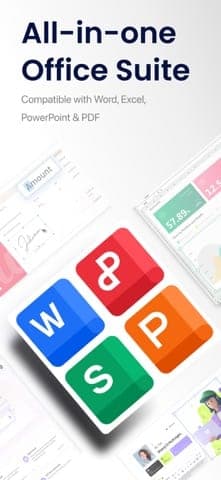
WPS Office is Kingsoft's office suite, made up of Writer (WPS Docs), Spreadsheet (WPS Sheets), Presentation (WPS Slides), PDF and Photo. Per Wikipedia, it traces back to Super-WPS, a DOS word processor from 1988; on 6 June 2014 all Kingsoft Office products were renamed WPS Office. It runs on Windows, Mac, Linux, Android, iOS and the web.
Key features
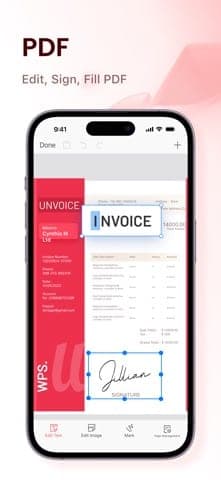
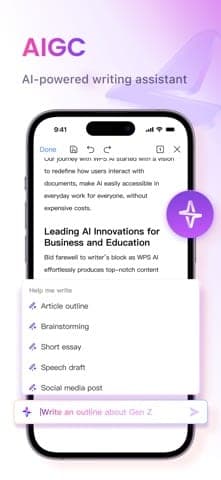
Per the WPS home page, the apps open, edit and convert MS Office, PDF and Google Docs files. The PDF tools view, edit, convert, sign, merge, split and compress. You can co-edit in real time, comment, track changes and set view, comment or edit permissions. The AI tools draft text from a prompt, build slides from a description, analyse spreadsheets, summarise PDFs, answer questions about documents and translate whole documents. iOS version 26.10.2 (2 November 2026) adds side-by-side AI chat and real-time audio transcription.
Pricing and value
WPS Standard is free to download, shows ads (per Google Play) and has 1 GB cloud storage and limited AI tools. The official pricing page only says the paid column has 20 GB of cloud storage and that Pro+ includes AI with a daily cap; it shows no amounts. On the US App Store, WPS VIP Monthly is 3.99 USD per month and WPS Pro AI Monthly 5.99 USD per month, while yearly plans range from 17.99 to 131.99 USD depending on the plan name. Because the same plan name can show several prices, check the price in the app before subscribing.
More analysis
Who it's for and how it compares
WPS Office fits people used to Microsoft Office who want a free alternative that also works on a phone. Microsoft 365 and Google Workspace integrate more deeply with email, storage and meetings; LibreOffice is an open-source desktop option. For sensitive documents, read the data policy closely and keep that content out of AI features, as WPS itself advises.
Screenshots
Plans & pricing
Prices last verified Nov 10, 2026
WPS Standard (Free)
PersonalFree
Free download. The comparison table on the WPS pricing page lists 1 user, 1 GB cloud storage and AI tools marked "limited". The Google Play listing says the Android app contains ads.
WPS Pro (App Store, in-app)
Personal$3.99/mo/user
On the US App Store, "WPS VIP Monthly" is 3.99 USD per month; "WPS Pro Yearly" appears at three prices (17.99, 29.99 and 35.99 USD per year) with no explanation. The WPS pricing page lists 20 GB cloud storage for the paid column but shows no amounts.
WPS Pro AI (App Store, in-app)
Personal$5.99/mo/user
The US App Store lists "WPS Pro AI Monthly" at 5.99 USD per month, "WPS Pro AI Yearly" at 25.49 or 35.99 USD per year and a "WPS Pro + WPS AI 1-Year Plan" at 131.99 USD per year. The pricing page says Pro+ includes AI with a daily usage limit; once it is used up, AI tools pause until the next day.
- Free plan limits
- The free edition shows ads (per Google Play) and has 1 GB cloud storage and limited AI tools. The WPS pricing page gives no figure for the AI allowance.
- Free trial
- No free trial
Cancellation & refunds
Neither the pricing page nor the help centre home page states a refund policy.
Privacy
The WPS privacy policy (updated 15 August 2025) says the company collects account details, log data, device identifiers (including IDFA and Android advertising IDs), and what you type into AI features along with the AI's output. WPS may share data with service providers (cloud, payment, marketing, AI), advertising partners for WPS Ad Services and SDK providers. The policy does not say whether AI content is used to train models; it only advises against entering personal data, sensitive information or business secrets into AI features. The home page, by contrast, says documents and prompts are "never used for AI training without permission". Data is stored in data centres in Singapore, France, Japan, the United States and India. To delete your account, sign in at account.wps.com or email [email protected].
WPS Office alternatives
 8.1/10
Google Workspace
Gmail, Docs, Meet and Drive for business, built around the browser
 7.8/10
Microsoft 365
Word, Excel, PowerPoint, Outlook and Teams with cloud storage and Copilot
Frequently asked questions
Is WPS Office free?
Yes. WPS Standard is free to download, shows ads (per Google Play) and has 1 GB cloud storage and limited AI tools. Paid plans raise storage to 20 GB (per the comparison table), and Pro+ includes AI with a daily limit.
Can WPS Office open Word, Excel and PowerPoint files?
Yes. The WPS home page says the apps open, edit and convert MS Office, PDF and Google Docs files. Macworld (2019) also found Office files opened with formatting intact, though complex files are worth checking.
Does WPS Office support Vietnamese?
Yes. The iOS App Store listing includes Vietnamese among its 40 languages.
Does WPS use my documents to train AI?
The home page says documents and prompts are never used for AI training without permission. The privacy policy does not address this explicitly and advises against entering sensitive information into AI features.
Review evidence & sources10
Scores
- Ease of use
- 7.6
- Features
- 7.9
- Value for money
- 7.2
- Performance
- 7.2
- Support
- 5.8
- Privacy & security
- 5.5
Why this score
A tabbed interface similar to Microsoft Office; Macworld (2019) found Office files opened with formatting intact. The app rates 4.8/5 on the US App Store but only 4.3/5 from over 6 million Google Play ratings. Marked down for the WPS Cloud login problems and missing synonym suggestions Macworld noted on the Mac version.
Why this score
Covers Writer, Spreadsheet, Presentation and PDF, plus co-editing, templates and a range of AI tools. No independent data on fidelity with complex files was found, so the score stays below the category leaders.
Why this score
The free edition already includes the core apps and App Store prices are low (WPS VIP Monthly at 3.99 USD per month in the US). Marked down because the free edition shows ads, the official site publishes no prices, the same plan appears at several prices, and the top AI bundle costs 131.99 USD per year.
Why this score
Macworld (2019) described the Mac app as under 300 MB with over 50 supported formats; the iOS app is now 674.9 MB. No recent independent speed benchmarks were found.
Why this score
The help centre offers search by product and topic plus social links, but its home page lists no email, chat or phone channel.
Why this score
The policy covers advertising IDs and sharing with ad partners and SDK providers and is silent on AI training, though the home page says there is no training without permission. The home page says its practices align with GDPR and ISO standards. ESET (January 2024) also documented unencrypted HTTP update requests being hijacked to deliver malware.
What users say
- App Store (US)4.8/5 · 18,562
- Google Play (US)4.3/5 · 6,018,242
Sources
- Vendor-providedWPS Office official home pageNov 10, 2026
- Vendor-providedWPS Office pricing pageNov 10, 2026
- Vendor-providedWPS Office buy pageNov 10, 2026
- Vendor-providedWPS Office privacy policyNov 10, 2026
- Vendor-providedWPS Help CenterNov 10, 2026
- storeApp Store: WPS Office (US)Nov 10, 2026
- storeGoogle Play: WPS Office (US)Nov 10, 2026
- Community-reportedWikipedia: WPS OfficeNov 10, 2026
- pressMacworld: WPS Office review (2019-10-21)Nov 10, 2026
- pressESET WeLiveSecurity: NSPX30 implant (2024-01-24)Nov 10, 2026
Specs & compatibility
- Developer
- Kingsoft Office
- Headquarters
- China
- Launched
- 1988
- Category
- Productivity
Capabilities
- AI features
- Real-time collaboration
- Templates
- Mobile app
Platforms
- Windows
- macOS
- Linux
- iOS
- Android
- Web
Interface languages
- Vietnamese
- English
- Japanese
- Chinese
- Spanish
- French
- Korean
- German
- Portuguese
- Russian
- Thai
- Indonesian
Integrations
- Microsoft Office (định dạng tệp)
- Google Docs (mở tệp)
Support
- Help center
- Community forum
Change history
- Update.WPS updates its current privacy policy, which covers AI inputs and outputs.
- Update.ESET reports the Blackwood group hijacking unencrypted WPS Office update requests to deliver the NSPX30 implant.
- Feature.WPS Office 2019 is released with full PDF support.
Full change history (5)
- Price.WPS Office 2016 for Windows becomes generally available as freemium software.
- Update.All Kingsoft Office products are renamed WPS Office.
About the author
Reviews & comments
Written by readers with a verified email address.
No reviews yet. Have you used WPS Office? Share your real experience.
Reader reviews are counted separately and do not affect the Editorial Team’s score.
No comments yet. Be the first to share your experience.
Comments are readers’ opinions, not content from the AppDuo Editorial Team.