Source-backed analysis9
Review basis
Research-based review: the AppDuo Editorial Team compiled it from official pages, documentation, app stores, press and user feedback, without hands-on testing. Every claim links to a source with the date it was checked.
9 reference sourcesInformation updated Nov 10, 2026
How we review
Trello Review
Simple Kanban-style work management from Atlassian
By AppDuo Editorial Team · Updated
- Web
- Windows
- macOS
- iOS
- Android
On this page
Decide at a glance
Our verdict
Trello suits individuals and small teams who want to track work with boards, lists and cards, and its Free plan covers basic needs. The trade-offs are a 10-board cap on Free, views like Calendar and Timeline reserved for Premium, and Trustpilot complaints about billing and cancellation.
Best for: Individuals and small teams who want an easy, visual Kanban board
Skip it if: Teams needing complex multi-dependency project management who do not want to pay for Premium
Pros
- Free plan has unlimited cards and up to 10 boards per Workspace
- Standard starts at 5 USD per user per month (annual), half the price of Premium
- A public REST API with webhooks, plus a Power-Up platform for integrations
Cons
- Free plan caps files at 10 MB and 250 command runs per month
- Calendar, Timeline, Table, Dashboard and Map views need Premium (10 USD per user per month)
All pros and cons · Who is it for?
Pros
- States SOC 2 Type 2, ISO/IEC 27001 and PCI-DSS certification, with a free 14-day Premium trial
Cons
- Trustpilot scores 2.3/5 (227 reviews), with many comments on cancellation, billing and support
- The Android app rates only 3.8/5 on Google Play (123K reviews)
Best for
- Teams already using Slack, Microsoft Teams or Google and Outlook calendars who want tasks in one place
Skip it if
- People who need more than 10 boards without paying
Problems it solves
Experience & key features
What is Trello?
Trello is a visual work management tool created by Fog Creek Software and released on 13 September 2011 at a TechCrunch event. Per Wikipedia, it spun out as its own company in 2014 and raised 10.3 million USD. Atlassian announced its intent to acquire Trello for 425 million USD on 9 January 2017.
How it works and key features
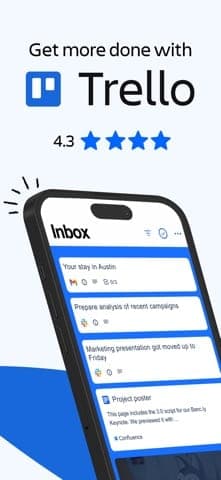
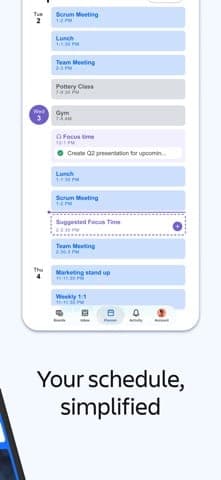
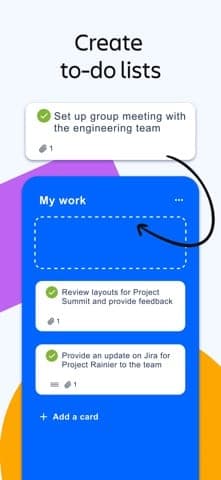
Work is arranged into boards, lists and cards, and you drag cards between columns such as To Do, In Progress and Done. Per the Google Play listing, the mobile app has Inbox, Boards and Planner, can save messages from Slack or Microsoft Teams and shows Google or Outlook calendars. Trello also offers a public REST API using a key and token, with webhooks, and acquired Butler in December 2018 for automation. Beyond web and mobile, there are desktop apps.
Pricing and value
Per the pricing page, Free is limited to 10 boards and 10 collaborators per Workspace. Standard costs 6 USD per user per month (5 USD billed annually) with unlimited boards and AI features. Premium costs 12.50 USD (10 USD annually), adds Calendar, Timeline, Table, Dashboard and Map views, and has a free 14-day trial. Enterprise is 17.50 USD per user per month, billed annually only.
More analysis
Who it is for, and how it compares
Trello fits simple Kanban-style task tracking. For more complex projects, Asana, ClickUp or monday.com offer more views and workflows, and Notion is worth a look if you also want notes and documents. This review is compiled from public sources.
Screenshots
Plans & pricing
Prices last verified Nov 10, 2026
Free
PersonalFree
Up to 10 boards per Workspace, up to 10 collaborators per Workspace, 10 MB per file and 250 Workspace command runs per month. Cards, Power-Ups per board and the activity log are unlimited.
Standard
Business$6/mo/user
$5/mo billed yearly
6 USD per user per month billed monthly, 5 USD billed annually. Unlimited boards, AI features, Planner, custom fields, card mirroring, 250 MB per file and 1,000 Workspace command runs per month.
Premium
Business$12.50/mo/user
$10/mo billed yearly
12.50 USD per user per month billed monthly, 10 USD billed annually, with a free 14-day trial. Adds Calendar, Timeline, Table, Dashboard and Map views, unlimited Workspace command runs, admin and security features and simple data export.
Enterprise
Business$17.50/mo/user
17.50 USD per user per month, billed annually only (210 USD per user per year). Adds unlimited Workspaces, organization-wide permissions and Power-Up administration, and includes Atlassian Guard Standard and 24/7 Enterprise admin support.
- Free plan limits
- Each Workspace gets up to 10 boards, 10 collaborators and 250 command runs per month, with files up to 10 MB. When you downgrade, paid features last until the prepaid period ends and the Workspace then becomes Free with 10 boards.
- Free trial
- 14-day free trial · no credit card
Cancellation & refunds
Trello's pricing page states no refund policy; it only says that on downgrade you keep paid features until the prepaid period ends. Trello offers non-profit and education discounts.
Privacy
Per the FAQ on the pricing page, Trello, Inc. is SOC 2 Type 2, ISO/IEC 27001 and PCI-DSS certified. Trello falls under Atlassian's general privacy policy: Atlassian processes content you post as a processor on behalf of customers, retains de-identified and aggregated content under data-contribution features, and may use support information and service-development data to train or fine-tune machine learning and AI models. Trello, Inc. is listed among the Atlassian entities adhering to the Data Privacy Framework for EU and Swiss data transferred to the US. On Google Play the developer declares no data shared with third parties and encryption in transit.
Trello alternatives

Frequently asked questions
Is Trello free?
Yes. The Free plan allows up to 10 boards and 10 collaborators per Workspace, unlimited cards, files up to 10 MB and 250 command runs per month.
What is the difference between Standard and Premium?
Standard (5 USD per user per month billed annually) unlocks unlimited boards, AI features, Planner and custom fields. Premium (10 USD) adds Calendar, Timeline, Table, Dashboard and Map views, unlimited Workspace commands and admin tools. Only Premium has a free 14-day trial.
Does Trello have an API?
Yes. Trello has a public REST API authenticated with an API key and token (or OAuth 2.0), rate-limited per API key, and it recommends webhooks over polling.
Is my data used for AI?
Atlassian's privacy policy says support information and data used to develop the services may be used to train or fine-tune machine learning and AI models, and that content is retained de-identified under data-contribution features. Read the full policy for opt-out options.
Review evidence & sources9
Scores
- Ease of use
- 8.6
- Features
- 7.0
- Value for money
- 7.4
- Performance
- 6.3
- Support
- 5.0
- Privacy & security
- 7.0
Why this score
The board, list and card drag-and-drop model has defined Trello since 2011, and the Google Play listing stresses drag-and-drop on mobile. The score rests on public descriptions.
Why this score
Includes automation, Power-Ups, an API and multiple views on Premium. Lower plans lack views such as Timeline, so it trails dedicated project management rivals.
Why this score
A usable Free plan, with Standard at 5 USD and Premium at 10 USD per user per month billed annually. The 10-board and 250-command caps push larger teams to pay sooner.
Why this score
There are no independent benchmarks. The iOS app rates 4.3/5 but the Android app only 3.8/5, and some Trustpilot reviewers mention logouts, outages and slowness with many tasks.
Why this score
Trustpilot reviewers describe support as hard to reach and the AI bot as rarely resolving issues; Enterprise includes 24/7 admin support. The sample is small and the profile is unclaimed.
Why this score
Trello states SOC 2 Type 2, ISO/IEC 27001 and PCI-DSS certification and adheres to the Data Privacy Framework. The deduction: Atlassian's policy allows data to be used to train or fine-tune machine learning and AI models.
What users say
- App Store (US)4.3/5 · 7,040
- Google Play (US)3.8/5 · 123,000
- Trustpilot2.3/5 · 227
Sources
- Vendor-providedOfficial pricing pageNov 10, 2026
- Vendor-providedTrello Premium page (free trial)Nov 10, 2026
- Vendor-providedTrello About pageNov 10, 2026
- Vendor-providedTrello REST API introductionNov 10, 2026
- Vendor-providedAtlassian Privacy PolicyNov 10, 2026
- storeApp Store listing (US)Nov 10, 2026
- storeGoogle Play listingNov 10, 2026
- Community-reportedWikipedia: TrelloNov 10, 2026
- review-siteTrustpilot: trello.comNov 10, 2026
Specs & compatibility
- Developer
- Atlassian
- Headquarters
- United States
- Launched
- 2011
- Category
- Productivity
Capabilities
- Real-time collaboration
- AI features
- Templates
- Integrations
- Public API
- Mobile app
Platforms
- Web
- Windows
- macOS
- iOS
- Android
Interface languages
- Vietnamese
- English
- Japanese
- Chinese
- Spanish
- French
- German
- Portuguese
- Russian
- Thai
Integrations
- Slack
- Microsoft Teams
- Google Calendar
- Outlook
- Zendesk
- SurveyMonkey
- Giphy
Support
- Help center
Change history
- Update.Wikipedia reports Trello reaching 50 million users.
- Feature.Trello acquires Butler, adding task automation.
- Company.Atlassian announces its intent to acquire Trello for 425 million USD (360 million in cash, 65 million in shares and options).
Full change history (5)
- Company.Trello spins out of Fog Creek as Trello, Inc.
- Launch.Trello launches at a TechCrunch event, built by Fog Creek Software.
About the author
Reviews & comments
Written by readers with a verified email address.
No reviews yet. Have you used Trello? Share your real experience.
Reader reviews are counted separately and do not affect the Editorial Team’s score.
No comments yet. Be the first to share your experience.
Comments are readers’ opinions, not content from the AppDuo Editorial Team.