Source-backed analysis8
Review basis
Research-based review: the AppDuo Editorial Team compiled it from official pages, documentation, app stores, press and user feedback, without hands-on testing. Every claim links to a source with the date it was checked.
8 reference sourcesInformation updated Nov 11, 2026
How we review
By AppDuo Editorial Team · Fact-checked
- macOS
On this page
Decide at a glance
Our verdict
Thaw suits Mac users who want a tidy menu bar without paying, with a broad feature set and open code. The trade-off is a young project: the macOS 27 version is still beta and the version you can use depends on your macOS.
Best for: macOS users who want to hide and arrange menu bar icons for free
Skip it if: Anyone who needs a stable release on macOS 27 right now (Thaw 3 is still beta)
Pros
- Free, open source under GPL-3.0, no account required
- Broad features: hiding, search, groups, profiles bound to displays or Focus, Zen mode, menu bar styling
- Interface in 20 languages (English, Japanese, Chinese, Spanish, French, Korean, German, …; two only in development builds)
Cons
- Versions depend on macOS: Thaw 3 for macOS 27 is beta, macOS 15 uses Thaw 2.2 beta, macOS 14 uses Thaw 1
- Requires Accessibility permission, a broad grant; a Product Hunt commenter raised this concern
All pros and cons · Who is it for?
More pros
- Thaw Bar for notched Macs, plus Raycast, Shortcuts and Siri integrations
More cons
- Recent release notes keep fixing freezes and crashes (malformed Accessibility replies, long uptime, Settings search)
- Support runs mainly through docs, GitHub issues and the community; no direct support channel
Best for
- People who prefer open-source software whose code they can read
- Notched-MacBook owners who need a secondary bar for icons the notch hides
Skip it if
- People unwilling to grant Accessibility permission to a third-party app
Experience & key features
Thaw is a macOS app for hiding, arranging and searching menu bar icons. According to its FAQ and AlternativeTo, Thaw 2 is a fork of Ice by Jordan Baird, while Thaw 3 is original work. ifun.de (12 Feb 2026) reported the project arose because Ice's development had largely stalled.
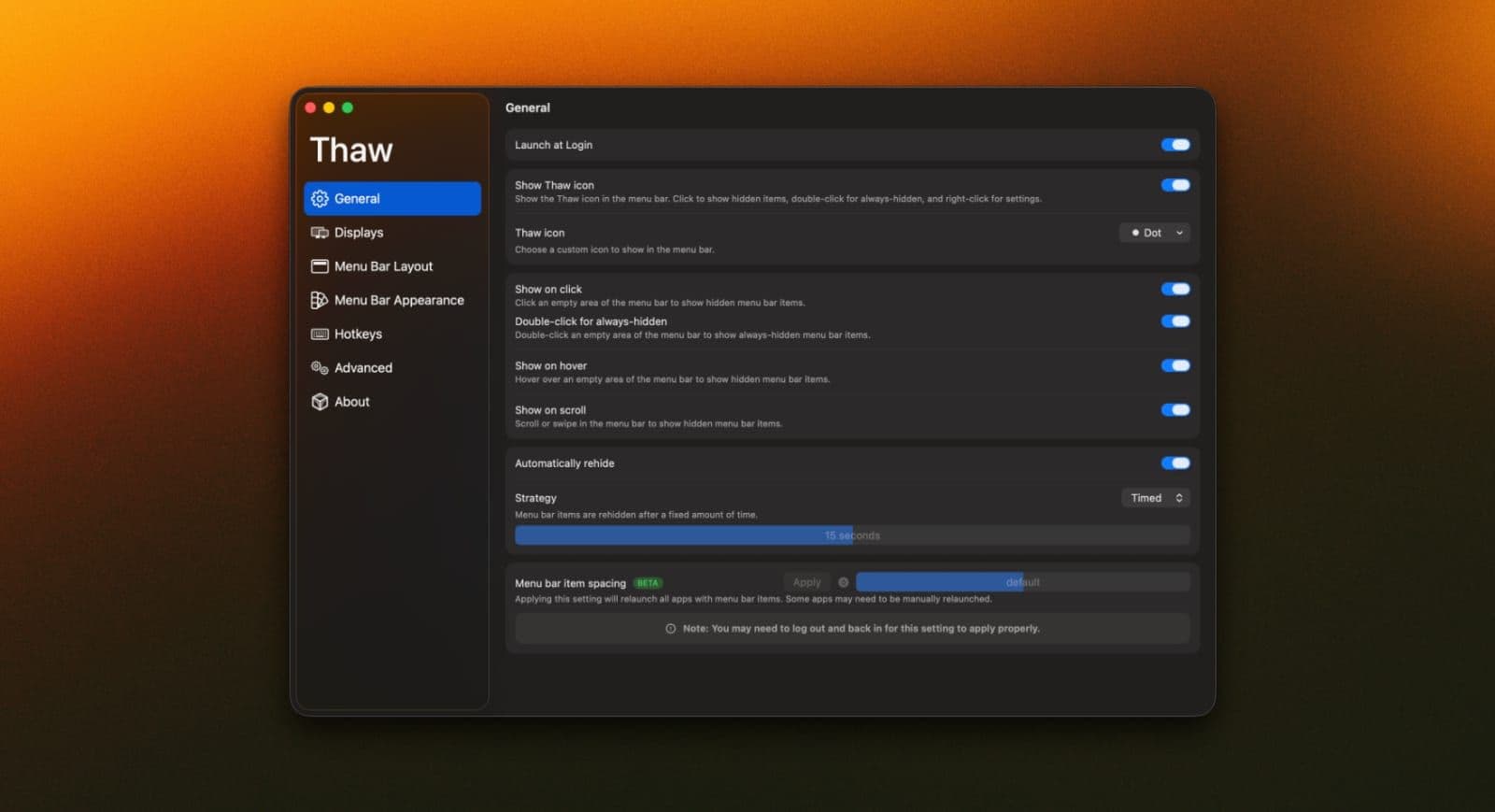
On features, the README lists hiding icons with an always-hidden section, revealing by hover, click, scroll or hotkey, keyboard search, groups, profiles bound to a display, Space or Focus, and a Zen mode. The bar can be tinted, shadowed and bordered; the Thaw Bar shows icons hidden by the notch in a separate bar.
The version depends on the OS. Per the website: macOS 27 uses Thaw 3 (beta), macOS 26 uses Thaw 2 (stable), macOS 15 uses Thaw 2.2 (beta) and macOS 14 uses Thaw 1. GitHub Releases shows 2.1.0 (14 Oct 2026) as the latest stable tag, alongside many recent beta and alpha builds.
Thaw costs nothing: it is free under GPL-3.0 with no account. What to weigh is the Accessibility permission, needed to move icons but a broad grant, and the maturity of a new project. Buyers who want commercial support will see a weakness; open-source fans will see a plus.
Screenshots

Plans & pricing
Prices last verified Nov 11, 2026
Thaw
PersonalFree
Free and open source under GPL-3.0, no account needed. Per the FAQ, updates for new macOS releases are free too. Thaw 3 for macOS 27 is in beta.
- Free plan limits
- The website lists no feature limits.
- Free trial
- No free trial
Cancellation & refunds
Not applicable: the app is free.
Privacy
Per the website and FAQ, Thaw has no analytics or tracking and needs no account. It goes online only to check for updates and fetch release notes, and both can be switched off. It needs Accessibility permission to move items; Screen Recording is optional (live previews and wallpaper tint). These are the developer's statements; the code is public under GPL-3.0, but no independent audit appeared in the sources opened. A Product Hunt commenter questioned the breadth of the Accessibility permission.
Controversies & incidents
Issues documented by the press, regulators, courts or the vendor itself. Every item is sourced; unproven claims are labelled as allegations. Last researched: Nov 11, 2026
No significant controversies or incidents found in the sources we checked.
Frequently asked questions
Is Thaw free?
Yes. Per the official FAQ, Thaw is free, open source under GPL-3.0, needs no account, and updates for new macOS releases are free.
Which macOS versions does Thaw support?
macOS 14 or later: macOS 27 uses Thaw 3 (beta), macOS 26 uses Thaw 2, macOS 15 uses Thaw 2.2 (beta), macOS 14 uses Thaw 1.
Does Thaw collect data?
Per the official FAQ, there are no analytics or tracking. The app goes online only for updates and release notes, and both can be turned off. This is the developer's statement.
Is Thaw the same as Ice?
Not exactly. Per the FAQ, Thaw 2 is a fork of Ice (by Jordan Baird), while Thaw 3 is original work.
Review evidence & sources8
Scores
- Ease of use
- 7.5
- Features
- 8.5
- Value for money
- 9.0
- Performance
- 7.0
- Support
- 6.5
- Privacy & security
- 7.5
Why this score
Installs via Homebrew or disk image, with a getting-started guide and a Simple Mode that puts the essentials on one settings page. Interface in 20 languages. Picking the right version for your macOS and granting Accessibility make the first run less straightforward.
Why this score
Several ways to reveal hidden icons, search, groups, profiles, triggers, Zen mode, styling, Thaw Bar and automation hooks; the full list adds 40+ more features.
Why this score
Free, open source, no account, and per the FAQ updates for new macOS releases are free.
Why this score
The README claims a small, steady memory footprint, but release notes for 2.1.0 and the Thaw 3 builds fix a run of freezes and crashes (malformed Accessibility replies, long uptime) and memory creeping up over days. The macOS 27 build is still beta.
Why this score
Docs, FAQ, roadmap, changelog, Discord and a GitHub issue tracker exist; as a community project it states no support commitment.
Why this score
The developer states no tracking, no account and network calls only for updates, which can be switched off; open code allows inspection. Accessibility is a broad permission and no independent audit was found.
What users say
- Product Hunt4.0/5 · 1
Sources
- Vendor-providedThaw GitHub repositoryNov 11, 2026
- Vendor-providedOfficial websiteNov 11, 2026
- Vendor-providedOfficial FAQNov 11, 2026
- Vendor-providedGitHub READMENov 11, 2026
- Vendor-providedGitHub ReleasesNov 11, 2026
- pressifun.de (2026-02-12)Nov 11, 2026
- review-siteProduct Hunt listingNov 11, 2026
- review-siteAlternativeTo listingNov 11, 2026
Specs & compatibility
- Developer
- thaw-app (open-source community, fork of Ice)
- Headquarters
- United States
- Launched
- 2026
- Category
- Utilities
Capabilities
- Open source
- Works offline
- Integrations
Platforms
- macOS
Interface languages
- English
- Japanese
- Chinese
- Spanish
- French
- Korean
- German
- Portuguese
- Russian
- Thai
- Indonesian
Integrations
- Raycast
- Shortcuts
- Siri
- Droppy
- Floe
- thaw:// links
Support
- Help center
- Community forum
Change history
- Feature.Thaw 3.0.0-beta.6 (for macOS 27) published on GitHub Releases.
- Feature.Stable release 2.1.0.
- Feature.Thaw 2.0.0 released.
Full change history (6)
- Update.ifun.de reported Thaw as a free GPL-3.0 fork of Ice.
- Launch.First stable release, 1.0.0.
- Launch.The thaw-app/Thaw repository was created on GitHub.
About the author
Reviews & comments
Written by readers with a verified email address.
No reviews yet. Have you used Thaw? Share your real experience.
Reader reviews are counted separately and do not affect the Editorial Team’s score.
No comments yet. Be the first to share your experience.
Comments are readers’ opinions, not content from the AppDuo Editorial Team.