Source-backed analysis15
Review basis
Research-based review: the AppDuo Editorial Team compiled it from official pages, documentation, app stores, press and user feedback, without hands-on testing. Every claim links to a source with the date it was checked.
15 reference sourcesInformation updated Nov 14, 2026
How we review
Read AI Review
AI meeting notetaker that also searches your email and chat
By AppDuo Editorial Team · Fact-checked
- Web
- iOS
- Android
- Windows
- macOS
- Browser extension
- API
On this page
Decide at a glance
Our verdict
Read AI suits sales, customer success and management teams that want meeting notes, meeting metrics and work search across Zoom, Meet and Teams. The trade-off is a bot that auto-joins calendar meetings and auto-shares reports with invitees, which led some universities to block it, and video playback only starts at the Enterprise tier.
Best for: Sales and customer success teams that push call summaries into Salesforce or HubSpot
Skip it if: Organisations with strict recording-consent or sensitive-data rules and no IT team to lock down bot settings
Pros
- Works across Zoom, Google Meet and Microsoft Teams, with iPhone, Android, Windows and macOS apps for in-person recording
- Ask Read searches across meetings, email and messages; MCP server and ChatGPT/Claude connectors
- Premium integrations with Salesforce, HubSpot, Notion, Jira, Confluence and Zapier from the Pro plan
Cons
- The bot can join and record even when the inviting user is absent; the University of Washington and Chapman University blocked or banned it
- Only 1.3/5 on Trustpilot (109 reviews), dominated by complaints about uninvited joins and hard removal
All pros and cons · Who is it for?
More pros
- Any participant can type "Read Stop" or "Opt Out" to stop or delete the recording
- Strong store ratings: 4.9/5 on the US App Store, 4.8/5 on Google Play
More cons
- Video playback needs Enterprise ($29.75 per user per month); no refunds
- Google Play's data-safety section says no data is shared with third parties, while the privacy policy says Read "shares and sells" identifiers to ad partners
Best for
- Companies that meet across Zoom, Google Meet, Teams and in person
- People who want their meeting history available in ChatGPT or Claude via MCP
Skip it if
- Anyone who needs many free meeting notes: the Free plan stops at 5 meetings a month
Experience & key features
What Read AI is
Read AI is an AI meeting notetaker from Read AI, Inc., a Seattle company founded in 2021 by David Shim, Robert Williams and Elliott Waldron. Once you connect a calendar, the "Read Assistant" bot joins Zoom, Google Meet or Microsoft Teams meetings, transcribes by speaker and sends a report with a summary, topics, action items and key questions. Since 2024 it has expanded into summarising email and Slack/Teams messages and searching across them with Ask Read. Read AI said in May 2026 that it has more than 5 million monthly active users; that figure is the company's own and has not been independently verified.
Key features
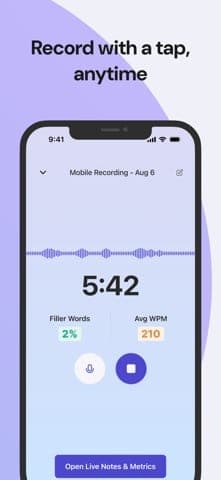
Beyond notes, Read AI leans on meeting analytics: talk time, engagement and coaching on speaking pace and filler words. The iPhone app (launched 21 October 2024), Android, Windows and macOS apps record in-person meetings without a bot. In 2026 it added an MCP server and ChatGPT and Claude connectors that feed meeting history into other AI assistants.
- Meeting reports
Summary, topics, action items, key questions and a speaker-labelled transcript. - Ask Read
AI Q&A over meetings, email and messages; included on every plan, Free too. - Integrations
Slack, Salesforce, HubSpot, Notion, Jira, Confluence, Zapier, webhooks; a Chrome extension for Gmail and Google Calendar.
Pricing and value
The Free plan covers 5 meetings a month, up to 1 hour each. Pro costs $19.75 per user per month, or $15 a month on annual billing, unlocking unlimited meetings and premium integrations but still no video playback. Enterprise ($29.75, or $22.50 annual) adds video and priority support; Enterprise+ ($39.75, or $29.75 annual, 5-licence minimum) adds HIPAA, SAML/SCIM and EU and Canada hosting. Read AI does not refund and accepts credit cards only. Zoom One Pro, Business and Business Plus customers get premium features through Zoom Essential Apps. Read AI publishes no VND prices.
More analysis
The privacy question
Read AI's biggest issue is how its bot spreads. Its own help centre confirms the bot can join whenever any invitee uses Read, even if that person does not attend. The University of Washington blocked Read AI's Zoom and Teams integrations, and Chapman University banned it outright on 13 August 2025. On Trustpilot it holds 1.3/5 from 109 reviews, mostly from people who never knowingly signed up. Read AI responds that the bot always asks to be admitted, announces itself in the chat and lets any participant stop or delete the recording.
Who it's for, and alternatives
Read AI makes sense for sales teams and managers who want meeting metrics, CRM sync and cross-channel search, as long as IT can lock down auto-join. People who only need meeting notes can also look at Fathom, Otter.ai, Fireflies.ai or Granola. Organisations already on Zoom can consider Zoom AI Companion, which Chapman University recommends instead of Read AI provided all participants consent.
Screenshots


Plans & pricing
Prices last verified Nov 14, 2026
Free
PersonalFree
Free, $0, no credit card required. 5 meeting transcripts and 5 meeting reports a month, 1-hour maximum per meeting; no audio/video uploads, no video playback; unlimited Ask Read search, basic integrations, meeting coach.
Pro
Personal$19.75/mo/user
$15/mo billed yearly
$19.75 per user per month billed monthly, or $15 per user per month billed annually ($180 per user per year). Unlimited meetings and transcripts, 4-hour maximum per meeting; 100 upload minutes a month; premium integrations (Notion, Salesforce, HubSpot, Jira, Confluence, Zapier, webhooks); Workspace access; no audio/video playback.
Enterprise
Business$29.75/mo/user
$22.50/mo billed yearly
$29.75 per user per month billed monthly, or $22.50 per user per month billed annually ($270 per user per year). Everything in Pro plus audio/video playback, video highlights, 200 upload minutes a month and prioritised support.
Enterprise+
Business$39.75/mo/user
$29.75/mo billed yearly
$39.75 per user per month billed monthly, or $29.75 per user per month billed annually ($357 per user per year); 5-licence minimum. Adds HIPAA compliance, SAML and SCIM, domain capture, custom data retention, 300 upload minutes a month, 8-hour meetings, EU and Canada hosting.
- Free plan limits
- The Free plan covers 5 meetings a month (transcript, summary, metrics), up to 1 hour each, with no video playback and no file uploads.
- Free trial
- No free trial
Cancellation & refunds
Read AI does not offer refunds. You can cancel any time before the renewal date; if you forget, access continues until the end of the billing period. Payment is by credit card only (no PayPal).
Privacy
Per its privacy policy (updated 29 June 2026), Read AI collects names and emails of invitees and participants (including people without an account), meeting audio and video, and calendar data. Its Read Score analyses the facial and verbal cues of all attendees to rate engagement (video is excluded for EU and UK users). If you connect a Google account, Read may collect Calendar, Gmail, Drive and Chat data to train personalised AI models, while pledging not to use it for generalised models. Meeting data is used to improve the product only if you opt in to the Customer Experience Program. Audio and video are kept for no more than 2 years, except that paid accounts keep data until they stop paying or ask for deletion. Under some US state-law definitions, the policy states that Read "shares and sells" certain identifiers (cookie IDs, hashed emails) to marketing and advertising partners. Any participant can type "opt out" in the meeting chat to remove Read. The US App Store privacy label lists data linked to the user: name (product personalisation), email address, audio data, product interaction and crash data (app functionality), with no 'Data Used to Track You' section. Google Play's data-safety section says the app may collect personal info, messages and 5 other data types, encrypts data in transit, lets you request deletion, and states "No data shared with third parties". That contradicts the privacy policy, which says Read "shares and sells" identifiers to marketing and advertising partners and passes data to vendors, including third-party AI tools. The store labels may cover only in-app data while the policy also covers the website, but Read AI does not explain the difference.
Read AI alternatives
 7.6/10
Fireflies.ai
AI meeting notetaker with a free-forever plan
 7.5/10
Zoom
Dedicated video meetings with a 40-minute free tier and built-in AI notes
Controversies & incidents
Issues documented by the press, regulators, courts or the vendor itself. Every item is sourced; unproven claims are labelled as allegations. Last researched: Nov 14, 2026
- Medium impactConfirmedPrivacy ·
Chapman University bans Read AI over security and privacy risks
Chapman University's IT office prohibited Read AI after repeated reports of the bot appearing in and recording meetings unwanted.
Read the full account
On 13 August 2025 Chapman University's IS&T office said it had received increasing reports of Read AI appearing in Zoom and Teams meetings, unwelcome to hosts and participants especially once it began recording. After an investigation it prohibited Read AI over security, privacy and institutional-data risks and blocked adding the app in Zoom and Teams, while noting this does not fully block it. The notice says some people had to delete their account entirely to stop it joining, and that Read AI may share summaries before the host can check them. Chapman recommends Zoom AI Companion instead, provided all participants consent to recording as California law requires.
Vendor response
Read AI says the bot always asks to join, names its inviter in the chat and lets anyone type "Read Stop" or "Opt Out"; CEO David Shim said the company has "rejected requests to make Read AI less noticeable". Its help centre says a bot that keeps joining after account deletion comes from another invitee using Read or a second account.
Sources:Chapman University IS&T – institutional notice: Security Notice Regarding Read AI, 2025-08-13 (not a vendor page)Read AI – How to Stop Read AI from Joining My MeetingsRead Help Center – Why is Read still joining my meetings
- Medium impactConfirmedPrivacy ·
University of Washington blocks Read AI's Zoom and Teams integrations
UW-IT blocked Read AI in Zoom and then Teams, saying it can record and summarise meetings without the user present and without other attendees' awareness or consent.
Read the full account
According to UW-IT's notice, several University of Washington members reported Read AI appearing in meetings to participants' surprise. After investigating, consulting other universities and talking to Read AI, UW-IT decided blocking Read AI's Zoom and Microsoft Teams integrations was necessary to protect institutional data. Zoom was blocked first and Teams on Tuesday 21 January (2025). UW-IT's reasons: once tied to a calendar, Read AI can join, transcribe and summarise meetings even when the user is absent and without other attendees' awareness or consent, and summaries may be shared automatically unless configured properly. Read AI's own help centre confirms an invitee can add the bot without attending.
Vendor response
UW-IT says it asked Read AI for enhanced privacy protections. Read AI maintains that its bot's visible presence is deliberate and that any participant can stop or delete a recording.
Sources:University of Washington IT – institutional notice: Required Deactivation of Read AI (not a vendor page)Read Help Center – Why is Read still joining my meetingsRead AI – How to Stop Read AI from Joining My Meetings
Frequently asked questions
Is Read AI free?
Yes, there is a permanent Free plan with no card required: 5 meetings a month, up to 1 hour each, no video playback and no uploads. Pro starts at $15 per user per month on annual billing ($19.75 monthly).
Does Read AI support Vietnamese?
No. The pricing page says "20+ languages supported", but the named meeting-report languages (English, Chinese, Japanese, Hindi, Spanish, ...) do not include Vietnamese, and neither do the website's 10 or the iPhone app's 19 interface languages.
How do I stop Read AI from joining my meetings?
In the meeting, type "Read Stop" (stops, still creates a report) or "Opt Out" (stops and deletes everything) in the chat, or the host can remove the bot like any participant. If it still appears after you delete your account, Read AI says another invitee uses Read or you have a second account.
Can I get a refund if I cancel?
No. Read AI does not refund; cancel before the renewal date and you keep access until the paid period ends.
Review evidence & sources15
Scores
- Ease of use
- 7.0
- Features
- 8.2
- Value for money
- 6.2
- Performance
- 7.0
- Support
- 5.8
- Privacy & security
- 5.0
Why this score
Setup is quick: connect a calendar, and G2 reviewers call it easy to start. But the default auto-join behaviour confuses people, and the mobile app requires a Google, Outlook or Zoom calendar (an App Store reviewer complains). The website offers 10 interface languages (English, Spanish, Italian, Portuguese, French, Japanese, Hindi, Russian, German, Chinese) and the iPhone app 19; the pricing page says "20+ languages supported", while its meeting-report list names 16+.
Why this score
Broad feature set: summaries, speaker-labelled transcripts, meeting coach, engagement metrics, Ask Read search across email and messages, apps on every platform, MCP and API. Minus: video playback and highlights start at Enterprise.
Why this score
Free stops at 5 meetings a month. Pro is $19.75 per user per month ($15 on annual billing) without video; Enterprise is $29.75 ($22.50 annual). No refunds, no admin-only licences, and every licence in a Workspace must be on the same plan. G2 and Trustpilot reviewers mention high prices.
Why this score
Store ratings are high (4.9/5 US App Store, 4.8/5 Google Play) and G2 reviewers praise transcript accuracy. Still, some G2 and Google Play reviews say the bot sometimes fails to join invited meetings, and one user reports an Android login loop.
Why this score
Email support and a detailed help centre; the developer replies to store reviews. But priority support starts at Enterprise, G2 lists "poor customer support" among cons, and several Trustpilot reviews say support requests went unanswered.
Why this score
Positives: an "Opt Out" command for every participant, use of meeting data to improve features tied to an opt-in programme, HIPAA and SAML on the top tier. But by default the bot auto-joins calendar meetings, can record when the inviter is absent and shares reports with invitees; the University of Washington and Chapman University blocked or banned it. The policy allows facial analysis of attendees (outside the EU and UK) and sharing identifiers with ad partners. Google Play's data-safety section says "No data shared with third parties", which contradicts the policy's own statement that Read "shares and sells" identifiers to ad partners; that inconsistency also costs points.
What users say
- App Store (US) – Read AI: Transcripts and Notes4.9/5 · 1,081
- Google Play (en-US listing) – Read AI: Meeting Notes4.8/5 · 2,820
- G24.0/5 · 44
- Trustpilot1.3/5 · 109
Sources
- Vendor-providedRead AI – Plans & PricingNov 14, 2026
- Vendor-providedRead Help Center – What are the different paid plans that Read offers?Nov 14, 2026
- Vendor-providedRead AI – Privacy Policy (updated 2026-06-29)Nov 14, 2026
- Vendor-providedRead AI – AboutNov 14, 2026
- Vendor-providedRead AI blog – iPhone app launch (2024-10-21)Nov 14, 2026
- Vendor-providedRead AI blog – MCP adoption (2026-05-12)Nov 14, 2026
- Vendor-providedRead Help Center – Why is Read still joining my meetingsNov 14, 2026
- Vendor-providedRead AI – How to Stop Read AI from Joining My MeetingsNov 14, 2026
- storeApp Store (US) – Read AI: Transcripts and NotesNov 14, 2026
- storeGoogle Play – Read AI: Meeting NotesNov 14, 2026
- review-siteG2 – Read AI reviewsNov 14, 2026
- review-siteTrustpilot – read.ai reviewsNov 14, 2026
- pressTechCrunch (2024-10-28) – Read AI raises $50MNov 14, 2026
- Vendor-providedUniversity of Washington IT – institutional notice: Required Deactivation of Read AI (not a vendor page)Nov 14, 2026
- Vendor-providedChapman University IS&T – institutional notice: Security Notice Regarding Read AI, 2025-08-13 (not a vendor page)Nov 14, 2026
Specs & compatibility
- Developer
- Read AI, Inc.
- Headquarters
- United States
- Launched
- 2021
- Category
- AIProductivityBusiness
Capabilities
- AI features
- Public API
- Integrations
- Real-time collaboration
- Mobile app
- Templates
Platforms
- Web
- iOS
- Android
- Windows
- macOS
- Browser extension
- API
Interface languages
- English
- Spanish
- Portuguese
- French
- German
- Japanese
- Chinese
- Russian
Integrations
- Zoom
- Google Meet
- Microsoft Teams
- Google Calendar
- Outlook
- Gmail
- Slack
- Salesforce
- HubSpot
- Notion
- Jira
- Confluence
- Asana
- Zapier
- Webhooks
- ChatGPT
- Claude (MCP)
Support
- Help center
Change history
- Feature.Read AI reports fast uptake of its MCP server and ChatGPT and Claude connectors and claims 5M+ monthly active users.
- Feature.iPhone app adds more interface languages (version 2.7.0).
- Feature.iPhone app adds a consent dialog reminding users to confirm everyone agreed before recording.
Full change history (5)
- Company.Raises a $50M Series B led by Smash Capital, six months after a $21M Series A, and releases a free Chrome extension for Gmail.
- Launch.Free iPhone app launches for recording, transcribing and summarising in-person meetings.
About the author

Do you make Read AI?
Add the AppDuo score badge to your website or social pages so people can see Read AI has been reviewed. The badge updates with the review.
Reviews & comments
Written by readers with a verified email address.
No reviews yet. Have you used Read AI? Share your real experience.
Reader reviews are counted separately and do not affect the Editorial Team’s score.
No comments yet. Be the first to share your experience.
Comments are readers’ opinions, not content from the AppDuo Editorial Team.