Source-backed analysis18
Review basis
Research-based review: the AppDuo Editorial Team compiled it from official pages, documentation, app stores, press and user feedback, without hands-on testing. Every claim links to a source with the date it was checked.
18 reference sourcesInformation updated Nov 11, 2026
How we review
OpusClip Review
AI tool that cuts long videos into captioned shorts for TikTok, Reels and Shorts
By AppDuo Editorial Team · Updated
- Web
- iOS
- Android
- API
On this page
Decide at a glance
Our verdict
OpusClip suits podcasters, creators and marketing teams who regularly need to turn a backlog of long videos into short clips, especially on yearly Pro billing. The trade-offs are credits metered by source minutes, heavily limited Free and Starter tiers, and a visible share of Trustpilot and Google Play complaints about processing, support and billing.
Best for: Podcasters and webinar or talk-show hosts who need many captioned vertical clips from each long episode
Skip it if: People who need a full timeline editor or want to create videos from scratch without existing footage
Pros
- ClipAnything picks moments from visuals, sound and emotion, not just speech, and accepts plain-language prompts for specific scenes
- Permanent free plan with 60 credits a month, plus a 7-day Pro trial with no card required
- Yearly Pro ($174/year, $14.50/month effective) includes a scheduler for 9 platforms, AI B-roll, 2 seats and XML export to Premiere Pro and DaVinci Resolve
Cons
- The free tier adds a watermark, blocks editing and limits exports to 3 days
- Starter is monthly-only, 9:16-only and has no scheduler; credits are charged per source minute, not per clip you keep
All pros and cons · Who is it for?
Pros
- Clips and captions videos in 25+ spoken languages (English, German, Japanese, Korean, Vietnamese…), though most are in beta
- API, MCP and an official Claude connector make it easy to automate
Cons
- Google Play sits at 2.7/5 with upload-failure and freezing complaints; 20% of Trustpilot reviews are 1-star, many about cancelling, charges and slow support
- The privacy policy allows selling or sharing data with advertising partners, ignores Do Not Track, and the Google Play data label does not match the App Store one
Best for
- Small marketing teams (up to 4 seats) that want clipping, scheduling and posting to many social networks in one place
- Developers and AI-agent users who want clipping via API, MCP or assistants such as Claude and ChatGPT
Skip it if
- Occasional users who clip only a few videos a month and dislike paying for expiring credits
Experience & key features
What OpusClip is
OpusClip is an AI tool from Opusclip Inc., a Mountain View, California company founded in 2022 by Young Zhao, Grace Wang and Jay Wu. The pitch is simple: feed it a long video such as a podcast episode, livestream or webinar, and the AI finds the strongest moments, cuts them into vertical clips, adds animated captions and reframes them for TikTok, Instagram Reels or YouTube Shorts. Business Insider reported 10 million users 18 months after launch; OpusClip's own pages now claim more than 20 million creators and businesses, a company-reported figure.
How it works and key features
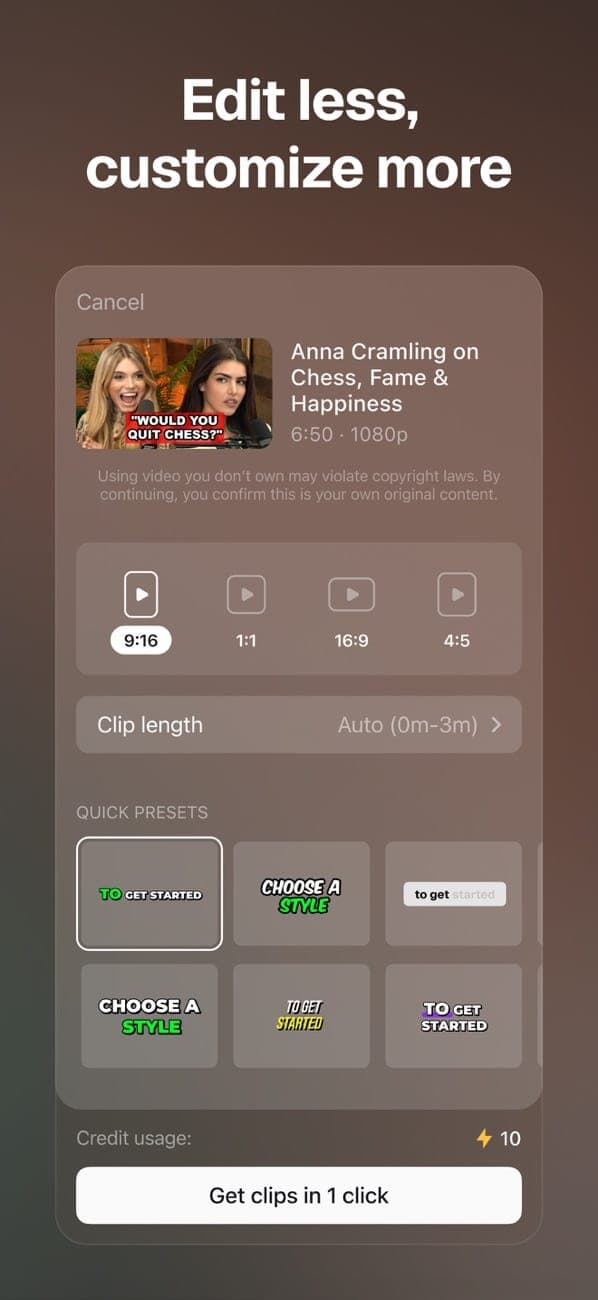
You paste a link (YouTube, Google Drive, Zoom, Vimeo and more) or upload a file, pick a clip length and caption preset, and get a batch of clips ranked by Virality Score. Pro unlocks much more for post-production and distribution. OpusClip 4.0, released on 2 November 2026, expands the product from clipping into editing whole raw takes.
- ClipAnything
Selects moments from speech, objects, sound and emotion, so it works on vlogs, gaming and sports, not only talking heads; plain-language prompts can target specific scenes. - Captions and reframing
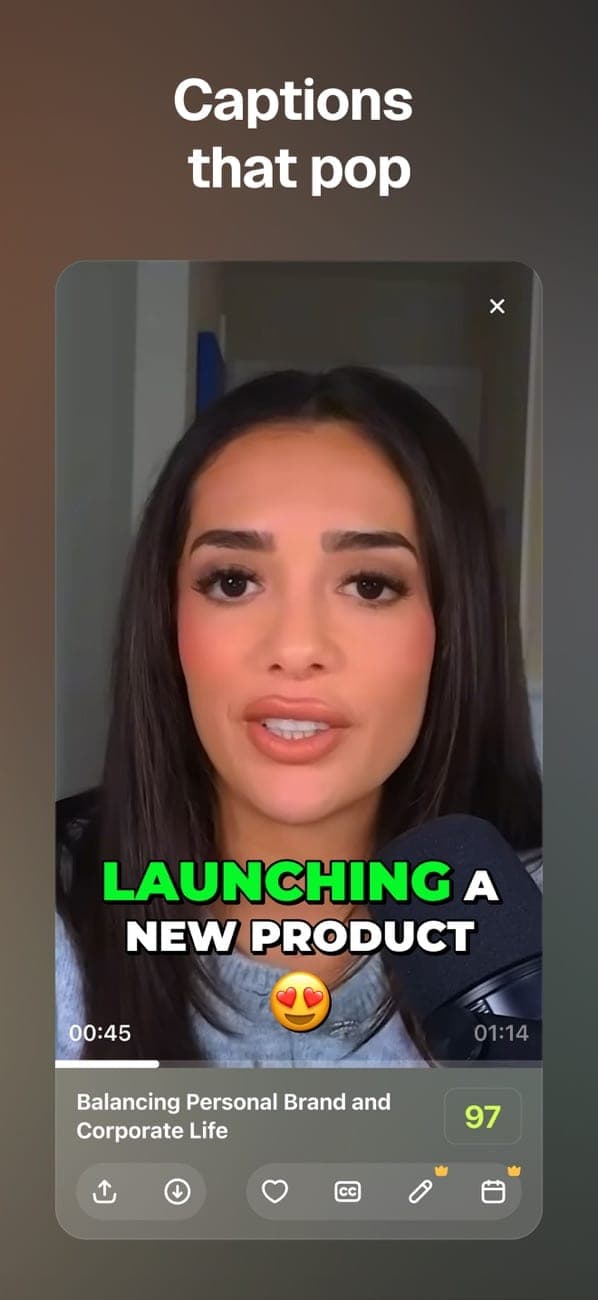
Animated captions with emoji and keyword highlights; videos in 25+ spoken languages, with Vietnamese and most languages beyond English, German, Spanish, French and Portuguese still in beta. AI reframe keeps the subject centred when switching to 9:16, 1:1 or 16:9. - Publishing and teamwork
Pro schedules posts to YouTube, Instagram, TikTok, LinkedIn, Facebook, X, Pinterest, Threads and Bluesky; team workspaces hold up to 4 seats; XML export goes to Premiere Pro or DaVinci Resolve. - Automation
There is an API, an MCP server and, since 11 September 2026, an official Claude connector; 4.0 adds the AI Producer plugin for editing from ChatGPT or Claude.
Pricing and value
On the website OpusClip has four USD plans: Free (60 credits/month), Starter at $15/month (150 credits, monthly only), Pro at $29/month or $174/year, and Business on quote. One credit equals one minute of source video processed, so cost depends on how much footage you feed in, not how many clips you keep. Yearly Pro is the most economical option for regular users; Starter feels thin because it is 9:16-only with no scheduler. In the US App Store the in-app prices are $15 (Starter), $29 (Pro monthly) and $174.99 (Pro yearly). Note that the terms rule out prorated refunds, and projects become inaccessible 3 days after you cancel.
More analysis
Mobile apps, reliability and support
The iOS app ships frequent updates (multi-platform posting, cloud-saved projects, an 8-language interface since 1 May 2026) and rates 4.9/5 on the US App Store and 4.8/5 on the Vietnam App Store (23 ratings). Android lags well behind at 2.7/5 on US Google Play (484 reviews), with complaints about failed uploads, rendering freezes and hard-to-reach support. On Trustpilot OpusClip scores 4.0/5 from 512 reviews; 63% are 5-star but 20% are 1-star; Trustpilot's summary flags complaints about slow support replies, billing transparency and long waits for refunds. Free users get support only through Discord and AI chat.
Who it's for and how it compares
OpusClip makes most sense for people who already have plenty of long-form footage and need a steady flow of shorts across platforms: podcasters, talk-show hosts, online educators and small marketing teams. If you need deeper transcript-based editing or recording inside the tool, Descript takes a different approach. If you want videos generated from a script or AI avatars without existing footage, InVideo AI or HeyGen fit better, while Canva and Adobe Express suit broader design work where short video is only one part. Try the free plan on your own footage before committing to a yearly plan.
Screenshots


Plans & pricing
Prices last verified Nov 11, 2026
Free
PersonalFree
60 credits/month (60 processing minutes), watermarked clips up to 1080p, 9:16 only, no editing; clips can no longer be exported after 3 days. Imports from local files and YouTube.
Starter
Personal$15/mo
$15/month, monthly billing only. 150 credits/month, no watermark, editor, 1 brand template, auto-post to YouTube Shorts, TikTok and Instagram Reels; clips stay 9:16 only and there is no post scheduler.
Pro
Personal$29/mo
$14.50/mo billed yearly
$29/month, or $174/year ($14.50/month effective) for 3,600 credits over 12 months; the pricing page says unused credits roll over for 2 months. Each pack adds 300 credits/month and 2 team-workspace seats, up to 4 seats at 2 packs. 2 brand templates, 6 social account connections, scheduler, AI B-roll, 9:16/1:1/16:9, export to Premiere Pro/DaVinci Resolve, 100 GB storage, limited API access. The US iOS in-app yearly price is $174.99.
Business
BusinessContact sales
Custom quote. For organisations needing more than 10 seats, high volume or API: priority processing, custom credits and seats, API and custom integrations, enterprise-level security, Master Service Agreement, dedicated Slack support channel.
- Free plan limits
- Free forever: 60 credits a month, watermarked clips, no editing and a 3-day export window. New users get a 7-day Pro trial with 90 processing minutes, no card required.
- Free trial
- 7-day free trial · no credit card
Cancellation & refunds
The Terms of Service rule out prorated refunds for the current period and say fees already paid are not refunded except as the terms provide; cancelling keeps access until the period ends. Pro users can refund a project's credits (not money) within 14 days if no clip has been downloaded. iOS in-app purchases are billed by Apple.
Privacy
Per its privacy policy (effective 17 November 2025), OpusClip runs on Google Cloud servers in the US. It collects profile data, IP and device data, web analytics, data from connected social accounts and uploaded content (videos, images, transcripts), which is used to provide features and to improve products and services. The policy states it has "sold or shared" (as US state laws define it) profile, device, web-analytics and IP-based location data with advertising partners for targeted ads, and it does not honour Do Not Track. The two store labels disagree: the App Store label says usage data is used for third-party advertising and to track users across other companies' apps and sites, while the Google Play Data safety section declares sharing of email, user IDs, device IDs, crash logs and app interactions for analytics only (purchase history for app functionality), with no advertising purpose. On retention, the policy only says data is kept "as long as necessary": profile and login data for as long as the account exists, payment data as long as needed to process the purchase, with no fixed periods. Users can request access, correction or deletion via [email protected] or [email protected], or delete their account by following the help-centre instructions; the terms warn that content may not be completely removable from OpusClip's records. Google Play states data is encrypted in transit. On the plus side, it is certified under the EU-U.S. Data Privacy Framework, lists SOC 2 Type 2 compliance, and EU/EEA users can opt out of AI research use by email. Users must be 16+; in Vietnam, under-16s need a parent's or guardian's approval.
OpusClip alternatives


Frequently asked questions
Is OpusClip free?
There is a permanent free plan with 60 credits (60 processing minutes) a month, but clips are watermarked, cannot be edited and can only be exported for 3 days. New users also get a 7-day Pro trial with 90 processing minutes, no card required.
Does OpusClip work with Vietnamese-language videos?
Yes. The help centre lists Vietnamese among its 25+ supported video languages, but it is in beta, so emojis and highlighted keywords may be inaccurate. The iOS app interface is available in 8 languages, not including Vietnamese.
How are credits counted?
One credit is one minute of source video processed, no matter how many clips you keep. Free gives 60 credits a month, Starter 150 and Pro 300 per pack; yearly Pro gets 3,600 credits over 12 months. Extra credits or packs can be bought from the subscription page.
Can I get a refund if I cancel?
Under the Terms of Service, no: cancelling stops renewal, you keep access until the period ends and there is no prorated refund. Pro users can refund a project's credits within 14 days if no clip was downloaded. Purchases made in the iOS app are billed by Apple.
What happens to my projects after I cancel?
The help centre warns that projects become inaccessible 3 days after cancelling, so download any clips you want to keep first.
Review evidence & sources18
Scores
- Ease of use
- 7.8
- Features
- 8.5
- Value for money
- 7.2
- Performance
- 7.0
- Support
- 6.5
- Privacy & security
- 6.0
Why this score
G2 and Trustpilot reviewers repeatedly praise the near one-click flow: paste a link or upload, choose a length, get captioned clips. The iOS app interface comes in 8 languages (English, French, German, Spanish, Portuguese, Italian, Dutch, Polish). Downsides: the mobile editor has fewer tools than the web version (noted by G2 and App Store reviewers), some basics like speeding up a clip are missing, and credit metering makes costs hard for newcomers to predict.
Why this score
A broad feature set that runs from clipping to publishing: ClipAnything across visuals/sound/emotion, Virality Score, AI reframe with subject tracking, animated captions in 25+ languages, AI B-roll, dubbing, speech enhancement, a scheduler for 9 platforms, XML export, API and MCP. Version 4.0 (2 November 2026) adds auto-editing of raw takes, Recipes, Viral Hook and Motion Graphics. Not a 9 because much of it is Pro-only, many languages are beta and the editor still trails a real timeline editor.
Why this score
Yearly Pro ($174 for 3,600 credits) is cheap per processing minute, and the free plan is enough to judge quality. But the $15 Starter is stripped down (9:16 only, no scheduler, no yearly option), credits are metered on source minutes, projects become inaccessible 3 days after cancelling, and Trustpilot reviewers complain about constant upsells for extra credits.
Why this score
The iOS app holds 4.9/5 from 9,263 ratings on the US App Store, but the Android app sits at 2.7/5 from 484 reviews (US Google Play) with complaints about slow or failed uploads and rendering freezes. G2 reviewers mention slow rendering queues at peak times, and a Trustpilot review reports distorted audio while credits were still deducted.
Why this score
Support is tiered: Free gets Discord and AI chat, Pro gets Intercom chat, Business gets a dedicated Slack channel. Trustpilot shows the company replies to 100% of negative reviews, typically within 24 hours, and many reviewers praise individual agents; yet 20% of 512 reviews are 1-star, citing many emails needed to cancel, chats left unanswered for days and circular AI-bot replies.
Why this score
Pluses include SOC 2 Type 2, EU-U.S. Data Privacy Framework certification and an opt-out from AI research use (EU/EEA users only). However, the policy admits selling or sharing profile, device and IP-location data with advertising partners, ignores Do Not Track, uses uploaded content to improve products, and the App Store label lists data used for tracking, while the Google Play label declares sharing for analytics only. The policy also gives no fixed retention periods.
What users say
- App Store (US)4.9/5 · 9,263
- App Store (Vietnam)4.8/5 · 23
- Google Play (US listing)2.7/5 · 484
- Trustpilot4.0/5 · 512
- G24.6/5 · 124
Sources
- Vendor-providedOpusClip pricing pageNov 11, 2026
- Vendor-providedOpusClip Help Center: PlansNov 11, 2026
- Vendor-providedOpusClip Help Center: Video languages supportedNov 11, 2026
- Vendor-providedOpusClip Help Center: Refunding a projectNov 11, 2026
- Vendor-providedOpusClip Privacy PolicyNov 11, 2026
- Vendor-providedOpusClip Terms of ServiceNov 11, 2026
- Vendor-providedOpusClip blog: Introducing OpusClip 4.0 (2026-11-02)Nov 11, 2026
- Vendor-providedOpusClip animated captions pageNov 11, 2026
- Vendor-providedOpusClip product changelogNov 11, 2026
- Vendor-providedOpusClip changelog: iOS app is hereNov 11, 2026
- storeApp Store listing (US)Nov 11, 2026
- storeApp Store listing (Vietnam)Nov 11, 2026
- storeGoogle Play listing (US)Nov 11, 2026
- review-siteTrustpilot: OpusClip reviewsNov 11, 2026
- review-siteG2: OpusClip reviewsNov 11, 2026
- pressBusiness Insider via AOL (2025-03-11)Nov 11, 2026
- pressTech Funding News (2025-03-12)Nov 11, 2026
- storeGoogle Play Data safety (US)Nov 11, 2026
Specs & compatibility
- Developer
- Opusclip Inc.
- Headquarters
- United States
- Launched
- 2022
- Category
- AIProductivity
Capabilities
- AI features
- Public API
- Real-time collaboration
- Templates
- Integrations
- Mobile app
Platforms
- Web
- iOS
- Android
- API
Interface languages
- English
- French
- German
- Spanish
- Portuguese
Integrations
- YouTube
- TikTok
- X (Twitter)
- Threads
- Bluesky
- Google Drive
- Dropbox
- Vimeo
- Zoom
- Adobe Premiere Pro
- DaVinci Resolve
- Zapier
- Claude
- ChatGPT
Support
- Live chat
- Community forum
- Help center
Change history
- Feature.Releases OpusClip 4.0 with auto-editing of raw takes, Recipes, Viral Hook, Motion Graphics and the AI Producer plugin.
- Feature.Adds publishing to Pinterest, Threads and Bluesky on Pro and above.
- Feature.Launches an official Claude connector, letting users run OpusClip features by prompt without API keys.
Full change history (6)
- Feature.iOS app version 1.3.3 adds French, German, Italian, Spanish, Dutch, Polish and Portuguese interfaces.
- Feature.iOS app version 1.1.0 adds in-app purchase and subscription management.
- Company.Announces a $20M round led by SoftBank Vision Fund 2 at a $215M valuation, bringing total funding to $50M.
About the author
Reviews & comments
Written by readers with a verified email address.
No reviews yet. Have you used OpusClip? Share your real experience.
Reader reviews are counted separately and do not affect the Editorial Team’s score.
No comments yet. Be the first to share your experience.
Comments are readers’ opinions, not content from the AppDuo Editorial Team.