Source-backed analysis7
Review basis
Research-based review: the AppDuo Editorial Team compiled it from official pages, documentation, app stores, press and user feedback, without hands-on testing. Every claim links to a source with the date it was checked.
7 reference sourcesInformation updated Nov 10, 2026
How we review
Opera Neon Review
Opera's agentic AI browser that carries out web tasks, sold by subscription
By AppDuo Editorial Team · Updated
- macOS
- Windows
On this page
Decide at a glance
Our verdict
Opera Neon suits early adopters who want a browser that does work such as research, document drafting or repeated tasks. The trade-offs are a $19.90 monthly price that is high next to Opera's free browsers, and no mobile version yet.
Best for: AI power users who want a browser with an agent, Cards (reusable prompts) and Tasks (self-contained workspaces)
Skip it if: People who only want a free AI assistant; TechCrunch notes Opera One, GX and Air already include free AI features
Pros
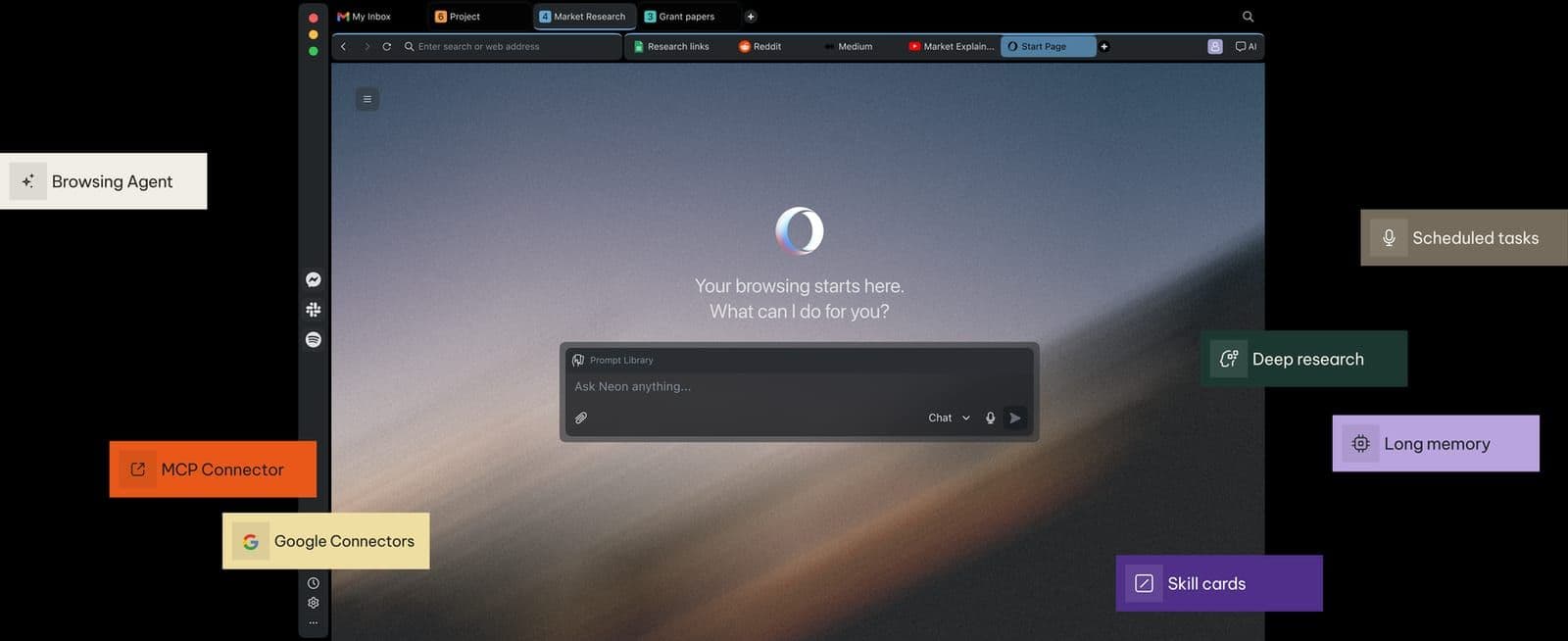
- Neon Do agent that performs tasks for you, plus deep research, Tasks and Cards
- Model-agnostic: the FAQ lists Gemini, GPT, Claude, Grok, DeepSeek and Qwen, plus creative models such as Veo 3.1
- Connects to external tools via MCP and CLI; since 31 March 2026 an MCP Connector links Claude, ChatGPT and other MCP-compatible clients
Cons
- $19.90 per month with no free tier or trial on the pages reviewed
- macOS and Windows only; a mobile version is only planned per the FAQ
All pros and cons · Who is it for?
Pros
- Opera states credentials, passwords, cards and cookies are never sent to its AI engine and user data is not used to train AI
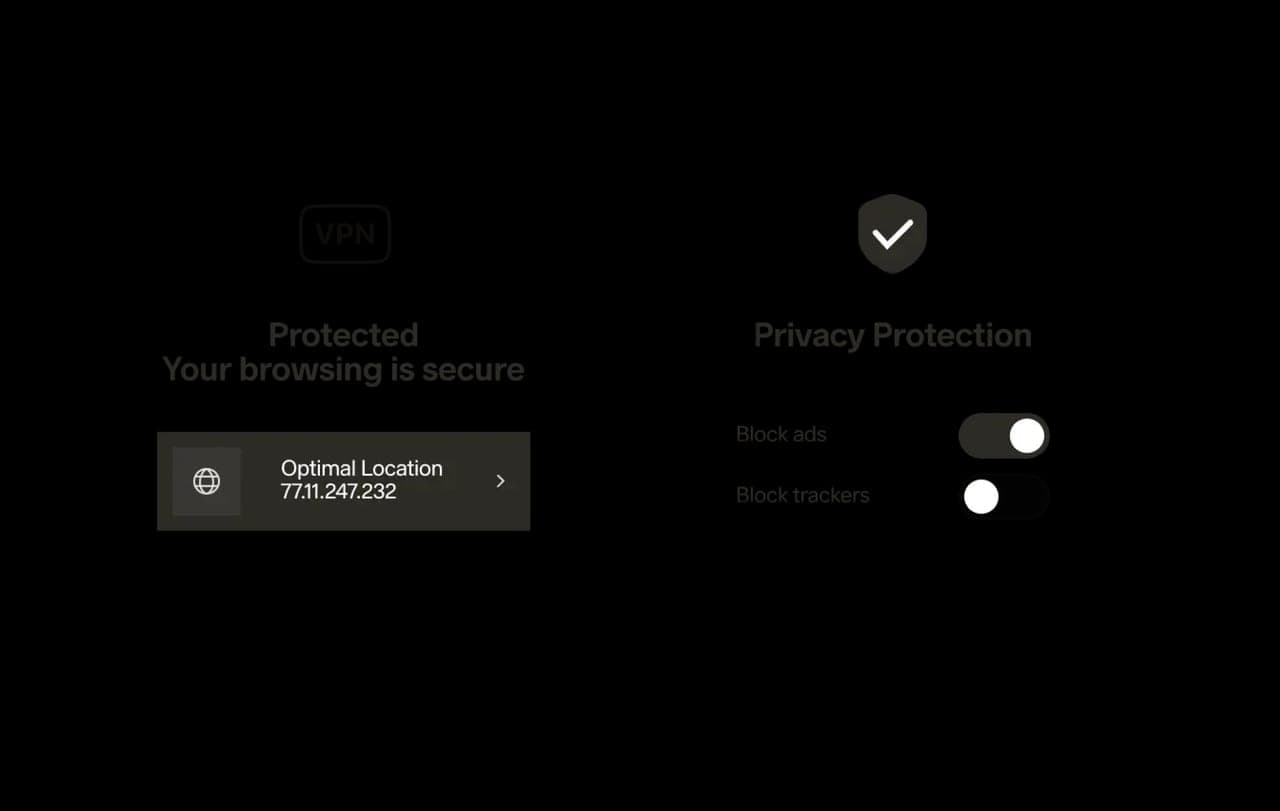
- Built-in ad blocker and free VPN with no extra setup
Cons
- Data is kept on Opera's servers for 365 days and page content goes to Opera's and OpenAI's servers
- No public user ratings were found on app stores or review sites
Best for
- People who want external AI tools such as Claude or ChatGPT to work inside the browser through MCP
Skip it if
- Linux, Android or iOS users, since it currently runs only on macOS and Windows
Problems it solves
Experience & key features
What Opera Neon is
Opera Neon is Opera's agentic AI browser, with the tagline "This browser is built to act." Opera announced it on 28 May 2025, began sending invites to select users on 30 September 2025 and opened it to anyone who subscribes on 11 December 2025. According to Wikipedia, Neon uses the Blink engine like Opera's other browsers. Opera positions it for AI power users.
Key features
According to TechCrunch, Neon has an AI chat panel, Neon Do (an agent that completes tasks, such as summarizing a blog post and sharing it to a Slack channel), Cards (reusable prompts that can be chained) and Tasks (workspaces grouping chats and tabs with their own AI context). Opera added its Deep Research Agent, ODRA, on 20 October 2025. The official site also lists tool connections through MCP and CLI, a built-in ad blocker and a free VPN.
Price and platforms
The official site lists $19.90 per month, which activates agentic functionality and top LLMs, and a free Opera Account is also needed. TechCrunch reports the subscription also includes Opera's Discord community and direct access to developers. The FAQ says Neon is available for macOS and Windows, with a mobile version planned, and that the interface comes in about 40 languages. The pages reviewed list no free tier or trial, and no store user ratings were found.
More analysis
Versus alternatives
TechCrunch places Neon among AI-first browsers such as Perplexity's Comet, OpenAI's Atlas and Dia. Neon charges a flat monthly fee, while Opera's own Opera One, GX and Air include free AI assistant features. Neon fits people who want an agent and multiple models; those who only need an assistant to answer questions can use a free browser.
Screenshots
Plans & pricing
Prices last verified Nov 10, 2026
Opera Neon
Personal$19.90/mo
Monthly subscription that activates agentic functionality and top LLMs. Requires a free Opera Account. The official pages state no specific usage limits.
- Free plan limits
- Neon is a paid product that requires a subscription. The official pages list no free tier or trial.
- Free trial
- No free trial
Cancellation & refunds
The Opera Neon FAQ does not cover refunds or cancellation; check Opera's terms of service.
Privacy
According to the FAQ, login credentials, passwords, payment details and cookies stay on the device "as much as possible" and are never sent to Opera's AI engine. Neon Do avoids screenshots of tabs where it can and reads page structure instead, and only webpage content is sent to Opera's and OpenAI's servers. Opera says it does not train AI models on user data. Data on Opera's servers is retained for 365 days, and deleting the Opera Account deletes associated Neon data. Some features still use context: Local Research uses Google Search results based on location and preferences, Neon's memory can learn habits such as shopping or travel preferences, and Neon Chat can see open pages. These are vendor claims; no independent audit was reviewed.
Opera Neon alternatives


Frequently asked questions
How much does Opera Neon cost?
The official site lists $19.90 per month, and a free Opera Account is required.
Which platforms does Opera Neon support?
Per the FAQ, macOS and Windows today, with a mobile version planned.
What is Neon Do?
Neon's agent, which performs web tasks for you. The FAQ says it avoids screenshots as much as possible, reading page structure (the DOM tree and layout) instead, and picks the model for each task itself.
Is my data used to train AI?
Opera says it never trains AI models on user data. Data on Opera's servers is retained for 365 days, after which dormant chats and workflows are deleted.
Review evidence & sources7
Scores
- Ease of use
- 6.8
- Features
- 7.7
- Value for money
- 5.8
- Performance
- 6.5
- Support
- 6.0
- Privacy & security
- 6.8
Why this score
A familiar browser base, but Tasks, Cards and Neon Do add concepts to learn; there are no user ratings to cross-check.
Why this score
An agent, deep research, multiple models, MCP and browser basics like ad blocking and VPN. Publicly available only since 11 December 2025, so still young.
Why this score
$19.90/month while Opera's other browsers include free AI assistants; no trial and no stated usage limits.
Why this score
No independent testing or user feedback on agent reliability or accuracy was found, so the score is conservative.
Why this score
An FAQ page and, per TechCrunch, a Discord community and direct access to developers for subscribers; email or chat support was not verified.
Why this score
Opera states sensitive data stays on-device "as much as possible" and never reaches its AI engine, with no AI training, but page content still goes to Opera's and OpenAI's servers, data is retained 365 days and no independent audit was reviewed.
Sources
- Vendor-providedOpera Neon official siteNov 10, 2026
- Vendor-providedOpera Neon FAQNov 10, 2026
- Vendor-providedOpera press releasesNov 10, 2026
- Vendor-providedOpera press release: MCP Connector (2026-03-31)Nov 11, 2026
- pressTechCrunch (2025-09-30)Nov 10, 2026
- pressTechCrunch (2025-12-11)Nov 10, 2026
- Community-reportedWikipedia: Opera (browser article covering Neon)Nov 10, 2026
Specs & compatibility
- Developer
- Opera
- Headquarters
- Norway
- Launched
- 2025
- Category
- Utilities
Capabilities
- AI features
- Integrations
- Public API
Platforms
- macOS
- Windows
Interface languages
- English
Integrations
- MCP
- Opera Browser CLI
- Google Connectors
- Claude
- ChatGPT
- Slack
Support
- Help center
- Community forum
Change history
- Feature.Launched MCP Connector, letting external AI clients such as Claude and ChatGPT connect to and act inside the browser.
- Price.Opened Neon to the public by subscription; TechCrunch reported $19.90 per month.
- Feature.Added the Opera Deep Research Agent (ODRA) to Neon.
Full change history (5)
- Launch.After a closed preview, Opera began sending Neon invites to select users, per TechCrunch.
- Launch.Opera announced Opera Neon, its first agentic AI browser.
About the author
Reviews & comments
Written by readers with a verified email address.
No reviews yet. Have you used Opera Neon? Share your real experience.
Reader reviews are counted separately and do not affect the Editorial Team’s score.
No comments yet. Be the first to share your experience.
Comments are readers’ opinions, not content from the AppDuo Editorial Team.