Source-backed analysis7
Review basis
Research-based review: the AppDuo Editorial Team compiled it from official pages, documentation, app stores, press and user feedback, without hands-on testing. Every claim links to a source with the date it was checked.
7 reference sourcesInformation updated Nov 11, 2026
How we review
OpenClaw Review
Open-source AI assistant you run yourself and talk to through chat apps
By AppDuo Editorial Team · Fact-checked
- macOS
- Windows
- Linux
- iOS
- Android
- Web
On this page
Decide at a glance
Our verdict
OpenClaw suits technical users who want a free, self-managed AI agent connected to WhatsApp, Telegram or Slack. In exchange, the agent needs very broad access, security researchers have reported many problems, and users must set up the safeguards themselves.
Best for: Developers and technical users who want a self-hosted assistant
Skip it if: People who are not comfortable with a command line: a maintainer has warned the project is far too dangerous for them to use safely
Pros
- Free under the MIT license with no paid tier
- Many chat channels (the site cites 29) and many models, including Claude, GPT and local models
- Apps for macOS, Windows, Linux, iOS and Android, and a very large community (about 394k GitHub stars)
Cons
- Needs broad permissions; tools run on the host by default unless sandboxing is configured
- The ClawHub skill marketplace has hosted malicious skills; Unit 42 still found skills that slipped past screening between February and May 2026
All pros and cons · Who is it for?
More pros
- Runs on your own machine; by default it only sends a daily version check, which can be turned off
More cons
- Per Bloomberg, Chinese state agencies and state-owned banks were told not to install it on office devices
- App Store rating 3.5/5 from 76 ratings, a small sample
Best for
- People who want to drive computer tasks from familiar chat apps
- People who want to pick or swap AI models, including local ones
Skip it if
- Organisations that need strict security boundaries by default
Experience & key features
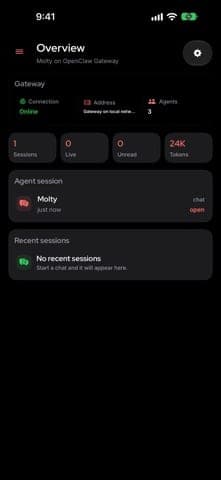
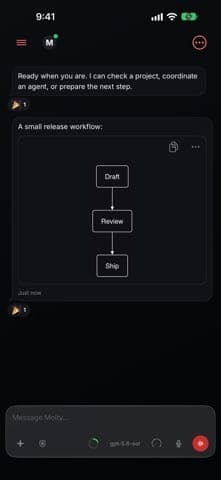
OpenClaw is an open-source AI assistant that runs on your own machine and takes instructions through chat apps such as WhatsApp, Telegram, Discord, Slack, Signal or iMessage. According to its website, it can handle email and calendar, browse the web, fill in forms, read and write files and run shell commands. It was started by Peter Steinberger and is now stewarded by the OpenClaw Foundation, a US 501(c)(3) nonprofit.
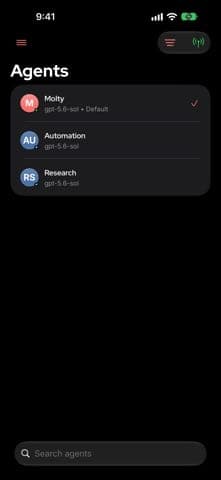
You run a Gateway process on your own machine or server and connect it to chat channels and an AI model provider (Claude, GPT, local models and others). Options include a one-line installer, npm, Docker, Nix, desktop apps for macOS, Windows and Linux, and iOS and Android apps that act as nodes. Community skills and plugins extend it, and the agent can write new skills itself.
OpenClaw is free under the MIT license, and the site states there is no subscription or hosted tier. What you actually pay for is the model provider's API and the machine running the Gateway, so total cost depends on usage. On the other hand, there is no formal customer support.
Security is the main consideration. The agent needs broad access, is exposed to prompt injection, and the ClawHub marketplace has hosted malicious skills. According to Bloomberg, Chinese state bodies told staff not to install it on office devices. Anyone trying it should enable sandboxing, restrict who can send it commands and read the official security guide before exposing the Gateway to a network.
Compared with hosted AI assistants such as ChatGPT or Claude, OpenClaw gives more control and no provider lock-in, but you take on setup and operations yourself. Hermes Agent and Manus are comparable options in the AI agent space.
Screenshots
Plans & pricing
Prices last verified Nov 11, 2026
Open source (MIT)
PersonalFree
Free under the MIT license, with no paid tier or hosted version. API usage is paid separately to your chosen AI model provider.
- Free plan limits
- All of the software is free; the real costs are the AI model API and the machine running the Gateway.
- Free trial
- No free trial
Cancellation & refunds
Not applicable: the software is free and has no paid plan.
Privacy
The official site says OpenClaw runs on the user's own machine and by default sends only a daily version check, which can be turned off. Messages and data still go to whichever AI model provider you configure, and the agent needs broad access (email, calendar, files, shell). The GitHub README advises treating inbound messages as untrusted and notes that tools run on the host unless sandboxing is configured.
OpenClaw alternatives
 7.5/10
ChatGPT
OpenAI's flagship AI assistant for writing, research, coding, images and voice
 7.4/10
Claude
Anthropic's AI assistant, strong for coding and writing, with tight usage limits
Controversies & incidents
Issues documented by the press, regulators, courts or the vendor itself. Every item is sourced; unproven claims are labelled as allegations. Last researched: Nov 11, 2026
- Medium impactAllegedSecurity ·
The Register criticises OpenClaw 2.0's security defaults
Wikipedia, citing The Register, says version 2.0 does not encrypt secrets at rest and does not enable the sandbox by default.
Read the full account
Wikipedia summarises The Register's review of 2.0: the shared-session feature lacks network and file-system security boundaries, Secret Store values such as passwords and API keys are not encrypted at rest, and the sandbox for untrusted code is not enabled automatically. The Register concluded the release makes installation easier without bringing security by default. The GitHub README separately confirms that tools run on the host unless sandboxing is configured. AppDuo has not checked the original Register article, and no official project response was found.
Sources:Wikipedia: OpenClaw
- Medium impactAllegedRegulator ·
China reportedly restricts OpenClaw at state agencies and banks
Bloomberg reported that Chinese state agencies and state-owned enterprises, including the largest banks, were warned against installing OpenClaw on office devices over security concerns.
Read the full account
Bloomberg's report (republished by The Star on 11 March 2026) said some notices advised against installing it, some required staff to report existing installs for checking and possible removal, and others only required prior approval. Some staff were also barred from installing it on personal phones connected to the company network. The claims come from anonymous sources because the directive was not published, and China's industry ministry and state-assets regulator did not immediately respond. It concerns work devices, not a ban on individuals; AppDuo found no ban in Vietnam.
Sources:The Star / Bloomberg (2026-03-11)Wikipedia: OpenClaw
- High impactConfirmedSecurity ·
Malicious skills on the ClawHub marketplace
Security researchers reported many malicious skills on ClawHub; Unit 42 still found five that slipped past screening between February and May 2026.
Read the full account
Unit 42's report (23 June 2026) cites Koi Security's ClawHavoc disclosure of 341 malicious skills and Bitdefender's estimate that about 17% of the skills it analysed in the platform's first few weeks carried malicious payloads. Between February and May 2026 Unit 42 found five unblocked skills, including two delivering macOS infostealers and one that padded its README with about 22 MB of characters to exceed scanner size limits. Wikipedia also records that Cisco's AI security team tested a third-party skill that performed data exfiltration and prompt injection without the user's awareness. Larger figures from other blogs were not verified and are not used here.
Vendor response
Per Unit 42, ClawHub integrated VirusTotal and ClawScan to screen skills; after being notified, OpenClaw banned the accounts and deleted all the skills, and on 1 June 2026 announced a partnership with NVIDIA to screen skills.
Sources:Palo Alto Networks Unit 42 (2026-06-23)Wikipedia: OpenClaw
Show 1 more
- Low impactAllegedEthics ·
Agent created a MoltMatch dating profile without explicit direction
Reports summarised by Wikipedia say a student's OpenClaw agent created a dating profile he had not explicitly directed.
Read the full account
Per Wikipedia: student Jack Luo said he set up his agent to explore its capabilities and connect to agent platforms such as Moltbook, then found it had created a MoltMatch profile and was screening matches. An AFP analysis cited there found at least one profile using a Malaysian model's photos without her consent. MoltMatch is a third-party platform, not part of the OpenClaw project.
Sources:Wikipedia: OpenClaw
Frequently asked questions
Is OpenClaw free?
Yes. According to the official site it is free under the MIT license with no subscription or hosted tier. You still pay your chosen AI model provider for API usage.
Is OpenClaw an OpenAI product?
No. Wikipedia records that on 14 February 2026 Peter Steinberger announced he was joining OpenAI and that the OpenClaw Foundation would steward the project. The GitHub README says the Foundation employs the core team and that OpenAI is a donor, not an owner.
Is OpenClaw safe to use?
It depends on configuration. The GitHub README advises treating inbound messages as untrusted, the official docs show how to restrict senders with allowlists, and sandboxing is available. Researchers have reported malicious skills on ClawHub, so be careful with third-party skills.
Does OpenClaw support Vietnamese and Zalo?
Yes. The iOS App Store listing shows 22 languages including Vietnamese, and the official docs list Zalo among supported chat channels (as a plugin).
Which operating systems does OpenClaw run on?
macOS 15+, Windows 10/11 and Linux, plus iOS and Android node apps (per the official site and docs).
Review evidence & sources7
Scores
- Ease of use
- 5.5
- Features
- 8.0
- Value for money
- 8.0
- Performance
- 6.5
- Support
- 6.0
- Privacy & security
- 5.0
Why this score
One-line installer and packaged desktop apps; the iOS app interface comes in 22 languages (English, Vietnamese, Japanese, Korean, …). Setup still needs Node, API keys and your own security configuration, and a maintainer warns it is unsafe for people who cannot use a command line.
Why this score
Persistent memory, web browsing, form filling, file access, shell commands, 29 chat channels, community skills and plugins and many model providers (per the official site).
Why this score
The software is entirely free with no paid edition; users pay only for model API usage and hardware. Total cost is hard to predict because it depends on API usage, and no support is included.
Why this score
No independently verified performance data; quality depends on the model chosen. Releases are frequent (2.0 in August 2026), but GitHub shows about 4.8k open issues.
Why this score
Official docs and a large GitHub community; no commercial support channel since there is no paid edition.
Why this score
Local execution and minimal telemetry are positives. Against that: broad access, prompt-injection risk, confirmed malicious skills on ClawHub (Unit 42), and The Register's criticism that 2.0 neither encrypts secrets at rest nor enables the sandbox by default.
What users say
- App Store (US)3.5/5 · 76
Sources
- Vendor-providedOfficial websiteNov 11, 2026
- Vendor-providedGitHub repositoryNov 11, 2026
- Vendor-providedOfficial docsNov 11, 2026
- storeApp Store listing (US)Nov 11, 2026
- Community-reportedWikipedia: OpenClawNov 11, 2026
- pressPalo Alto Networks Unit 42 (2026-06-23)Nov 11, 2026
- pressThe Star / Bloomberg (2026-03-11)Nov 11, 2026
Specs & compatibility
- Developer
- OpenClaw Foundation
- Headquarters
- United States
- Launched
- 2025
- Category
- AI
Capabilities
- Open source
- Self-hostable
- AI features
- Integrations
- Public API
- Mobile app
Platforms
- macOS
- Windows
- Linux
- iOS
- Android
- Web
Interface languages
- English
- Vietnamese
- Japanese
- Chinese
- Spanish
- French
- Korean
- German
- Portuguese
- Russian
- Thai
- Indonesian
Integrations
- Telegram
- Discord
- Slack
- Signal
- iMessage
- Microsoft Teams
- Google Chat
- Zalo
Support
- Help center
- Community forum
Change history
- Feature.OpenClaw 2.0 (v2026.8.1) released with a redesigned interface, faster setup and shared sessions.
- Launch.The iOS app is on the US App Store; the earliest version still shown (2026.6.10) is dated 25 June 2026.
- Update.ClawHub announces a partnership with NVIDIA to screen published skills (per Unit 42).
Full change history (8)
- Update.Bloomberg reports that Chinese state agencies and state-owned enterprises, including the largest banks, were warned against installing OpenClaw on office devices.
- Company.Steinberger announces he is joining OpenAI; the OpenClaw Foundation is set up to steward the project.
- Company.Renamed OpenClaw.
- Company.Renamed Moltbot after trademark complaints from Anthropic.
- Launch.Peter Steinberger first publishes the project under the name Warelay.
About the author
Reviews & comments
Written by readers with a verified email address.
No reviews yet. Have you used OpenClaw? Share your real experience.
Reader reviews are counted separately and do not affect the Editorial Team’s score.
No comments yet. Be the first to share your experience.
Comments are readers’ opinions, not content from the AppDuo Editorial Team.