Source-backed analysis8
Review basis
Research-based review: the AppDuo Editorial Team compiled it from official pages, documentation, app stores, press and user feedback, without hands-on testing. Every claim links to a source with the date it was checked.
8 reference sourcesInformation updated Nov 10, 2026
How we review
Microsoft SwiftKey Review
Microsoft's predictive keyboard with swipe typing, Copilot, 700+ languages
By AppDuo Editorial Team · Updated
- Android
- iOS
On this page
Decide at a glance
Our verdict
SwiftKey suits people who want a keyboard that learns their typing, with swipe, themes and Copilot built in. The trade-offs: Google Play shows ads, sync relies on a Microsoft account and OneDrive, and the iPhone version allows only two languages at once and lacks some languages the Android version has (Vietnamese, for example).
Best for: People who type mostly English or European languages and want predictions that adapt to them
Skip it if: People who need to type several non-European languages on iPhone: the iOS language list lacks some languages found on Android (Vietnamese, for example), and Microsoft does not say whether Telex or VNI input is offered on Android
Pros
- Strong ratings: 4.6/5 on the US App Store (122,087) and 4.3/5 on Google Play (about 4.6M reviews, 1B+ downloads)
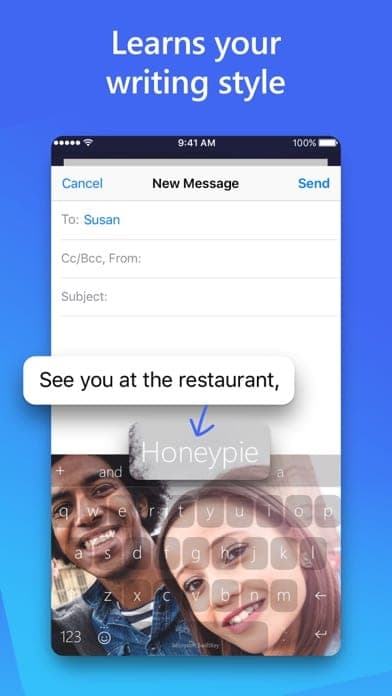
- Learns your writing style, slang and emoji; swipe or tap typing; toolbar with clipboard, GIFs and translator
- Includes Copilot, AI tone rewriting and drafting
Cons
- Google Play shows ads; App Store reviewers mention a Bing toolbar button (the developer says it can be turned off in Settings)
- Sync needs a Microsoft account and runs via OneDrive; iPhone supports only two languages at once
All pros and cons · Who is it for?
Pros
- 100+ themes, custom themes from your photo, and up to five languages at once on Android
Cons
- A history of incidents: a 2016 sync bug, and in 2022 Microsoft announced then reversed ending iOS support
Best for
- Users who want AI tone rewriting and drafting inside the keyboard
Skip it if
- Anyone who dislikes ads or does not want a Microsoft account for syncing
Problems it solves
Experience & key features
What is SwiftKey?
SwiftKey is a keyboard for Android and iPhone known for learning how you type. The company was founded in 2008, and an Android beta launched in July 2010 with seven languages. Microsoft acquired it for $250 million in February 2016, and since May 2020 the app has been named Microsoft SwiftKey. The iPhone keyboard launched in September 2014 after Apple allowed third-party keyboards in iOS 8. Per Wikipedia, its head office is in London.
Key features
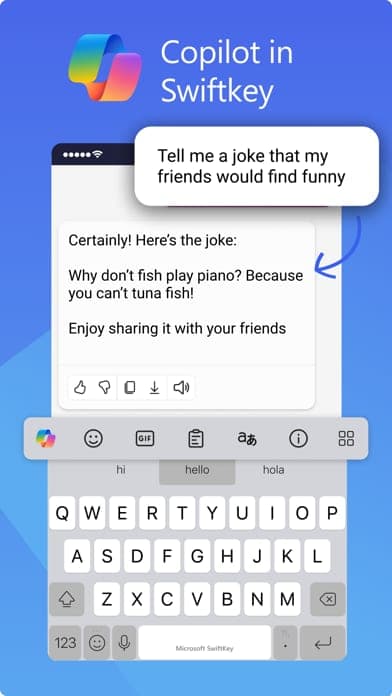
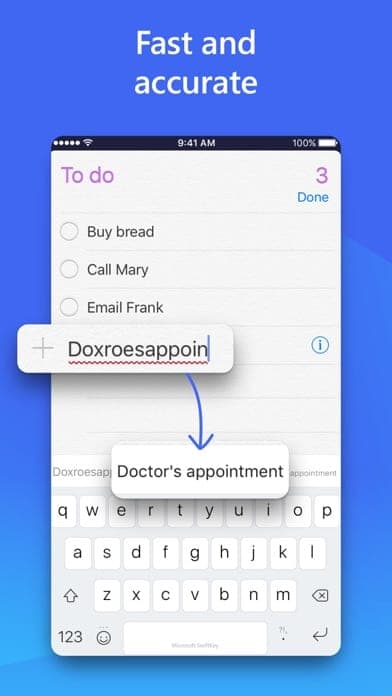
According to the homepage and Google Play, the keyboard corrects spelling, suggests next words, supports swipe (Flow) or tap typing, and has a customizable toolbar with GIFs, clipboard, translator and stickers, plus voice typing. The current version includes Copilot, AI tone rewriting and drafting, and 100+ themes, with your own photo as a background. A cloud clipboard moves text between phone and Windows but requires sign-in.
Price and languages
The app is free. Google Play shows ads; the App Store page lists in-app purchases with themes shown at $0.00. Google Play says the keyboard supports over 700 languages with up to five enabled at once, and Microsoft's page says iPhone supports two. Microsoft's support page includes Vietnamese in the Android language list (700+) but not in the iOS list (600+), and does not say whether Telex or VNI input is offered.
More analysis
Privacy and reliability
Microsoft says data stays on the device if you do not sign up for an account, and sync is optional. The history has two notable points: in July 2016 a sync bug exposed other people's personal details as suggestions; in September 2022 Microsoft announced ending iOS support, removed the app from the App Store on 5 October 2022, then reversed course and relisted it on 18 November 2022 after customer feedback. Both come from Wikipedia.
Versus alternatives
Gboard is the main free comparison, while Laban Key is built for Vietnamese. SwiftKey's strengths are adaptive prediction and Copilot integration. If you type Vietnamese regularly, try the Vietnamese layout on Android first, since Microsoft does not describe it in detail, and the iPhone list does not include Vietnamese.
Screenshots
Plans & pricing
Prices last verified Nov 10, 2026
Microsoft SwiftKey
PersonalFree
Microsoft's page says the app is free on Android and iPhone. Google Play shows the app contains ads; the App Store lists in-app purchases (the page shows themes at $0.00).
- Free plan limits
- The sources reviewed show no paid tier. According to Microsoft's page, Android supports typing in up to five languages at once and iPhone up to two.
- Free trial
- No free trial
Cancellation & refunds
Not applicable; the app is free.
Privacy
Per Microsoft's privacy Q&A, unless you opt in to a SwiftKey Account on Android, personal and language data stays on the device and is never transferred. With Backup & Sync on, Microsoft's servers process the data; Microsoft says synced data is now stored in a secure folder in your own OneDrive, rolled out in phases and complete by 31 May 2026, and the feature can be turned off. The keyboard does not learn from password fields or remember long numbers such as card numbers, but a password can still be predicted in some cases (for example if you texted it or typed it into a field not flagged as a password). The App Store privacy label (self-declared) lists email and identifiers linked to you plus usage and diagnostics data not linked to you; Google Play says no data is shared with third parties and data is encrypted in transit. In July 2016 a sync bug exposed other people's personal details as suggestions and cloud sync for word suggestions was disabled (per Wikipedia).
Microsoft SwiftKey alternatives

Frequently asked questions
Is Microsoft SwiftKey free?
Yes. Microsoft's page says it is free on Android and iPhone. Google Play shows the app contains ads.
Does SwiftKey support Vietnamese?
On Android, yes: Microsoft's support page lists Vietnamese among Android languages, though it does not say whether Telex or VNI input is used. The iOS list does not include Vietnamese.
Does SwiftKey include Copilot?
Yes. The Google Play description says Microsoft SwiftKey comes with Copilot, letting you ask AI inside your apps.
Does SwiftKey store passwords I type?
According to Microsoft, the keyboard does not learn from password fields. A password can still be suggested if you texted it or typed it into a field not flagged as a password; you can remove it by long-pressing the word in the prediction bar.
Review evidence & sources8
Scores
- Ease of use
- 8.0
- Features
- 8.2
- Value for money
- 8.5
- Performance
- 7.5
- Support
- 6.5
- Privacy & security
- 6.5
Why this score
Good user ratings on both stores (4.6 App Store, 4.3 Google Play). Marked down because some App Store reviewers cite the Bing button and the Full Access requirement for swipe typing.
Why this score
Adaptive prediction, swipe typing, clipboard, GIFs, translator, voice, themes, Copilot and AI rewriting. Marked down for the two-language cap on iPhone and features that need sign-in.
Why this score
Free with no paid tier in the sources reviewed; marked down for ads on Android.
Why this score
The sources reviewed contain no latency or battery figures; the score rests on store ratings that praise autocorrect and predictions, alongside some complaints about auto-correction.
Why this score
Help articles exist on support.microsoft.com, but the sources reviewed show no dedicated direct-support channel for the app.
Why this score
Data stays on the device without an account, and sync is opt-in and now moves to the user's own OneDrive. Marked down for the 2016 sync incident, identifiers linked to you in the App Store label, and passwords that can still be predicted in some cases.
What users say
- App Store (US)4.6/5 · 122,087
- Google Play4.3/5 · 4,600,000
Sources
- Vendor-providedOfficial SwiftKey page (Microsoft)Nov 10, 2026
- Vendor-providedMicrosoft support: SwiftKey and your dataNov 10, 2026
- Vendor-providedMicrosoft support: Backup and sync with OneDriveNov 10, 2026
- storeGoogle Play listingNov 10, 2026
- storeApp Store listing (US)Nov 10, 2026
- Vendor-providedMicrosoft support: supported languagesNov 10, 2026
- Vendor-providedMicrosoft support: using more than one languageNov 10, 2026
- Community-reportedWikipedia: SwiftKeyNov 10, 2026
Specs & compatibility
- Developer
- Microsoft (SwiftKey)
- Headquarters
- United States
- Launched
- 2010
- Category
- Utilities
Capabilities
- AI features
- Mobile app
- Integrations
Platforms
- Android
- iOS
Interface languages
- English
- French
- German
- Portuguese
- Spanish
Integrations
- Microsoft Copilot
- OneDrive
- Bing
- Windows (cloud clipboard)
Support
- Help center
- Community forum
Change history
- Feature.Date Microsoft gives for completing the rollout of Backup & Sync storage in the user's own OneDrive.
- Update.After announcing the end of iOS support (September 2022) the app is removed from the App Store; on 18 November 2022 Microsoft reverses the decision and relists it.
- Update.The app is rebranded Microsoft SwiftKey; the Windows 10 integration is removed in the May 2020 Update.
Full change history (7)
- Update.A sync bug exposed other people's personal details as suggestions and word-suggestion cloud sync was disabled (Wikipedia gives July 2016).
- Company.Microsoft acquires SwiftKey for $250 million (Wikipedia gives February 2016).
- Feature.The iPhone app is on the App Store (release date listed there); Wikipedia places the launch in September 2014 after iOS 8 allowed third-party keyboards.
- Launch.SwiftKey beta launches on the Android Market with seven languages (Wikipedia gives July 2010).
About the author
Reviews & comments
Written by readers with a verified email address.
No reviews yet. Have you used Microsoft SwiftKey? Share your real experience.
Reader reviews are counted separately and do not affect the Editorial Team’s score.
No comments yet. Be the first to share your experience.
Comments are readers’ opinions, not content from the AppDuo Editorial Team.