Source-backed analysis7
Review basis
Research-based review: the AppDuo Editorial Team compiled it from official pages, documentation, app stores, press and user feedback, without hands-on testing. Every claim links to a source with the date it was checked.
7 reference sourcesInformation updated Nov 10, 2026
How we review
Microsoft Edge Review
Microsoft's Chromium browser, built into Windows with Copilot integration
By AppDuo Editorial Team · Updated
- Windows
- macOS
- Linux
- iOS
- Android
On this page
Decide at a glance
Our verdict
Edge suits Windows and Microsoft-ecosystem users who want a free cross-platform browser with Copilot and battery-saving tools. The trade-offs are Microsoft's record of criticism for pushing Edge as the default on Windows, and optional diagnostic data worth reviewing in settings.
Best for: Windows 10/11 users with a Microsoft account who want passwords, favorites and settings synced
Skip it if: Users who dislike default-browser prompts or ties to a Microsoft account
Pros
- Free on Windows, macOS, Linux, Android and iOS
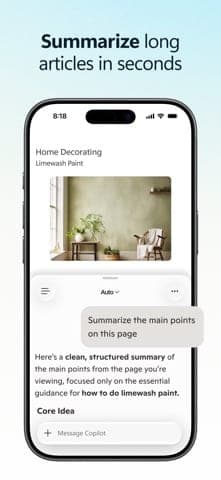
- Built-in Copilot summarizes articles, PDFs and videos and answers questions about the current page, per the App Store listing
- Energy Saver, Startup Boost and Sleeping Tabs; Microsoft claims an average 25 extra minutes of battery with Energy Saver
Cons
- Criticized for pushing Edge inside Windows, such as blocking the EdgeDeflector workaround in November 2021 (per Wikipedia)
- Optional diagnostic data can include sites visited, so users must opt out themselves if they prefer not to send it
All pros and cons · Who is it for?
Pros
- The mobile app includes Tracking Prevention, AdBlock Plus and Microsoft Defender SmartScreen
- Rated 4.8/5 on the Vietnam App Store and 4.7/5 on Google Play
Cons
- Copilot Mode was experimental at launch, and TechCrunch wrote that how well it works in practice "remains to be seen"
Best for
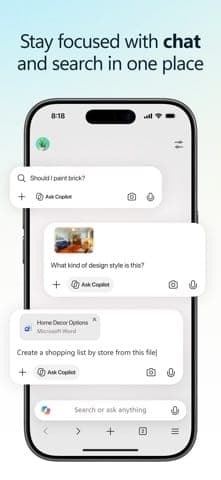
- People who want Copilot in the browser to summarize pages and compare tabs
- Those who want a Chromium browser with extensions on both desktop and phone
Skip it if
- People who still rely on Manifest V2 extensions such as legacy uBlock Origin
Problems it solves
Experience & key features
What Edge is
Microsoft Edge is a browser developed by Microsoft. Edge Legacy launched in 2015 and the Chromium-based version on 15 January 2020, per Wikipedia. It runs on Windows, macOS, Linux, Android and iOS, and ships with Windows 11 and Windows 10 version 20H2 or later. According to Microsoft's release notes, the latest stable version at the time of research was 157, released on 5 November 2026.
Features and Copilot
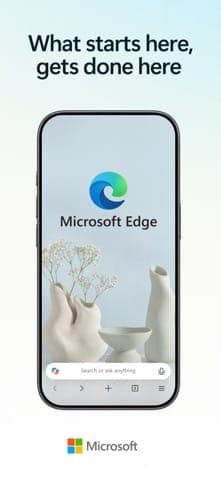
The Edge page highlights Copilot working across tabs to compare options, syncing of passwords and favorites, and performance tools such as Energy Saver, Startup Boost and Sleeping Tabs. The App Store listing adds article and PDF summaries, Read Aloud, page translation, tab groups, extensions and Microsoft Defender SmartScreen. On 28 July 2025 Microsoft launched Copilot Mode, an experimental AI browsing mode; TechCrunch reported it was free at the time and views open tabs only with the user's permission.
Price and value
Edge is free and has no paid tier for the browser itself. The in-app purchases in the iOS app are Microsoft 365 plans, separate from Edge. On price it matches Chrome, Firefox and Brave, all of which are free.
More analysis
Privacy and controversies
Microsoft documents each kind of diagnostic data in detail and lets users turn off the optional data. Wikipedia nonetheless records criticism: Windows routes some links to Edge regardless of the default browser, Microsoft blocked EdgeDeflector in November 2021, and it showed prompts on Chrome's download page. Review privacy settings right after installing.
Compared with alternatives
Edge is built on Chromium like Chrome, so extension compatibility is strong. Chrome fits better if you live in a Google account; Edge fits better with Windows and Microsoft 365. People who put privacy first may prefer Firefox or Brave.
Screenshots
Plans & pricing
Prices last verified Nov 10, 2026
Microsoft Edge
PersonalFree
Free to download and use. Microsoft's Edge page lists no price and only notes "internet access required, fees may apply". The iOS app offers in-app purchases, but those are Microsoft 365 plans, not a browser fee.
- Free plan limits
- The browser is free. At the Copilot Mode launch on 28 July 2025, TechCrunch reported the feature was free at the time and still experimental.
- Free trial
- No free trial
Cancellation & refunds
Not applicable; the browser is free.
Privacy
Microsoft's privacy documentation splits diagnostic data into required (to keep Edge secure and up to date) and optional (sent only with permission, and can include the URLs and titles of pages visited). On Windows, diagnostic data carries an identifier unique to the device; it is aggregated, stripped of personal identifiers and kept for up to two years. Microsoft states that information about sites visited is never sent in InPrivate or Guest mode. With SmartScreen on, the file name and URL of downloads are sent to check reputation. For Copilot, if you allow use of page content, Edge sends the full browsing context only for public pages in the Bing index; page content is not stored, but conversation history is kept until you delete it. Synced autofill data is stored on encrypted Microsoft servers.
Microsoft Edge alternatives
 7.7/10
Mozilla Firefox
Mozilla's open-source browser with tracker blocking on by default and its own Gecko engine
 7.6/10
Google Chrome
The world's most-used browser, with data synced through your Google Account
Frequently asked questions
Is Microsoft Edge free?
Yes. Microsoft's Edge page offers a download with no price listed. The iOS in-app purchases are optional Microsoft 365 plans.
Does Edge run on phones and macOS?
Yes. Per Wikipedia, Edge is available on Windows, macOS, Linux, Android and iOS/iPadOS. The App Store page lists iOS 18.0 or later for the current version.
Can I turn off diagnostic data sent to Microsoft?
You can turn off the optional data, including information about sites you visit. Required data (connectivity, configuration, software setup) stays on, according to Microsoft's privacy documentation.
Does InPrivate browsing send data about sites visited?
According to Microsoft's privacy documentation, information about websites you visit is never sent while browsing InPrivate or in Guest mode.
Review evidence & sources7
Scores
- Ease of use
- 8.0
- Features
- 8.5
- Value for money
- 8.8
- Performance
- 7.6
- Support
- 6.5
- Privacy & security
- 6.2
Why this score
A familiar Chromium-style interface, preinstalled on Windows and synced via a Microsoft account.
Why this score
Copilot, Read Aloud, page translation, tab groups, extensions and SmartScreen put it level with top Chromium browsers.
Why this score
Free on every platform with no paid tier for the browser; in-app purchases are Microsoft 365 plans only. On par with Chrome.
Why this score
Startup Boost, Sleeping Tabs and Energy Saver, and version 157 announces Accelerated App Launch on Windows 11. The 25-minute battery figure is Microsoft's claim, with no independent benchmark found.
Why this score
Detailed Microsoft Learn documentation and per-version release notes; no direct Edge support channel for individual users was found.
Why this score
Diagnostic data is documented in detail, and InPrivate and tracking prevention exist, but the Windows device identifier, optional data including URLs and default-browser pushing weigh on the score.
What users say
- App Store (Vietnam)4.8/5 · 12,847
- Google Play4.7/5 · 1,633,545
Sources
- Vendor-providedMicrosoft Edge official pageNov 10, 2026
- Vendor-providedMicrosoft Edge privacy whitepaper (Microsoft Learn)Nov 10, 2026
- Vendor-providedMicrosoft Edge Stable Channel release notesNov 10, 2026
- storeApp Store listing (Vietnam)Nov 10, 2026
- storeGoogle Play listingNov 10, 2026
- pressTechCrunch: Copilot Mode (2025-07-28)Nov 10, 2026
- Community-reportedWikipedia: Microsoft EdgeNov 10, 2026
Specs & compatibility
- Developer
- Microsoft Corporation
- Headquarters
- United States
- Launched
- 2015
- Category
- Utilities
Capabilities
- AI features
- Integrations
- Mobile app
Platforms
- Windows
- macOS
- Linux
- iOS
- Android
Interface languages
- Vietnamese
- English
- Japanese
- Chinese
- Spanish
- French
- Korean
- German
- Portuguese
- Russian
- Thai
- Indonesian
Integrations
- Microsoft account
- Copilot
- Microsoft Defender SmartScreen
- Microsoft Rewards
- Microsoft 365
Support
- Help center
Change history
- Feature.Edge 157 stable: sign-in with an Apple account, an upgraded Copilot new tab page, and Accelerated App Launch support on Windows.
- Feature.Microsoft launched Copilot Mode, an experimental AI browsing mode.
- Update.The Canary channel began automatically disabling Manifest V2 extensions, affecting uBlock Origin.
Full change history (6)
- Feature.Microsoft announced a Bing Chat button (later Copilot) replacing Discover, along with a Fluent Design overhaul.
- Update.Microsoft blocked the EdgeDeflector workaround for choosing a different default browser for links in Windows.
- Launch.Chromium-based Edge released.
About the author
Reviews & comments
Written by readers with a verified email address.
No reviews yet. Have you used Microsoft Edge? Share your real experience.
Reader reviews are counted separately and do not affect the Editorial Team’s score.
No comments yet. Be the first to share your experience.
Comments are readers’ opinions, not content from the AppDuo Editorial Team.