Source-backed analysis13
Review basis
The AppDuo team prepared this review by analysing product features, official documentation and user feedback to help you understand its strengths, limitations and suitability for your needs.
13 reference sourcesInformation updated Nov 10, 2026
How we review
Google Chrome Review
The world's most-used browser, with data synced through your Google Account
By AppDuo Editorial Team · Updated
- Windows
- macOS
- iOS
- Android
On this page
Decide at a glance
Our verdict
Chrome suits people already in the Google ecosystem who want a free browser on every device, a huge extension store and steady security updates. The trade-offs are privacy terms that rest on Google's general policy, and Google's phase-out of Manifest V2 extensions, which ended support for some older ad blockers.
Best for: Google Account users who want bookmarks, passwords and tabs synced between computer and phone
Skip it if: Privacy-first users who do not want browsing data tied to a Google Account
Pros
- Free on Windows, Mac, iPhone, iPad and Android; signing in syncs bookmarks and passwords across devices
- Built-in password manager, Safe Browsing (standard and enhanced), Safety Check and Privacy Guide
- Tab groups, vertical tabs, split view, Memory Saver and Energy Saver for heavy tab users
Cons
- Privacy rests on Google's general policy; Gemini in Chrome reads tab content and can search your browsing history
- Chrome 138 (July 2025) fully disabled Manifest V2 extensions, and from 31 Aug 2026 they were removed from the Chrome Web Store
All pros and cons · Who is it for?
Pros
- Well rated on both stores: 4.6/5 from more than 357,000 ratings on the Vietnam App Store and 4.3/5 from nearly 49.6 million on Google Play
Cons
- Needs a recent OS: Windows 10 or later and macOS 13 or later; Windows 7/8 stopped at Chrome 109
Best for
- People who want the large Chrome Web Store extension catalogue plus built-in Google Lens and full-page translation
- Anyone who wants the Gemini assistant built into the browser
Skip it if
- Users who still rely on legacy Manifest V2 ad-blocking extensions
Experience & key features
What is Chrome?
Google Chrome is Google's web browser, released as a public beta on 2 September 2008 with the first stable release on 11 December 2008. It is built on the open-source Chromium project, but branded Chrome is proprietary freeware. Wikipedia, citing StatCounter, puts its share at about 71.22% across all platforms in December 2025. On iOS, Chrome runs on WebKit rather than Blink.
Key features
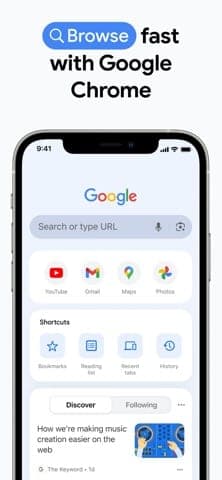
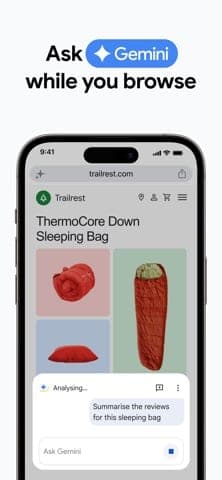
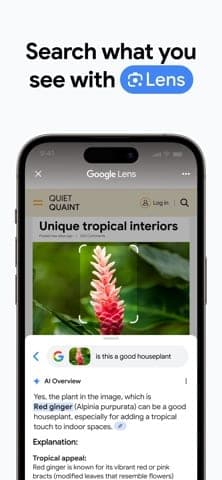
The Chrome homepage lists tab groups with labels and colours, vertical tabs, split view for two tabs, dark mode and themes, plus Memory Saver and Energy Saver. Signing in with a Google Account syncs bookmarks and passwords; Google Password Manager generates strong passwords and autofills. Security covers standard and enhanced Safe Browsing, Safety Check and the Privacy Guide. The App Store description adds full-page translation across 130+ languages and Google Lens. Gemini in Chrome summarises and explains page content and answers using the tabs you share.
Pricing and value
Chrome is free on Windows, Mac, iPhone, iPad and Android, so no rival beats it on price. The only thing to check is your machine: Intel needs Windows 10 or later, Windows on ARM needs Windows 11, and Macs need macOS 13 or later. Windows 7, 8 and 8.1 stopped at Chrome 109. Among AI features, Auto browse is the one with a subscription condition (Google AI Pro or Ultra, US only).
More analysis
Extensions, privacy and how it compares
Google's Manifest V2 phase-out began disabling those extensions on 9 October 2024; Chrome 138 (24 July 2025) disabled them with no way to re-enable, and from 31 August 2026 they were removed from the Chrome Web Store. Users of older extensions should check whether a Manifest V3 version exists, or look at alternatives such as Firefox, Brave, Edge or Cốc Cốc. Chrome's strengths are Google-service sync and ubiquity; privacy is its weaker side.
Screenshots
Plans & pricing
Prices last verified Nov 10, 2026
Chrome
Free
Free to download and use on Windows, Mac, iPhone, iPad and Android. Only the Auto browse agent feature is restricted, to Google AI Pro and Ultra subscribers in the US, according to the Chrome homepage.
- Free plan limits
- The browser itself is entirely free. Advanced AI features such as Auto browse require a Google AI Pro or Ultra plan and are US-only for now.
- Free trial
- No free trial
Cancellation & refunds
Not applicable; the browser is free.
Privacy
Google has retired Chrome's separate privacy notice; personal data in Chrome is now covered by Google's general Privacy Policy, with topic articles in the Chrome Help Center. Signing in to Chrome is optional and needs a Google Account; when signed in, bookmarks, passwords and other data sync across devices, and history can sync if Web & App Activity is on. Incognito mode only limits what is saved on the device (cookies and history are cleared when the window closes and third-party cookies are blocked by default), but Google states that websites, Google, and your school, employer or internet provider may still see activity. Gemini in Chrome reads the current tab, can be given up to 10 open tabs on a computer, and offers a feature that searches your Chrome history. In July 2024 Google said it would not deprecate third-party cookies in Chrome and would instead introduce a new experience in which users make an informed choice.
Google Chrome alternatives
 7.7/10
Mozilla Firefox
Mozilla's open-source browser with tracker blocking on by default and its own Gecko engine
 7.6/10
Microsoft Edge
Microsoft's Chromium browser, built into Windows with Copilot integration
Frequently asked questions
Is Chrome free?
Yes. Chrome is free on Windows, Mac, iPhone, iPad and Android. Only Auto browse in Gemini requires a Google AI Pro or Ultra plan, and it is US-only.
Do I have to sign in to use Chrome?
No. Google's help page says signing in to Chrome is optional. You only need it to sync bookmarks, passwords and other data across devices.
Does Incognito hide my browsing completely?
No. Incognito only avoids saving history and cookies on your device once you close the window. Google says websites, Google, and your school, employer or internet provider can still see your activity.
Which operating systems does Chrome support?
Windows 10 or later (Windows on ARM needs Windows 11) and macOS 13 or later. Windows 7, 8 and 8.1 stopped at Chrome 109. Mobile versions exist for iOS and Android.
Why did some ad-blocking extensions stop working in Chrome?
Google ended support for Manifest V2 extensions. Chrome 138 disabled them for all users and by 31 Aug 2026 they were removed from the Chrome Web Store; extensions must move to Manifest V3.
Review evidence & sources13
Scores
- Ease of use
- 8.6
- Features
- 8.5
- Value for money
- 8.8
- Performance
- 7.6
- Support
- 6.5
- Privacy & security
- 5.8
Why this score
Simple setup, and one sign-in brings your data to every device. User ratings are strong: 4.6/5 on the Vietnam App Store (over 357,000) and 4.3/5 on Google Play (nearly 49.6 million).
Why this score
Covers the modern browser toolkit: tab groups, vertical tabs, split view, password manager, page translation, Lens, Gemini and the Chrome Web Store. Marked down because advanced AI features are limited by plan and country, and the end of Manifest V2 narrowed the choice of ad blockers.
Why this score
Entirely free with no paid browser tier; only the Auto browse feature requires a Google AI Pro or Ultra plan.
Why this score
Google ships Memory Saver and Energy Saver and a roughly four-week release cycle. No independent benchmark was among the sources opened, so the score stays moderate.
Why this score
The Chrome Help Center has extensive articles and a help community, but individual users get no direct support channel. Scored in line with other free Google apps that offer documentation-only support.
Why this score
Offers Safe Browsing, the Privacy Guide, third-party cookie blocking in Incognito and optional sign-in. Marked down because Chrome's own privacy notice was retired in favour of Google's general policy, Gemini reads tab content and history, and Google kept third-party cookies rather than removing them.
What users say
- App Store (Vietnam)4.6/5 · 357,547
- Google Play4.3/5 · 49,566,019
Sources
- Vendor-providedOfficial Chrome homepageNov 10, 2026
- Vendor-providedChrome system requirements (Chrome Enterprise help)Nov 10, 2026
- Vendor-providedChrome privacy notice retirement pageNov 10, 2026
- Vendor-providedGemini Help: Gemini in ChromeNov 10, 2026
- Vendor-providedChrome Help: Incognito modeNov 10, 2026
- Vendor-providedChrome Help: sign in to ChromeNov 10, 2026
- Vendor-providedChrome for Developers: Manifest V2 deprecation timelineNov 10, 2026
- Vendor-providedPrivacy Sandbox blog: update on third-party cookiesNov 10, 2026
- storeApp Store listing (Vietnam)Nov 10, 2026
- storeGoogle Play listingNov 10, 2026
- storeiTunes Lookup API (rating, release date, languages)Nov 10, 2026
- Community-reportedWikipedia: Google ChromeNov 10, 2026
- pressDigiday: Google won't have to sell Chrome (2025-09-02)Nov 10, 2026
Specs & compatibility
- Developer
- Google LLC
- Headquarters
- United States
- Launched
- 2008
- Category
- Utilities
Capabilities
- AI features
- Integrations
- Mobile app
Platforms
- Windows
- macOS
- iOS
- Android
Interface languages
- Vietnamese
- English
- Japanese
- Chinese
- Spanish
- French
- Korean
- German
- Portuguese
- Russian
- Thai
- Indonesian
Integrations
- Google Account
- Google Password Manager
- Google Lens
- Google Translate
- Google Pay
- Chrome Web Store
- Gemini
Support
- Help center
Change history
- Feature.Remaining Manifest V2 extensions are removed from the Chrome Web Store.
- Company.Judge Amit Mehta rules Google need not divest Chrome in the search antitrust case, but bars exclusive distribution contracts for Chrome, Search and Gemini.
- Feature.Chrome 138 disables Manifest V2 extensions for all users with no option to re-enable.
Full change history (9)
- Update.Google says it will not deprecate third-party cookies in Chrome and will instead introduce a user-choice experience.
- Feature.Google announces Manifest V3 for extensions, restricting some ad-blocking methods and prohibiting remotely hosted code; many developers objected.
- Launch.Chrome for iOS appears on the App Store.
- Feature.The Chrome Web Store, Chrome's extension marketplace, opens.
- Launch.Chrome reaches its first stable release.
- Launch.Google releases the first public beta of Chrome for Windows.