Source-backed analysis15
Review basis
Research-based review: the AppDuo Editorial Team compiled it from official pages, documentation, app stores, press and user feedback, without hands-on testing. Every claim links to a source with the date it was checked.
15 reference sourcesInformation updated Nov 12, 2026
How we review
Littlebird Review
An AI assistant that reads your active window and meetings so it already knows your work
By AppDuo Editorial Team · Fact-checked
- macOS
- Windows
- Web
- iOS
- Android
On this page
Decide at a glance
Our verdict
Littlebird suits knowledge workers who jump between meetings, email and many windows and want an AI that needs no catching up. The trade-off is letting a cloud service continuously read what is on your screen, with real costs tied to a credit system that is hard to predict.
Best for: Founders, managers and consultants with many meetings who want summaries, meeting prep and action items drawn from their own work
Skip it if: People or companies that need local-only storage, or handle sensitive information that policy forbids sending to third-party clouds
Pros
- Builds context from the active window, meetings and connected apps, so you can ask directly without pasting emails or explaining projects
- Bot-free meeting notes in more than 30 spoken languages, with speaker labels, meeting prep and summaries you can send to attendees
- Routines run on a schedule or from Gmail events, and Littlebird MCP lets other AI chat apps and code editors search your work memory
Cons
- Memory lives in AWS's US cloud, context is sent to third-party AI providers, and privacy statements on the Play listing, privacy page and store labels don't fully line up; there is no local-only mode
- Hard-to-predict costs: chats, routines, meeting prep and MCP searches all use credits; Basic has only 25 meeting notes in total; purchases are non-refundable
All pros and cons · Who is it for?
More pros
- Layered privacy controls: pause, exclude apps and sites, delete by hour/day/range; SOC 2 Type II report and optional HIPAA
- Positive user ratings: 4.7/5 on G2 (162 reviews), 4.5/5 on US Google Play and 4.3/5 on the US App Store
More cons
- English-only interface; Hover, the floating quick-ask overlay, is Mac-only
- Still maturing: weekly changelogs keep fixing meeting-recording bugs, and other attendees are not notified when Littlebird takes notes
Best for
- People who want meeting notes without a bot joining the call
- People already using ChatGPT, Claude or MCP-capable code editors who want those tools to search their work memory
Skip it if
- Phone-first users: the iPhone app captures no context from the phone, and the Android app reads the screen only if you opt in; the fullest memory still comes from the Mac or Windows app
Experience & key features
What Littlebird is
Littlebird is an AI assistant from Little Bird Software in San Francisco, founded in 2024 by Alap Shah, Naman Shah and Alexander Green. The idea: instead of pasting emails, summarising meetings or writing long prompts so an AI understands your situation, the Mac or Windows app reads the text of the window you're working in, takes notes in your meetings and, if you allow it, reads email, calendar and documents from connected apps. TechCrunch notes that unlike Rewind or Microsoft Recall, Littlebird stores text rather than screenshots. The company announced its public launch and an $11 million seed round led by Lotus Studio in March 2026.
Key features
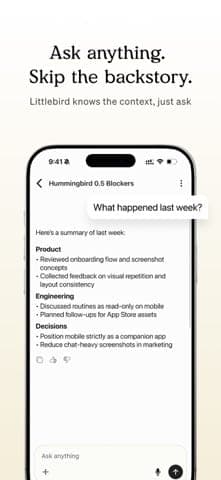
Every feature draws on one shared work memory, built from the window you're working in on your computer, your meetings and the apps you choose to connect, such as Gmail, Google Calendar, Slack, Notion or Microsoft Teams. That is why you can ask a question without pasting an email or re-explaining a project. The four main parts are:
- Chat
Ask about your own work with sources, draft emails and reports; Max mode (and Ultra on Pro) takes more steps on hard questions. Since August 2026 it can build web pages, PDFs, CSVs or Markdown files. - Meeting notes
Transcribes audio playing on your computer with no bot in the call, in 30+ languages, with action items, speaker labels and pre-meeting prep. Meeting notes don't use credits. - Routines
Recurring tasks such as a morning brief or weekly recap, or runs triggered by Gmail events, delivered in the app and by email. - Hover and MCP
Hover is a floating overlay for quick questions about what's open (Mac only). Littlebird MCP (Plus and up) lets other AI chat apps and code editors query your memory.
Pricing and value
Free Basic includes daily credits, 5 routines and 25 meeting notes in total. Plus is $17/month billed annually ($204) or $20/month billed monthly, with a 14-day trial that needs a card. Power is $42.50/month annually or $50/month, with twice Plus's credits. Pro starts at $100/month. Students get Plus for $15/month. Team starts at $17 per seat per month billed annually, and Enterprise is quoted. The thing to watch is the credit system: chats, routines, meeting prep and MCP searches all spend credits, and when they run out the app drops to a lighter mode or you buy more. The terms say purchases are non-refundable unless the law requires otherwise.
More analysis
Who it's for, and alternatives
If you only need meeting notes, dedicated tools such as Granola, Otter.ai, Fathom or Fireflies.ai are simpler. If you just want a general chatbot, ChatGPT or Claude will do. Littlebird is worth considering when your problem is work context scattered across meetings, email, documents and browser tabs, and you accept a cloud service continuously reading your active window. Companies should check internal policy before installing it on work machines, as Littlebird itself recommends.
Screenshots


Plans & pricing
Prices last verified Nov 12, 2026
Basic
PersonalFree
Free, no card needed. Daily usage credits (reset at midnight), 25 meeting notes in total (not per month), 5 routines, 2 Max mode messages a day on desktop and web. No Littlebird MCP.
Plus
Personal$20/mo
$17/mo billed yearly
$17/month billed annually ($204/year); monthly billing costs $36 a year more, i.e. $20/month. Unlimited meeting notes, up to 100 routines, monthly usage credits (extra packs never expire), Max mode, Littlebird MCP. 14-day trial, card required.
Power
Personal$50/mo
$42.50/mo billed yearly
$42.50/month billed annually ($510/year); monthly billing costs $90 a year more, i.e. $50/month. Twice Plus's monthly usage credits and premium image generation. No trial.
Pro
Personal$100/mo
From $100/month, billed monthly only. 5x Plus's monthly usage credits (a 12x tier also exists; its price is not shown on the pricing page, while the US App Store lists "Pro (More Usage)" at $199.99), Ultra mode, priority support, early access to new features.
Plus for students
Personal$15/mo
$15/month, billed monthly, until graduation (up to four years); first two months free if you haven't had a trial. Apply in the app with a school email and student ID.
Team
Business$17/mo/user
From $17 per seat per month billed annually; each person is on Plus, Power or Pro on one bill (monthly or annual; the pricing page only states the annual seat price). Admin controls, usage analytics, shared projects and routine templates, a shared credit pool. Admins can't open members' chats, meeting notes or memory.
Enterprise
BusinessContact sales
Custom pricing. Everything in Team plus single sign-on, with the option to require SSO for company domains.
- Free plan limits
- Basic is free indefinitely: screen context, daily credits for chats and routines, 25 meeting notes in total, 5 routines, 2 Max messages a day, and connections to Gmail, Google Calendar, Drive, Outlook and more.
- Free trial
- 14-day free trial · credit card required
Cancellation & refunds
The Terms of Use (effective June 24, 2026) state that all purchases are final and non-refundable except as required by law. To avoid being charged, cancel the Plus trial in Settings › Subscription before the 14 days end.
Privacy
Per its Privacy & Security page, the desktop app reads only the text of the window you're working in and does not capture video or log keystrokes. Password managers are always excluded; on Mac, password fields and private browsing windows are skipped; banking and adult sites are excluded by default. Data is encrypted in transit and at rest on AWS in the US (US East) and kept until you delete it or close your account. The company holds a SOC 2 Type II report (September 2026) and offers HIPAA once you accept the BAA in the app. On Android, screen reading via the AccessibilityService API is optional and off by default. Littlebird's own documents do not fully line up. The Google Play listing says screen content is "never sold or shared with third parties" and data is "never used to train AI models", yet the Privacy & Security page says Littlebird sends the context it needs to AI providers (subprocessors are listed in its Trust Center), and the Terms grant Littlebird a license to use content to "provide and improve" its services. The company pledges never to sell data, but its App Store privacy label says usage data may be used to track you across other companies' apps and websites, and the Google Play data safety section says the app may share email address, crash logs and app interactions with third parties for analytics. Meeting notes use no bot, so other people on the call aren't notified; the company advises asking them first. The company itself says users who need local-only storage may not be a fit.
Littlebird alternatives
 7.6/10
Fireflies.ai
AI meeting notetaker with a free-forever plan
 7.5/10
ChatGPT
OpenAI's flagship AI assistant for writing, research, coding, images and voice
Controversies & incidents
Issues documented by the press, regulators, courts or the vendor itself. Every item is sourced; unproven claims are labelled as allegations. Last researched: Nov 12, 2026
No significant controversies or incidents found in the sources we checked.
Frequently asked questions
Does Littlebird take screenshots or log keystrokes?
According to the company, no. It reads the text and elements of the window you're working in, doesn't capture video or keystrokes, and always skips password managers. The data is then encrypted and stored on AWS in the US.
Is Littlebird's interface available in Vietnamese?
No. The App Store and G2 list English only. Meeting notes, however, work in more than 30 spoken languages, per the pricing page.
Can I use Littlebird on my phone?
Yes, there are iPhone and Android apps for chat, meeting notes and routines. The iOS listing states it doesn't capture new context from the phone. The Android app can read on-screen content through the AccessibilityService API, but that feature is optional, off by default and needs your consent. Most context still comes from the Mac or Windows app.
How do I cancel the Plus trial without being charged?
Cancel in the app under Settings › Subscription before the 14 days end. Otherwise Plus renews on the billing you chose, and the terms say payments are non-refundable except as required by law.
Do other meeting participants know Littlebird is taking notes?
No. Littlebird doesn't add a bot to the call, so others aren't notified; the company's privacy page advises asking them first. Only the transcript and summary are stored, not the audio.
Review evidence & sources15
Scores
- Ease of use
- 7.8
- Features
- 8.3
- Value for money
- 7.2
- Performance
- 7.0
- Support
- 7.2
- Privacy & security
- 6.5
Why this score
Works after install with no required integrations; you can ask from the Hover overlay (double-tap Option on Mac), the web, iPhone or Android. Marked down for an English-only interface, Mac-only Hover, and credit modes (Quick, Max, Ultra) that users have to keep track of.
Why this score
Few rivals combine screen context, bot-free meeting notes, scheduled or Gmail-triggered routines, generated files (Library), shared projects and MCP. G2 lists 100+ integrations on paid plans, and Microsoft Teams arrived in October 2026. On phones, the iOS app captures no new context, while the Android app reads the screen only through an optional, off-by-default AccessibilityService feature.
Why this score
Free Basic is enough to test the core idea, and Plus at $17–20/month includes unlimited meeting notes and MCP. But every AI action spends credits, Power reaches $50/month, Pro starts at $100/month, the free tier caps meeting notes at 25 in total, and the terms rule out refunds.
Why this score
Store ratings are solid (4.3/5 US App Store, 4.5/5 US Google Play). Still, the October 2026 changelog lists many meeting-recording fixes, transcripts rewinding, and the app closing after updates on some Macs; the iOS app is still on a 0.x version.
Why this score
Support via [email protected], in-app and Discord, plus docs and a weekly changelog; security reports are acknowledged within 5 business days. Priority support is Pro-only, with no phone line or published response time for regular users.
Why this score
Strong controls (exclude, pause, delete), encryption, SOC 2 Type II, HIPAA with a BAA, and a no-selling pledge. But the product continuously reads the active window, keeps memory in a US cloud until deleted and sends context to AI providers, at odds with the Play listing's "never shared with third parties" line. The App Store label discloses data that may be used for tracking, Google Play's data safety section discloses sharing email and usage data with third parties, and call participants aren't notified. No reported security incidents were found.
What users say
- App Store (US)4.3/5 · 67
- Google Play (US)4.5/5 · 62
- G24.7/5 · 162
Sources
- Vendor-providedOfficial pricing pageNov 12, 2026
- Vendor-providedOfficial Privacy & Security pageNov 12, 2026
- Vendor-providedTerms of Use (effective 2026-06-24)Nov 12, 2026
- Vendor-providedLittlebird docs changelogNov 12, 2026
- Vendor-providedAbout LittlebirdNov 12, 2026
- Vendor-providedOfficial homepageNov 12, 2026
- storeApp Store listing (US)Nov 12, 2026
- storeGoogle Play listing (US)Nov 12, 2026
- review-siteG2 reviewsNov 12, 2026
- pressTechCrunch (2026-03-23)Nov 12, 2026
- pressPR Newswire funding announcement (2026-03-24)Nov 12, 2026
- Vendor-providedOfficial changelog, January 2026Nov 12, 2026
- storeiTunes lookup API (App Store release date)Nov 12, 2026
- storeApp Store listing (Vietnam, VND in-app prices)Nov 12, 2026
- storeGoogle Play data safety sectionNov 12, 2026
Specs & compatibility
- Developer
- Little Bird Software, LLC
- Headquarters
- United States
- Launched
- 2025
- Category
- AIProductivity
Capabilities
- AI features
- Integrations
- Mobile app
- Real-time collaboration
- Templates
Platforms
- macOS
- Windows
- Web
- iOS
- Android
Interface languages
- English
Integrations
- Gmail
- Google Calendar
- Google Drive
- Google Tasks
- Outlook
- Dropbox
- Apple Calendar
- Apple Reminders
- Apple Notes
- Notion
- Slack
- Microsoft Teams
- GitHub
- Obsidian
- Pipedrive
- Zoho CRM
- MCP clients (AI chat apps, code editors)
Support
- Community forum
- Help center
Change history
- Feature.Microsoft Teams integration, Gmail-triggered routines and speaker labels in meeting transcripts.
- Feature.Adds Artifacts (web pages, PDFs, CSVs, Markdown), shared team projects and Ultra mode for Pro; Hummingbird is renamed Hover.
- Company.Public launch and an $11M seed round led by Lotus Studio, with Lenny Rachitsky and Scott Belsky among the angels.
Full change history (5)
- Feature.Meeting Notes opens to all users (open beta), alongside website-category exclusions and a referral program.
- Launch.The Littlebird iPhone/iPad companion app is released on the App Store.
About the author
Reviews & comments
Written by readers with a verified email address.
No reviews yet. Have you used Littlebird? Share your real experience.
Reader reviews are counted separately and do not affect the Editorial Team’s score.
No comments yet. Be the first to share your experience.
Comments are readers’ opinions, not content from the AppDuo Editorial Team.