Source-backed analysis7
Review basis
Research-based review: the AppDuo Editorial Team compiled it from official pages, documentation, app stores, press and user feedback, without hands-on testing. Every claim links to a source with the date it was checked.
7 reference sourcesInformation updated Nov 10, 2026
How we review
Files by Google Review
Google's free Android file manager with cleanup tools and Quick Share
By AppDuo Editorial Team · Updated
- Android
On this page
Decide at a glance
Our verdict
Files by Google suits Android users who want a free, lightweight file manager with storage cleanup suggestions, a locked folder and offline sharing. The trade-offs are that it is Android-only, backup is tied to Google Drive, and there is no way to request deletion of collected data.
Best for: Android users who want to free space by removing unused apps, large files and duplicates
Skip it if: iPhone or desktop users, since the app is Android-only
Pros
- Free; the Clean tab suggests removing unused apps, large files and duplicates, per Wikipedia
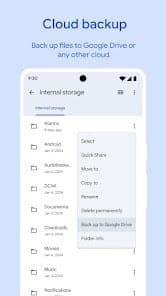
- Safe Folder protected by a pattern or PIN, plus backup to Google Drive
- Offline sharing through Quick Share, encrypted and without mobile data
Cons
- Android-only; Google dropped Android 5 to 7 in 2024 and the app now needs Android 8 or later
- The interface keeps changing: 9to5Google reported in January 2024 that the Important tab was shutting down and deleting its files, and the bottom bar was removed in February 2024
All pros and cons · Who is it for?
Pros
- 4.5/5 from over 9.1 million ratings on Google Play
Cons
- Collects device IDs and interaction data, with no way to request deletion, per the Google Play Data safety section
Best for
- People who need to send files to someone nearby without using mobile data
Skip it if
- Users who need advanced file management such as network-server connections
Problems it solves
Experience & key features
What Files by Google is
Files by Google is a file management app for Android, formerly named Files Go. Per Wikipedia, Google released the first version on 5 December 2017; TechCrunch reported on it on 7 November 2017, describing a file manager, a file transfer tool and a cleanup utility in one. It now needs Android 8 or later and is available in 90 languages.
Key features
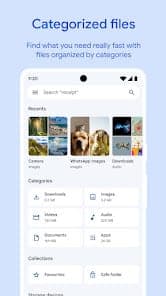
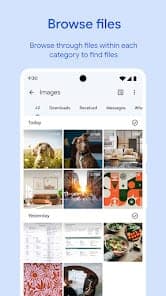
The Files homepage lists cleanup suggestions for unused apps, large or duplicate files and low-resolution videos; smart filters for finding files; encrypted offline sharing with people nearby; and backup to Google Drive or other cloud storage. The help center adds guides on zip and unzip, document scanning, Quick Share, Circle to Search and asking Gemini about PDFs.
Price and data
The app is free. The Google Play Data safety section says no data is shared with third parties, but the app does collect device IDs, diagnostics and interaction data, with no deletion request option. Drive backups use your Google account's storage, so watch the quota if you back up a lot.
More analysis
Update history
According to 9to5Google, Safe Folder began rolling out on 4 August 2020, the app passed 1 billion Play Store downloads on 30 March 2021 and 5 billion on 13 January 2025. The interface has changed several times: Material You in 2021, removal of the bottom bar on 6 February 2024, and an M3 Expressive redesign on 18 August 2025.
Compared with alternatives
Files by Google focuses on cleanup and quick sharing rather than in-depth file management. For transfers across operating systems, LocalSend or Send Anywhere are other options; for cloud storage, Google Drive or OneDrive fit better.
Screenshots
Plans & pricing
Prices last verified Nov 10, 2026
Files by Google
PersonalFree
Free on Google Play; the official page lists no price. Backups to Google Drive count against the Google account's storage.
- Free plan limits
- No paid plan is listed for the app itself.
- Free trial
- No free trial
Cancellation & refunds
Not applicable; the app is free.
Privacy
The Google Play Data safety section (page updated 9 November 2026) states no data is shared with third parties. Data the app may collect includes device IDs, crash logs, diagnostics and app interactions, plus optional items such as email address, user IDs and in-app search history, for app functionality and analytics. Data is encrypted in transit, but the developer provides no way to request deletion. The app falls under Google's general Privacy Policy. According to Wikipedia, Safe Folder is protected by a pattern or PIN and Quick Share transfers are encrypted; the Files homepage also states that nearby transfers are encrypted.
Files by Google alternatives
 8.1/10
LocalSend
Free, open-source file sharing between any devices on the same Wi-Fi
 7.8/10
Google Drive
File storage and sharing tied to Gmail, Docs and Photos, with 15 GB free
Frequently asked questions
Is Files by Google free?
Yes, the app is free on Google Play and the official page lists no price.
Which Android versions does Files by Google support?
Per Wikipedia, the app needs Android 8 or later; support for Android 5 to 7 ended in 2024.
How does Safe Folder protect files?
Per Wikipedia, Safe Folder is protected by a pattern or PIN.
How long does the Trash keep files?
Per Wikipedia, files in Trash are permanently deleted after 30 days.
Is there an iPhone version?
No. Wikipedia describes it as currently available only on Android.
Review evidence & sources7
Scores
- Ease of use
- 8.0
- Features
- 7.5
- Value for money
- 9.0
- Performance
- 7.5
- Support
- 6.5
- Privacy & security
- 6.5
Why this score
Clean, Browse and Share tabs are easy to grasp, though 9to5Google documents frequent redesigns.
Why this score
Covers the basics: cleanup, Safe Folder, Quick Share, Drive backup, document scanning, zip and unzip; lacks the advanced features of dedicated file managers.
Why this score
Free with no listed paid plan or ads, while still covering the core features.
Why this score
A lightweight app that grew out of the Android Go effort for budget phones; no independent benchmark was found.
Why this score
A help center with many how-to articles and a feedback email on Google Play; no direct support channel was found.
Why this score
Google Play states no data is shared with third parties and data is encrypted in transit, but the app collects device IDs and interaction data, offers no deletion request and relies on Google's general policy.
What users say
- Google Play4.5/5 · 9,115,333
Sources
- Vendor-providedFiles by Google official pageNov 10, 2026
- Vendor-providedFiles by Google HelpNov 10, 2026
- storeGoogle Play listingNov 10, 2026
- Community-reportedWikipedia: Files (Google)Nov 10, 2026
- press9to5Google: Files by Google guideNov 10, 2026
- pressTechCrunch: Files Go (2017-11-07)Nov 10, 2026
- storeGoogle Play Data safetyNov 10, 2026
Specs & compatibility
- Developer
- Google LLC
- Headquarters
- United States
- Launched
- 2017
- Category
- Utilities
Capabilities
- Works offline
- Mobile app
- Integrations
Platforms
- Android
Interface languages
- Vietnamese
- English
- Japanese
- Chinese
- Spanish
- French
- Korean
- German
- Portuguese
- Russian
- Thai
- Indonesian
Integrations
- Google Drive
- Quick Share
- Google Photos
- Gemini
- Circle to Search
Support
- Help center
Change history
- Feature.M3 Expressive redesign.
- Update.The app passed 5 billion Google Play downloads.
- Feature.The app got a new PDF viewer on Android.
Full change history (8)
- Feature.Material You redesign with support for Android 12 dynamic colors.
- Update.The app passed 1 billion Google Play downloads.
- Feature.PIN-protected Safe Folder began rolling out; the app had 150 million monthly users.
- Launch.Google released Files Go.
- Update.TechCrunch reported Google was preparing Files Go, combining file management, file transfer and cleanup.
About the author
Reviews & comments
Written by readers with a verified email address.
No reviews yet. Have you used Files by Google? Share your real experience.
Reader reviews are counted separately and do not affect the Editorial Team’s score.
No comments yet. Be the first to share your experience.
Comments are readers’ opinions, not content from the AppDuo Editorial Team.