Source-backed analysis12
Review basis
Research-based review: the AppDuo Editorial Team compiled it from official pages, documentation, app stores, press and user feedback, without hands-on testing. Every claim links to a source with the date it was checked.
12 reference sourcesInformation updated Nov 10, 2026
How we review
Cline Review
Open-source coding agent that runs on the AI models you choose
By AppDuo Editorial Team · Updated
- macOS
- Windows
- Linux
- Browser extension
- API
On this page
Decide at a glance
Our verdict
Cline suits developers who want an open-source agent, a free choice of model and provider, and pay-for-what-you-use costs. The trade-off is less predictable API spend, and you manage keys, models and per-action approvals yourself.
Best for: Developers who want to use their own API keys or local models
Skip it if: People who want one predictable flat price covering all frontier models
Pros
- Open source under Apache-2.0, with about 71.5k GitHub stars
- No provider lock-in: Anthropic, OpenAI, Google, OpenRouter, Bedrock, Ollama, LM Studio
- Plan/Act modes, checkpoints and per-action approval
Cons
- Inference cost depends on model and usage, with no fixed ceiling
- Mixed marketplace ratings: 4.0/5 on VS Code Marketplace, 3.4/5 on JetBrains Marketplace, 3.3/5 on Open VSX
All pros and cons · Who is it for?
More pros
- Extensible through MCP, .clinerules files, an SDK and a CLI, plus headless runs in CI
More cons
- The free plan has community support only; dedicated support and an SLA are Enterprise features
Best for
- Teams that need an open-source agent in VS Code, JetBrains or the CLI
Problems it solves
Experience & key features
What Cline is
Cline is an open-source coding agent from Cline Bot Inc. that runs in VS Code, JetBrains, Windsurf, Cursor, the terminal and a desktop app. Its homepage claims over 11 million developers, and its VS Code Marketplace page lists 5,894,120 installs.
How it works
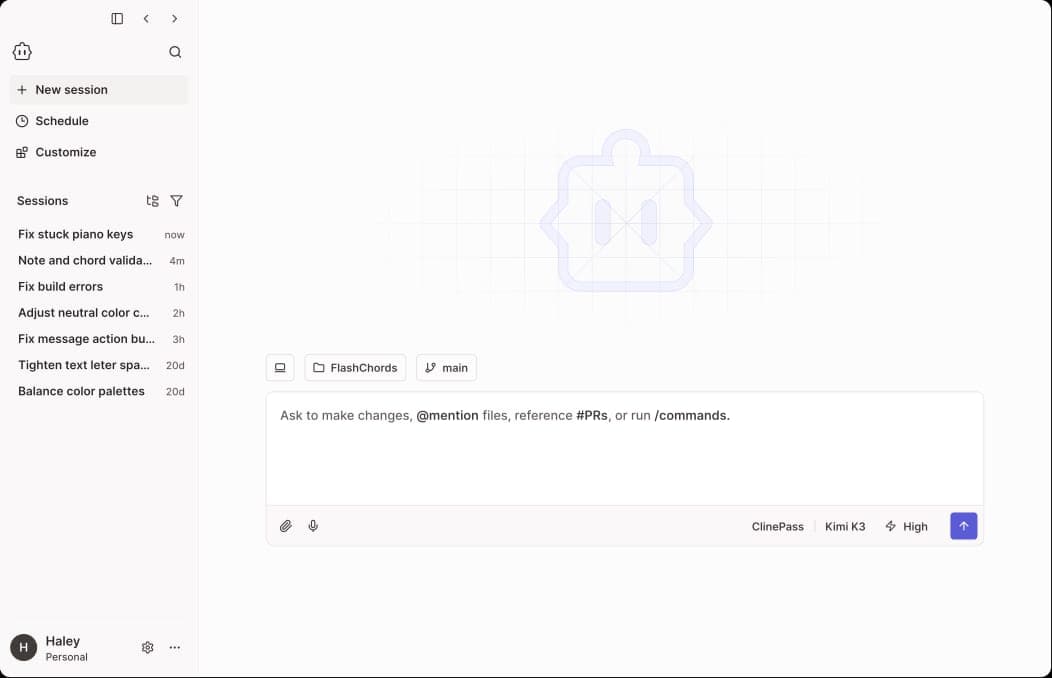
You describe a task and settle on a plan with Cline in Plan mode; in Act mode it edits multiple files, shows diffs and runs terminal commands while reading their output. Checkpoints let you roll back, .clinerules files capture project conventions, and MCP connects external tools. Newer additions include an SDK, cron-scheduled agents and a headless mode for CI.
Pricing and cost
The pricing page lists the open-source version as free for individuals: you pay for inference by usage, or use your own API key. Per the docs, ClinePass costs 9.99 USD/month for a set of open models such as DeepSeek, GLM, Kimi and Qwen, with 5-hour, weekly and monthly limits. Enterprise is quoted individually and adds SSO, an SLA and centralized administration.
More analysis
Compared with alternatives
Unlike AI IDEs such as Cursor or Windsurf, Cline is an open-source extension: you bring your own API key instead of buying a subscription bundled with frontier models. That is flexible and transparent on cost, but anyone wanting an all-in-one plan may find Cursor or GitHub Copilot simpler.
Screenshots

Plans & pricing
Prices last verified Nov 10, 2026
Open Source
PersonalFree
Free for individual developers, with no subscription or seat fee. You pay only for AI inference by usage, or bring your own API keys.
ClinePass
Personal$9.99/mo/user
Monthly subscription to a set of popular open coding models; the docs claim 2–5x the rate limits of standard API access. Usage is capped over a rolling 5-hour window, the calendar week and the calendar month.
Enterprise
BusinessContact sales
Custom pricing via sales. Adds SSO, an SLA, dedicated support, the JetBrains extension, centralized billing and role-based access control.
- Free plan limits
- Cline sets no usage cap on the open-source plan; costs come from whichever AI model provider you choose.
- Free trial
- No free trial
Cancellation & refunds
Neither the pricing page nor the ClinePass docs mention refunds.
Privacy
According to its telemetry docs, Cline records features used, errors, token counts, model and provider names, version, OS, a device identifier and, when signed in, your account. It excludes your code, file contents and prompts, except with the Cline or ClinePass providers, where telemetry can include the prompt and the model's response. With your own API key, prompts go only to the provider you choose. Telemetry can be turned off in VS Code, JetBrains, the desktop app and the CLI, but Cline still contacts its servers for sign-in and feature flags and sends a few required events. The privacy policy gives no data retention period.
Cline alternatives
 7.5/10
GitHub Copilot
An AI coding assistant that runs in most major IDEs and ties into GitHub
 7.4/10
Claude Code
Anthropic's coding agent across terminal, IDE, web and CI
Frequently asked questions
Is Cline free?
According to the pricing page, Cline is free for individual developers. You pay only for AI inference by usage, or use your own API key.
Does Cline send my code to its servers?
Per the telemetry docs, the data Cline collects excludes code, file contents and prompts unless you use the Cline or ClinePass providers. With your own API key, prompts go only to your chosen model provider.
Where does Cline run?
VS Code, JetBrains, Windsurf, Cursor, a CLI (npm i -g cline) and a desktop app for macOS, Windows and Linux.
Can I use local models?
Yes. The homepage and GitHub list local models through Ollama and LM Studio, plus any OpenAI-compatible endpoint.
Review evidence & sources12
Scores
- Ease of use
- 7.0
- Features
- 8.2
- Value for money
- 8.0
- Performance
- 7.0
- Support
- 6.5
- Privacy & security
- 7.3
Why this score
Installs as a VS Code extension or via npm, but you pick a provider, set API keys and watch costs yourself; by default every action waits for approval. English-only interface.
Why this score
Per the homepage and GitHub: multi-file edits, terminal commands, Plan/Act, checkpoints, MCP, multi-agent teams, cron schedules, Slack/Linear integrations and headless CI mode.
Why this score
The tool itself is free and you pay only for models; ClinePass costs 9.99 USD/month for a set of open models. Total cost depends on usage.
Why this score
Output quality depends on the chosen model. User ratings are mixed: 4.0/5 on VS Code Marketplace (326), 3.4/5 on JetBrains Marketplace (76) and 3.3/5 on Open VSX (16). No independent benchmark was available as evidence.
Why this score
The free plan gets docs, a Discord and GitHub community and the [email protected] address; dedicated support and an SLA are Enterprise-only.
Why this score
Telemetry is on by default and includes a device ID, but the docs state code and prompts are excluded (except with the Cline/ClinePass providers) and it can be turned off; with your own key, prompts go straight to the model provider. The general policy gives no retention period.
What users say
- Visual Studio Marketplace (VS Code extension)4.0/5 · 326
- JetBrains Marketplace (plugin)3.4/5 · 76
- Open VSX Registry3.3/5 · 16
Sources
- Vendor-providedOfficial homepageNov 10, 2026
- Vendor-providedOfficial pricing pageNov 10, 2026
- Vendor-providedOfficial privacy policyNov 10, 2026
- Vendor-providedCline docs overviewNov 10, 2026
- Vendor-providedCline docs: telemetryNov 10, 2026
- Vendor-providedCline docs: ClinePassNov 10, 2026
- Vendor-providedCline funding announcement (2025-07-31)Nov 10, 2026
- Community-reportedGitHub repositoryNov 10, 2026
- Community-reportedGitHub releasesNov 10, 2026
- storeVisual Studio Marketplace listingNov 10, 2026
- storeJetBrains Marketplace listingNov 10, 2026
- storeOpen VSX listingNov 10, 2026
Specs & compatibility
- Developer
- Cline Bot Inc.
- Headquarters
- United States
- Launched
- 2024
- Category
- DevelopmentAI
Capabilities
- Open source
- AI features
- Public API
- Integrations
- Real-time collaboration
Platforms
- macOS
- Windows
- Linux
- Browser extension
- API
Interface languages
- English
Integrations
- VS Code
- JetBrains
- Windsurf
- Cursor
- MCP
- Slack
- Discord
- Telegram
- Linear
- Ollama
- LM Studio
- OpenRouter
- AWS Bedrock
Support
- Help center
- Community forum
Change history
- Company.Cline announced 32 million USD in combined seed and Series A funding, led by Emergence Capital and Pace Capital.
- Feature.Launched Cline Teams with organization management, centralized billing, a dashboard, budgets and audit logs.
- Update.At the funding announcement Cline cited 2.7 million installs across VS Marketplace and Open VSX and 48k GitHub stars.
About the author
Reviews & comments
Written by readers with a verified email address.
No reviews yet. Have you used Cline? Share your real experience.
Reader reviews are counted separately and do not affect the Editorial Team’s score.
No comments yet. Be the first to share your experience.
Comments are readers’ opinions, not content from the AppDuo Editorial Team.