Source-backed analysis7
Review basis
Research-based review: the AppDuo Editorial Team compiled it from official pages, documentation, app stores, press and user feedback, without hands-on testing. Every claim links to a source with the date it was checked.
7 reference sourcesInformation updated Nov 10, 2026
How we review
Adobe Illustrator Review
Adobe's long-running vector graphics software, sold by subscription only
By AppDuo Editorial Team · Updated
- Windows
- macOS
- iOS
On this page
Decide at a glance
Our verdict
Illustrator suits people who make logos, icons and vector illustrations to print-grade standards inside the Adobe ecosystem. The trade-offs are a subscription that is not cheap, early termination fees, and Adobe's low Trustpilot score over billing and cancellation.
Best for: Professional designers making logos, icons and vector illustrations
Skip it if: People who need quick designs and do not want a paid subscription
Pros
- Available on Windows, macOS and iPad, with files syncing between desktop and iPad via the cloud
- Around since 1987 and widely used for vector work in the industry
- Includes generative AI features such as Text to Vector Graphic and Generative Shape Fill
Cons
- Subscription only; 22.99 USD per month, and early cancellation can cost 50% of the remaining contract
- Trustpilot rates Adobe 1.2/5 (7,598 reviews), mostly over billing and cancellation
All pros and cons · Who is it for?
More pros
- The iPad app is rated 4.5/5 on the App Store (about 38,000 ratings)
More cons
- No free plan, only a seven-day trial
Best for
- People already on Creative Cloud who move files between Adobe apps
Skip it if
- People who want a long-term free tool, since only a seven-day trial exists
Problems it solves
Experience & key features
What is Illustrator?
Illustrator is Adobe's vector graphics software. Per Wikipedia, version 1.0 shipped in March 1987 for the Apple Macintosh, the first Windows version was 2.0 in 1989, and since CC (2013) it has been sold by subscription only. It currently runs on Windows 10/11, macOS Ventura 13 or later and iPadOS 14 or later.
Key features
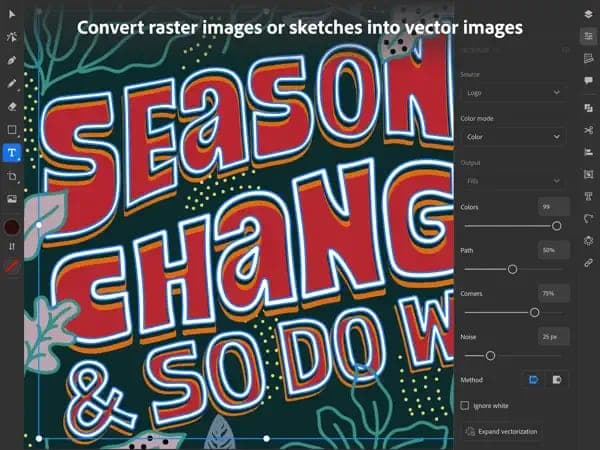
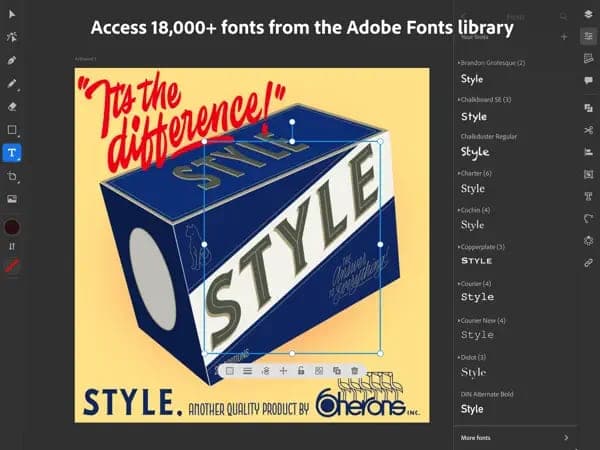
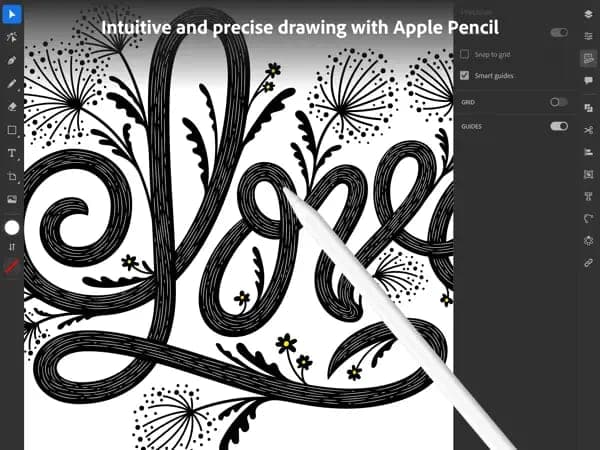
Per the App Store description, the iPad app offers drawing tools, brushes, image vectorizing, pattern and shape creation, type tools with 18,000+ fonts, gradients and offline use; it saves native AI files and exports SVG, PDF, PNG and PSD. On generative AI, Wikipedia notes version 27.6 added generative recoloring (beta) and 28.0 (October 2023) added Text to Vector Graphic (beta). Adobe's July 2024 blog introduced Generative Shape Fill, also in beta.
Pricing and value
Adobe's product page lists Illustrator for individuals at 22.99 USD per month (one-year contract billed monthly), Illustrator for teams at 37.99 USD per license, and Creative Cloud Pro at a regular 69.99 USD per month. A free seven-day trial is offered. Under Adobe's terms, cancelling after 14 days on a monthly-billed plan costs 50% of the remaining contract, so the terms are worth reading before signing up.
More analysis
Compared with alternatives
Illustrator targets professional vector work, while Figma focuses on team-based interface design and Canva on quick template-based design. Affinity and Sketch are other alternatives in the AppDuo catalog. This review is compiled from public sources.
Screenshots
Plans & pricing
Prices last verified Nov 10, 2026
Illustrator (individual)
Personal$22.99/mo/user
22.99 USD per month on a one-year contract billed monthly. Includes 100 GB cloud storage, 25 generative credits per month, Adobe Express Premium, fonts and tutorials. The product page lists no prepaid annual price.
Illustrator (teams)
Business$37.99/mo/user
37.99 USD per license per month on a one-year contract billed monthly. Includes 100 GB cloud storage, 25 generative credits per month and business features.
Creative Cloud Pro
Personal$69.99/mo/user
Regular price 69.99 USD per month (one-year contract billed monthly); new subscribers pay 34.99 USD per month for the first 3 months. 20+ apps, 100 GB storage, 4,000 generative credits per month. Students and teachers: 19.99 USD per month for the first year, then 39.99 USD.
Illustrator on iPad
Personal$9.99/mo/user
$6.67/mo billed yearly
In-app purchase on the US App Store: 9.99 USD per month or 79.99 USD per year (about 6.67 USD per month). Free for Creative Cloud members whose plan includes Illustrator.
- Free plan limits
- There is no free plan. The product page mentions a free seven-day trial; the iPad app is free to download but needs a subscription.
- Free trial
- 7-day free trial · no credit card
Cancellation & refunds
Per Adobe's subscription terms (US, Creative Cloud for individuals): full refund within 14 days. On a one-year contract billed monthly, cancelling after 14 days triggers a lump-sum fee of 50% of the remaining contract (in California, 30% of the annual commitment); a prepaid annual plan is non-refundable after 14 days.
Privacy
Adobe's privacy policy says it collects account details, usage and device data, and content you send to Adobe servers. Adobe may analyze cloud content with automated techniques to improve its services, subject to your opt-out rights; content is also scanned automatically for abusive material and may get human review when flagged. The policy links a separate machine learning opt-out page and honors the Global Privacy Control signal. Data may be shared with Adobe group companies and processors for payments, analytics and AI processing.
Adobe Illustrator alternatives


Frequently asked questions
Is Illustrator free?
No free plan. Adobe's product page mentions a free seven-day trial. The iPad app is free to download but needs a subscription (9.99 USD per month or 79.99 USD per year on the US App Store) unless you already have a Creative Cloud plan that includes Illustrator.
Does cancelling Illustrator cost anything?
Under Adobe's US terms, cancelling within 14 days gets a full refund. After that, a one-year plan billed monthly carries a lump-sum fee of 50% of the remaining contract (in California, 30% of the annual commitment); a prepaid annual plan is non-refundable.
Which systems does Illustrator run on?
Per Wikipedia: Windows 10 (21H2 LTSC, 22H2) or Windows 11 (23H2 or later), macOS Ventura 13 or later and iPadOS 14 or later. There is no Android or Linux version listed.
Does Adobe use my content for AI?
Adobe's policy says it may analyze cloud content with automated techniques to improve its services, subject to your opt-out rights, and it links a separate page to opt out of machine learning use.
Review evidence & sources7
Scores
- Ease of use
- 6.8
- Features
- 9.0
- Value for money
- 5.8
- Performance
- 7.6
- Support
- 5.0
- Privacy & security
- 6.0
Why this score
A deep toolset means a learning curve for newcomers; Adobe bundles tutorials with the plan. This score is inferred from product descriptions.
Why this score
An industry-standard vector tool since 1987 with extensive drawing, type and gradient tools, native AI files, export to SVG, PDF and PNG, and generative AI features. Few rivals match the breadth.
Why this score
22.99 USD per month for a single app, no free plan and a 50% early termination fee after 14 days. The iPad plan at 79.99 USD per year is cheaper but iPad only.
Why this score
There are no independent performance benchmarks. The score rests on the iPad app's 4.5/5 rating and Adobe's continued yearly major releases (version 30.0 in October 2025).
Why this score
Official documentation exists, but Trustpilot reviewers describe support as hard to reach and the page says Adobe replies to 0% of negative reviews.
Why this score
A detailed policy with a separate machine-learning opt-out page, but Adobe collects many data types and may analyze cloud content by default, subject to opt-out.
What users say
- App Store (US, Illustrator on iPad)4.5/5 · 38,000
- Trustpilot (Adobe, company-wide)1.2/5 · 7,598
Sources
- Vendor-providedAdobe Illustrator product page (pricing)Nov 10, 2026
- Vendor-providedAdobe Subscription TermsNov 10, 2026
- Vendor-providedAdobe Privacy PolicyNov 10, 2026
- Vendor-providedAdobe blog: Illustrator innovations (2024-07-23)Nov 10, 2026
- storeApp Store listing (US)Nov 10, 2026
- Community-reportedWikipedia: Adobe IllustratorNov 10, 2026
- review-siteTrustpilot: adobe.comNov 10, 2026
Specs & compatibility
- Developer
- Adobe Inc.
- Headquarters
- United States
- Launched
- 1987
- Category
- Productivity
Capabilities
- AI features
- Templates
- Integrations
- Mobile app
- Works offline
- Real-time collaboration
Platforms
- Windows
- macOS
- iOS
Interface languages
- English
- French
- German
- Japanese
- Korean
Integrations
- Adobe Creative Cloud
- Adobe Express
Support
- Help center
Change history
- Feature.Illustrator 2026 (version 30.0) ships, the latest major release in Wikipedia's version table.
- Feature.Adobe introduces Generative Shape Fill (beta), Text to Pattern and the Dimension tool.
- Feature.Illustrator 2024 (28.0) brings Text to Vector Graphic in beta, using generative AI.
Full change history (4)
- Launch.Illustrator 1.0 launches on the Apple Macintosh.
About the author
Reviews & comments
Written by readers with a verified email address.
No reviews yet. Have you used Adobe Illustrator? Share your real experience.
Reader reviews are counted separately and do not affect the Editorial Team’s score.
No comments yet. Be the first to share your experience.
Comments are readers’ opinions, not content from the AppDuo Editorial Team.