Source-backed analysis11
Review basis
Research-based review: the AppDuo Editorial Team compiled it from official pages, documentation, app stores, press and user feedback, without hands-on testing. Every claim links to a source with the date it was checked.
11 reference sourcesInformation updated Nov 10, 2026
How we review
Papago Review
NAVER's free translator for text, images and voice, built around Korean
By AppDuo Editorial Team · Updated
- Web
- iOS
- Android
- Browser extension
On this page
Decide at a glance
Our verdict
Papago suits travelers to Korea and people who often translate Korean, Japanese or Chinese: the app is free, covers image, voice, conversation and offline translation, and holds 4.5 to 4.7/5 on the app stores. The trade-offs are a 14-language list, tracking identifiers on its App Store label, and a paid Papago Plus that is a separate, work-oriented app.
Best for: Travelers to Korea who need to translate signs, menus and conversations on the phone
Skip it if: Anyone needing languages outside the app's 14
Pros
- Free app covering text, image, voice, conversation, handwriting, website and document translation
- Offline translation, available since November 2019 per Wikipedia
- A generous free tier: 300 images in the app, 20 documents and 30 voice minutes per month
Cons
- Only 14 languages, fewer than the largest translation services
- The App Store label lists identifiers used for tracking, and Google Play says app activity and device IDs may be shared with third parties
All pros and cons · Who is it for?
Pros
- Strong ratings: 4.7/5 on the US App Store, 4.5/5 on Google Play from about 179,000 reviews
Cons
- Papago Plus is a separate app, from US$9.99 per month on the web but from 399,000 VND per month as a Vietnam in-app purchase
- Support is limited to a help center, a feedback form and a Korean phone line
Best for
- Language learners who want to photograph a passage and turn it into study notes (Edu mode)
- People who need formatting-preserving document translation or custom glossaries (via Papago Plus)
Skip it if
- Anyone avoiding tracking identifiers: the App Store label lists them as used to track you
Problems it solves
Experience & key features
What Papago is
Papago is an AI machine-translation service from Korean tech company NAVER. The name is Esperanto for "parrot". According to its Google Play description, the app translates 14 languages: Korean, English, Japanese, Simplified and Traditional Chinese, Spanish, French, Vietnamese, Thai, Indonesian, Russian, German, Italian and Arabic. The App Store lists 13 interface languages.
Translation modes
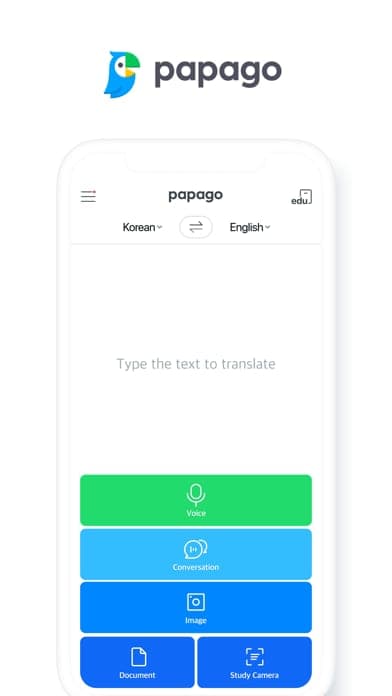
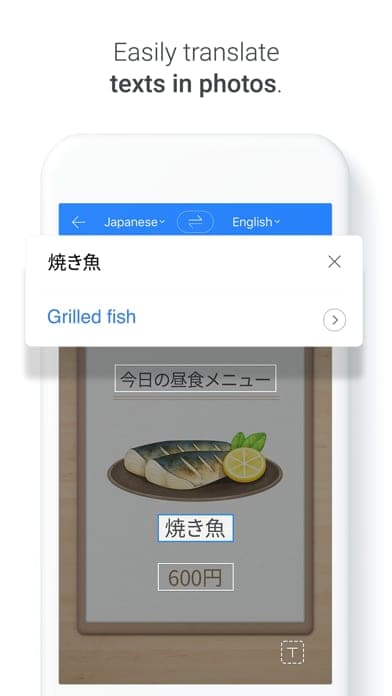
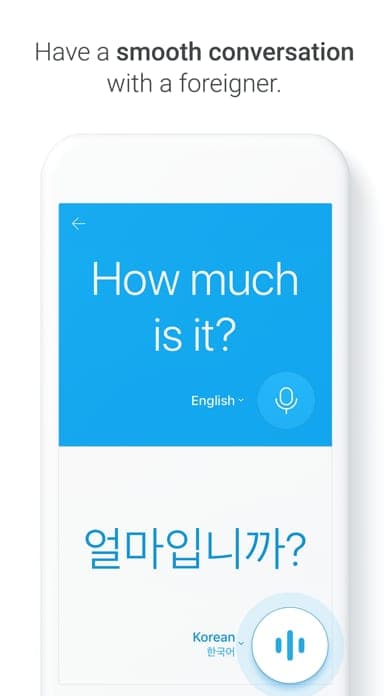
Beyond text, the app translates images, voice, two-person conversations, handwriting, websites and documents with their formatting intact. Edu mode turns a photo of a passage into study notes, Papago Mini shows a translation when you copy text in another app, and there is a built-in dictionary. Translation also works offline. Version 1.13.0 (October 14, 2026) added Trend, a daily ranking of popular things and spots in Korea.
Pricing and Papago Plus
The Papago app is free. Papago Plus is a paid service with its own app. The official pricing page lists Basic at US$9.99 per month, Standard at US$29.99 per member per month and Advanced at US$55.99 per member per month, with Enterprise Pass quoted on request. Paid plans raise image, document and voice quotas and add glossaries; Standard and up add team management for 2 to 100 members. Basic and Standard include a free first month, once only. In-app purchases on the Vietnamese App Store are priced separately: Basic 399,000 VND, Standard 1,199,000 VND and Advanced 2,299,000 VND per month.
More analysis
Who it is for
Papago's strongest footing is Korean: a March 2024 survey by South Korea's Ministry of Culture, Sports and Tourism found 48.3% of foreign visitors used it to translate during their trip. Google Translate covers more languages, and DeepL is worth comparing for long-form text. This review compiles public sources; AppDuo did not test the app.
Screenshots
Plans & pricing
Prices last verified Nov 10, 2026
Free
PersonalFree
The Papago app is free on the App Store and Google Play. Per the Papago Plus pricing page, the free tier gives limited text translation, 30 images on the web or 300 in the app and Chrome extension, 20 documents, 30 minutes of voice translation (beta) per month, and 1 glossary of up to 10 terms.
Plus Basic
Personal$9.99/mo
Monthly: unlimited text translation, 100 images on the web (1,000 in the app and Chrome extension), 30 documents with editing, 60 minutes of voice translation (beta), 1 glossary of up to 5,000 terms. First month free, once only.
Plus Standard
Business$29.99/mo/user
Per member per month: 500 images on the web (1,000 in the app and Chrome extension), 70 documents, 120 minutes of voice translation (beta), 10 glossaries of 10,000 terms each, teams of 2 to 100 members. First month free, once only.
Plus Advanced
Business$55.99/mo/user
Per member per month: 1,000 images, 150 documents, 180 minutes of voice translation (beta), 1,000 glossaries of 10,000 terms each, teams of 2 to 100 members. No free month. Enterprise Pass is quoted on request.
- Free plan limits
- The free tier caps text translation, images (30 on the web, 300 in the app), documents (20) and voice translation (30 minutes) each month. The pricing page has an annual toggle marked 15% off but shows no yearly prices.
- Free trial
- 30-day free trial · no credit card
Cancellation & refunds
The Papago app is free, so refunds do not apply. The pages read do not state a refund policy for Papago Plus.
Privacy
Papago is covered by NAVER's group Privacy Policy (version 12.2), which says personal information is destroyed once its purpose is met, except data kept by law such as login records (3 months) and payment records (5 years). The Papago site has a separate "Consent to improving quality" page on consent to quality-improvement use. The developer-provided App Store labels list identifiers as used to track you; contact info, identifiers and usage data are linked to you, while photos, audio and precise location are not. Google Play says app activity, app info and performance, and device or other IDs may be shared with third parties, data is encrypted in transit and deletion can be requested. The sources read do not say how long translated text is kept or what it is used for.
Papago alternatives


Frequently asked questions
Is Papago free?
The Papago app on the App Store and Google Play is free. Papago Plus is a separate paid service, from US$9.99 per month on the official pricing page.
Which languages does Papago translate?
Per Google Play, 14 languages: Korean, English, Japanese, Simplified and Traditional Chinese, Spanish, French, Vietnamese, Thai, Indonesian, Russian, German, Italian and Arabic.
Does Papago work offline?
Yes. The Google Play description lists offline translation, and per Wikipedia it arrived in November 2019.
How do Papago and Papago Plus differ?
Papago is the free translator app. Papago Plus is a separate paid, work-oriented app with higher image and document quotas, glossaries, document editing and team management.
Review evidence & sources11
Scores
- Ease of use
- 8.3
- Features
- 8.0
- Value for money
- 8.2
- Performance
- 7.3
- Support
- 6.0
- Privacy & security
- 6.3
Why this score
One app bundles many translation modes with a 13-language interface; rated 4.7/5 on the US App Store and 4.5/5 on Google Play.
Why this score
The Google Play description lists 11 feature groups including image, voice, conversation, offline, document and Papago Mini, but only 14 languages.
Why this score
Free for personal use with fair quotas; Papago Plus (US$9.99 to US$55.99 per month on the web, more as an in-app purchase) is only needed for heavy document, image or team use.
Why this score
No independent accuracy benchmark in the sources read; the score rests on user ratings, 20.74 million monthly users (May 2024) and some reviews citing errors with numbers, times and honorifics.
Why this score
A help center, a feedback form on the site and a Korean phone line (1588-3820); no live chat found.
Why this score
NAVER's policy states legal retention periods, but the App Store label lists tracking identifiers, Google Play notes third-party sharing, and handling of translated text is unclear.
What users say
- App Store (United States)4.7/5 · 3,502
- App Store (Vietnam)4.6/5 · 2,185
- Google Play4.5/5 · 179,000
Sources
- Vendor-providedPapago official websiteNov 10, 2026
- Vendor-providedPapago Plus pricing pageNov 10, 2026
- Vendor-providedNAVER Privacy Policy (v12.2)Nov 10, 2026
- storeApp Store listing (US)Nov 10, 2026
- storeApp Store listing (Vietnam)Nov 10, 2026
- storePapago Plus App Store listing (Vietnam)Nov 10, 2026
- storeGoogle Play listingNov 10, 2026
- Community-reportedWikipedia: Naver PapagoNov 10, 2026
- pressKorea JoongAng Daily (2024-06-10)Nov 10, 2026
- pressNation Thailand (2017-07-22)Nov 10, 2026
- pressKorea Times (2024-06-10)Nov 10, 2026
Specs & compatibility
- Developer
- NAVER Corp.
- Headquarters
- South Korea
- Launched
- 2016
Capabilities
- AI features
- Works offline
- Mobile app
Platforms
- Web
- iOS
- Android
- Browser extension
Interface languages
- English
- Korean
- Japanese
- Chinese
- Spanish
- French
- German
- Russian
- Indonesian
- Thai
- Vietnamese
Integrations
- Papago Chrome extension
Support
- Help center
- Phone
Change history
- Feature.iOS version 1.13.0 added Trend, a ranking of popular things and spots in Korea.
- Update.Monthly active users (app and web) passed 20 million for the first time, reaching 20.74 million in May 2024.
- Feature.Image translation for text in photos was added.
Full change history (6)
- Feature.Papago gained offline translation.
- Launch.Papago left beta, first as a smartphone app and later on the web.
- Launch.NAVER released Papago as a beta mobile app.
About the author
Reviews & comments
Written by readers with a verified email address.
No reviews yet. Have you used Papago? Share your real experience.
Reader reviews are counted separately and do not affect the Editorial Team’s score.
No comments yet. Be the first to share your experience.
Comments are readers’ opinions, not content from the AppDuo Editorial Team.