Source-backed analysis8
Review basis
Research-based review: the AppDuo Editorial Team compiled it from official pages, documentation, app stores, press and user feedback, without hands-on testing. Every claim links to a source with the date it was checked.
8 reference sourcesInformation updated Nov 10, 2026
How we review
OneDrive Review
Microsoft's cloud storage, built into Windows and Microsoft 365, with 5 GB free
By AppDuo Editorial Team · Updated
- Web
- Windows
- macOS
- iOS
- Android
On this page
Decide at a glance
Our verdict
OneDrive suits Windows and Microsoft 365 users who want file sync and desktop folder backup inside one ecosystem. The trade-offs are a 5 GB free tier, extra storage that comes through Microsoft 365 plans, and a privacy statement that lets Microsoft use data for AI training.
Best for: Windows and Office users who want to save, edit and share files directly from Word, Excel and PowerPoint
Skip it if: Anyone who needs end-to-end encryption or a commitment against using data for AI
Pros
- Web, Windows, macOS, iOS and Android apps, built into Word, Excel, PowerPoint and Outlook
- Strong store ratings: 4.7/5 from over 488,000 ratings on the US App Store and 4.6/5 from over 7.4 million on Google Play
- Basic gives 100 GB for 19.99 USD per year; new Family and Premium plans share 2 TB among up to six people
Cons
- Only 5 GB free; over quota you cannot upload, edit or sync
- Per Wikipedia, automated content scanning can suspend Microsoft accounts without notice, cutting off OneDrive access
All pros and cons · Who is it for?
More pros
- Personal Vault adds a second authentication step for protected files (announced September 2019)
More cons
- The privacy statement allows customer data to be used to train AI models
Best for
- People who need cheap extra space: Basic with 100 GB is 1.99 USD per month or 19.99 USD per year
Skip it if
- People who live mainly in Gmail and Android, where Google Drive is built in
Problems it solves
Experience & key features
What is OneDrive?
OneDrive is Microsoft's cloud storage service. Per Wikipedia it launched on 1 August 2007 as SkyDrive. In June 2013 a UK court ruled the name breached Sky's trademark, and the OneDrive name took effect on most platforms on 19 February 2014. It runs on the web, Windows, macOS, iOS and Android.
Storage and quotas
Per Microsoft's quotas page, the free tier has 5 GB, Basic 100 GB and Personal 1 TB for one person. New Family and Premium subscriptions from 8 October 2026 get 2 TB shared among up to six people, and existing ones switch at renewal from 2 May 2027. New Pro subscriptions get 5 TB, with existing Pro plans moving over from 1 November 2027. Over the quota you cannot upload, edit or sync new files, and after six months over the limit Microsoft might delete the data, which cannot be recovered.
Pricing and value
Per Microsoft's official pages, Microsoft 365 Basic (100 GB) is 19.99 USD per year or 1.99 USD per month and has no AI features; Personal is 99.99 USD per year or 9.99 USD per month; Family 129.99 USD per year or 12.99 USD per month; Premium 199.99 USD per year or 19.99 USD per month. Personal, Family and Premium come with a one-month free trial; the page mentions none for Basic. The US App Store also sells a Microsoft 365 Storage 50 GB plan at 0.99 USD. On the Vietnam App Store, Microsoft 365 Basic is listed at 49,000 VND and Storage 50 GB at 25,000 VND, but the page gives no billing period.
More analysis
Who it's for and how it compares
OneDrive is the natural pick for Windows and Microsoft 365 users. If you rely mostly on Gmail and Android, Google Drive integrates better; Dropbox, Box and MEGA are storage-focused services with different pricing. Keep a second copy of important files elsewhere, particularly because a Microsoft account can be suspended.
Screenshots

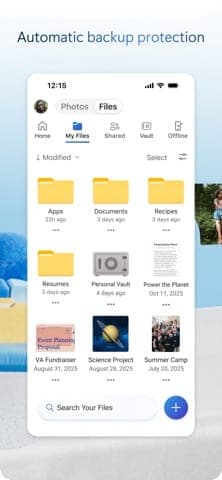

Plans & pricing
Prices last verified Nov 10, 2026
Free
PersonalFree
5 GB for one person, per Microsoft's storage quotas page.
Microsoft 365 Basic
Personal$1.99/mo
$1.67/mo billed yearly
100 GB for one person, plus ad-free Outlook. The Microsoft 365 Basic page lists 19.99 USD per year or 1.99 USD per month and says AI features are not included.
Microsoft 365 Personal
Personal$9.99/mo
$8.33/mo billed yearly
1 TB for one person. Microsoft's comparison page lists 9.99 USD per month or 99.99 USD per year, with a one-month free trial.
Microsoft 365 Family
Personal$12.99/mo
$10.83/mo billed yearly
Up to six people, 12.99 USD per month or 129.99 USD per year per the comparison page. New subscriptions from 8 October 2026 get 2 TB shared; existing ones switch at renewal from 2 May 2027.
Microsoft 365 Premium
Personal$19.99/mo
$16.67/mo billed yearly
Up to six people, 19.99 USD per month or 199.99 USD per year per the comparison page. Storage matches Family: 2 TB shared for new subscriptions from 8 October 2026.
- Free plan limits
- Over the quota you cannot upload, edit or sync new files, and existing files become read-only. After three months over the limit the OneDrive is frozen; after six months Microsoft might delete it and its files, which cannot be recovered.
- Free trial
- 30-day free trial · no credit card
Cancellation & refunds
The Microsoft 365 Basic page, the plan comparison page and the quotas page do not state a refund policy.
Privacy
Microsoft's privacy statement (updated November 2026) says it does not use the content of email, chat, video calls or voicemail, nor your personal files, photos and documents, to target ads. It also says Microsoft may use customer data to develop, train and fine-tune AI models, including large language models, often after de-identifying it. OneDrive files are kept until you delete them. You can export OneDrive data; closing a Microsoft account marks it for deletion, with permanent deletion after 60 days. Per Wikipedia, automated content scanning can lead to account suspension without notice, and some critics argue Microsoft holds the encryption keys and could decrypt content.
OneDrive alternatives


Frequently asked questions
How much free storage does OneDrive give?
Per Microsoft, a free account gets 5 GB for one person.
How much does extra OneDrive storage cost?
Per Microsoft, Basic with 100 GB is 1.99 USD per month or 19.99 USD per year; Personal with 1 TB is 9.99 USD per month or 99.99 USD per year. For a household, Family (2 TB shared on new subscriptions) is 129.99 USD per year.
What happens when OneDrive is full?
You cannot upload, edit or sync new files and existing files become read-only. After three months the OneDrive is frozen; after six months Microsoft might delete the data.
Does Microsoft use OneDrive files for ads?
The privacy statement says Microsoft does not use your personal files, photos and documents to target ads, but also says it may use customer data to train AI models.
Review evidence & sources8
Scores
- Ease of use
- 8.2
- Features
- 7.8
- Value for money
- 7.8
- Performance
- 7.3
- Support
- 6.8
- Privacy & security
- 6.3
Why this score
Syncs desktop folders and opens files from familiar Office apps. The app scores 4.8/5 on the Vietnam App Store, 4.7/5 in the US and 4.6/5 on Google Play. No independent usability comparison was found.
Why this score
Sync, sharing, Personal Vault, version history and Microsoft 365 integration. The pages consulted mention no end-to-end encryption for ordinary files.
Why this score
Basic at 19.99 USD per year for 100 GB is cheap, and Personal at 99.99 USD per year bundles 1 TB with the Microsoft 365 apps. Marked down because the free tier is only 5 GB, below many peers, and anything over 100 GB means buying a full Microsoft 365 plan.
Why this score
No independent sync-speed measurements or specific incident data were found. The score rests on consistently solid store ratings.
Why this score
Microsoft has detailed support articles (such as the storage quotas page) and the Microsoft Q&A forum, and the Microsoft 365 Basic page lists ongoing technical support for the paid plan. Free users rely mainly on docs and the forum.
Why this score
Microsoft says personal files, photos and documents are not used to target ads, and offers export and account deletion. Marked down because the statement allows data use for AI training, ordinary files lack end-to-end encryption and, per Wikipedia, content scanning can lock accounts without notice.
What users say
- App Store (Vietnam)4.8/5 · 34,219
- App Store (US)4.7/5 · 488,230
- Google Play (US)4.6/5 · 7,415,830
Sources
- Vendor-providedMicrosoft storage quotas (support)Nov 10, 2026
- Vendor-providedMicrosoft Privacy StatementNov 10, 2026
- Vendor-providedMicrosoft 365 Basic (official page)Nov 10, 2026
- Vendor-providedCompare all Microsoft 365 plansNov 10, 2026
- storeApp Store: Microsoft OneDrive (Vietnam)Nov 10, 2026
- storeApp Store: Microsoft OneDrive (US)Nov 10, 2026
- Community-reportedWikipedia: OneDriveNov 10, 2026
- storeGoogle Play: Microsoft OneDrive (US)Nov 10, 2026
Specs & compatibility
- Developer
- Microsoft Corporation
- Headquarters
- United States
- Launched
- 2007
- Category
- ProductivityUtilities
Capabilities
- Real-time collaboration
- Works offline
- Integrations
- Mobile app
Platforms
- Web
- Windows
- macOS
- iOS
- Android
Interface languages
- Vietnamese
- English
- Japanese
- Chinese
- Spanish
- French
- Korean
- German
- Portuguese
- Russian
- Thai
- Indonesian
Integrations
- Microsoft 365
- Word
- Excel
- PowerPoint
- Outlook
- Teams
- Windows
Support
- Help center
- Community forum
Change history
- Limits.New Microsoft 365 Family and Premium subscriptions get 2 TB shared instead of 1 TB per person; new Pro gets 5 TB.
- Feature.Microsoft announces Personal Vault, a protected area that needs a second authentication step.
- Feature.Version history extends to all file types, kept for up to 30 days.
Full change history (7)
- Limits.Microsoft drops unlimited storage and cuts free storage from 15 GB to 5 GB; by 21 November 2015 more than 70,000 people had protested on OneDrive's official UserVoice page.
- Limits.Default free storage rises to 15 GB and storage plan prices drop.
- Update.The OneDrive name takes effect on most platforms following the trademark ruling in Sky's favour.
- Launch.Microsoft launches the service as SkyDrive.
About the author
Reviews & comments
Written by readers with a verified email address.
No reviews yet. Have you used OneDrive? Share your real experience.
Reader reviews are counted separately and do not affect the Editorial Team’s score.
No comments yet. Be the first to share your experience.
Comments are readers’ opinions, not content from the AppDuo Editorial Team.