Source-backed analysis9
Review basis
Research-based review: the AppDuo Editorial Team compiled it from official pages, documentation, app stores, press and user feedback, without hands-on testing. Every claim links to a source with the date it was checked.
9 reference sourcesInformation updated Nov 10, 2026
How we review
NotebookLM Review
Google's source-grounded research assistant that answers from your own documents
By AppDuo Editorial Team · Updated
- Web
- iOS
- Android
On this page
Decide at a glance
Our verdict
A good fit for students and researchers who want summaries and Q&A over a fixed set of documents, with in-line source citations and a fairly generous free tier. The trade-offs: the name and limits have changed more than once, and answers stay within the sources you add.
Best for: Students and researchers who need to read and synthesise many long documents
Skip it if: People who want a general-purpose chatbot answering freely beyond their own documents
Pros
- Answers cite sources in-line, making it easy to check against the originals
- Free tier allows 100 notebooks and 50 sources per notebook per the help page
- iOS and Android apps rated highly on both stores (4.9/5 and 4.7/5)
Cons
- The name and limits have changed, so figures in older articles often go stale
- The Ultra plan's USD price was not clearly published on the pages read
All pros and cons · Who is it for?
More pros
- On Workspace, Education and Cloud, data is not used to train models
More cons
- On consumer accounts, submitting feedback lets Google review that interaction's content
- Consumer support is mostly the help centre and community, with no direct contact channel found
Best for
- People who like podcast-style summaries on the go
Problems it solves
Experience & key features
What NotebookLM is
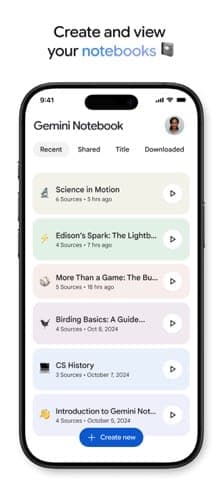
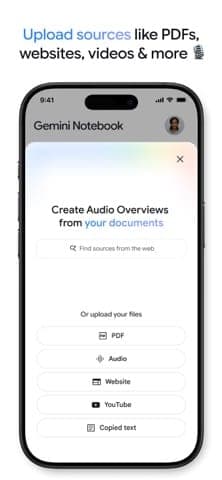
NotebookLM is Google's AI research assistant: you add PDFs, web pages, YouTube videos or text to a notebook, then ask questions and get answers with in-line source citations. Google says it began as a small Google Labs team, was shown as Project Tailwind at Google I/O 2023 and opened to the public in July 2023. On 16 July 2026 Google renamed it Gemini Notebook while calling it the same standalone product; this review keeps the NotebookLM name for searchability. Google says more than 30 million people and over 600,000 organisations use it.
Key features
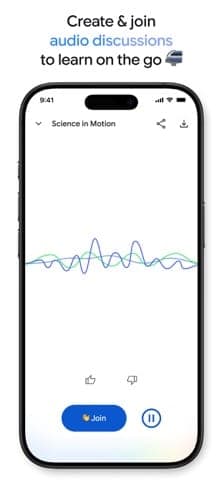
Beyond Q&A, the product turns sources into other formats. According to the plans page and Google Play, users can generate podcast-style Audio Overviews with two AI hosts, Video Overviews, flashcards, slides, reports and infographics. Audio Overviews launched in September 2024 and Video Overviews on 29 July 2025. The mobile apps arrived around 19 May 2025 with background playback and offline listening for Audio Overviews. With the rename, Google added a cloud computer to each notebook for running data-analysis code. At announcement it was open to Ultra users and Workspace customers with AI Ultra Access or AI Expanded Access, with Pro users on the web to follow over the next few weeks.
Pricing and limits
The free tier has standard limits: 100 notebooks per user and 50 sources per notebook. Beyond that you need a Google AI plan: Plus doubles the limits (200 notebooks, 100 sources), Pro gives four times (500 notebooks, 300 sources) and Ultra gives 5 to 20 times Pro (up to 600 sources per notebook). The US App Store lists Plus at $4.99 per month or $49.99 per year and Pro at $19.99 per month; Google One's Vietnam page lists Plus at 132,000 VND, Pro at 489,000 VND and Ultra from 2,250,000 VND per month. The AI plans are sold only in some regions, and the help page marks the limits as subject to change, so check before subscribing.
More analysis
Who it suits
NotebookLM suits cases where you already hold a set of documents and want answers you can verify through citations, such as exam revision, literature reviews or long reports. General chatbots like ChatGPT, Gemini or Claude fit better if you need writing, coding or knowledge beyond your documents. Note that data handling differs between consumer accounts and Workspace, Education or Cloud accounts.
Screenshots
Plans & pricing
Prices last verified Nov 10, 2026
Free
PersonalFree
Standard limits for chat and for generating Slides, Audio Overviews and other artifacts. Per the help page: 100 notebooks per user, 50 sources per notebook, 500 notes per notebook.
Google AI Plus
Personal$4.99/mo
$4.17/mo billed yearly
Double the standard usage limits: 200 notebooks, 100 sources per notebook and early access to new features. US App Store price: $4.99 per month or $49.99 per year, with 400 GB of Google storage.
Google AI Pro
Personal$19.99/mo
Four times the standard usage limits: 500 notebooks, 300 sources per notebook and priority access to new features. US App Store price: $19.99 per month, with 5 TB of storage.
Google AI Ultra
PersonalContact sales
5 to 20 times Pro usage limits: 500 notebooks and 500 sources per notebook on the 20 TB tier or 600 on the 30 TB tier. Google One's Vietnam page lists it from 2,250,000 VND per month; an official USD price was not verified for this review.
Workspace, Education, Enterprise
BusinessContact sales
Businesses, schools and organisations get it through Google Workspace, Workspace for Education or Google Cloud. Google says organisational data is not used to train models.
- Free plan limits
- The free tier uses Gemini models at standard access, with up to 50 sources per notebook.
- Free trial
- No free trial
Cancellation & refunds
The plans page and help page state no refund policy. Google AI Plus, Pro and Ultra are billed through Google One or the app stores under their own terms.
Privacy
Per Google's help page, consumer data is not used to train Gemini Notebook unless you provide feedback, in which case Google may review the full context of that interaction, including queries, uploads and model responses; Google may also process data to prevent fraud, abuse and technical issues. For Workspace and Workspace for Education, uploads, queries and responses are not used for training and are not seen by human reviewers, even when you give thumbs-up or thumbs-down feedback. For Google Cloud, files, chats and outputs are not used to improve models and uploaded files stay within your GCP project. The page does not state a retention period.
NotebookLM alternatives

 7.5/10
Gemini
Google's AI assistant, tied into Gmail, Drive, Android and Google storage plans
 7.5/10
ChatGPT
OpenAI's flagship AI assistant for writing, research, coding, images and voice
Frequently asked questions
Is NotebookLM free?
Yes, there is a free tier with standard limits: 100 notebooks per user and 50 sources per notebook per the help page. For more, you need Google AI Plus, Pro or Ultra.
Is NotebookLM the same as Gemini Notebook?
Yes. Google renamed NotebookLM to Gemini Notebook on 16 July 2026 and calls it the same standalone product, now with deeper Google integration.
Does Google train AI on my documents?
Per the help page, not on consumer accounts unless you submit feedback. For Workspace, Education and Cloud, content is not used for training.
Is there a mobile app?
Yes, iOS and Android apps launched around 19 May 2025. On Google Play the app is rated 4.7/5 with over 50 million downloads.
Review evidence & sources9
Scores
- Ease of use
- 8.2
- Features
- 8.0
- Value for money
- 8.3
- Performance
- 7.6
- Support
- 5.8
- Privacy & security
- 7.0
Why this score
Simple flow: add sources, then ask or generate summaries. Mobile apps exist, though a Google Play reviewer asked for multi-select when adding sources from Google Drive.
Why this score
Per the plans page: in-line citations, Audio and Video Overviews, flashcards, slides, reports, infographics, Source Discovery and Deep Research. The scope is research over your own sources, not a general assistant.
Why this score
A broad free tier and a $4.99 per month Plus on the US App Store, well below the usual $20 per month AI plans. Points off for the unclear Ultra USD price and region-limited AI plans.
Why this score
Ratings of 4.7/5 on Google Play and 4.9/5 on the App Store indicate high satisfaction. Usage is capped by plan, and one Google Play review says Audio Overviews max out at 20 minutes.
Why this score
A detailed help centre and a user community, but the pages read list no direct contact channel for consumer accounts. That puts it level with other consumer AI assistants such as ChatGPT and Gemini.
Why this score
No training on consumer data unless feedback is sent; no training or human review for Workspace, Education and Cloud. Better than many chatbots' defaults, but points off for no stated retention period and possible human review of consumer feedback.
What users say
- App Store (US)4.9/5 · 64,860
- Google Play4.7/5 · 355,000
Sources
- Vendor-providedOfficial plans pageNov 10, 2026
- Vendor-providedOfficial help page (privacy, limits)Nov 10, 2026
- Vendor-providedGoogle blog: rename announcementNov 10, 2026
- Vendor-providedGoogle blog: inside story of building NotebookLMNov 10, 2026
- Vendor-providedGoogle One AI plans (Vietnam)Nov 10, 2026
- storeApp Store listingNov 10, 2026
- storeGoogle Play listingNov 10, 2026
- pressTechCrunch (2025-05-20)Nov 10, 2026
- pressAlternativeTo (2026-07-17)Nov 10, 2026
Specs & compatibility
- Developer
- Headquarters
- United States
- Launched
- 2023
- Category
- AI
Capabilities
- AI features
- Mobile app
- Real-time collaboration
- Works offline
Platforms
- Web
- iOS
- Android
Interface languages
- English
- Vietnamese
- Japanese
- Chinese
- Spanish
- French
- Korean
- German
- Portuguese
- Russian
- Thai
- Indonesian
Integrations
- Gemini app
- Google Drive
- Google Workspace
- Google Cloud
Support
- Help center
- Community forum
Change history
- Company.Google renames NotebookLM to Gemini Notebook and adds a cloud computer for running code in each notebook.
- Feature.Video Overviews launch, turning documents into visual presentations.
- Launch.NotebookLM apps released for Android and iOS.
Full change history (6)
- Feature.Audio Overviews launch, podcast-style conversations between two AI hosts.
- Launch.Public launch as NotebookLM.
- Launch.Project Tailwind, the forerunner of NotebookLM, is shown at Google I/O 2023.
About the author
Reviews & comments
Written by readers with a verified email address.
No reviews yet. Have you used NotebookLM? Share your real experience.
Reader reviews are counted separately and do not affect the Editorial Team’s score.
No comments yet. Be the first to share your experience.
Comments are readers’ opinions, not content from the AppDuo Editorial Team.