Source-backed analysis8
Review basis
Research-based review: the AppDuo Editorial Team compiled it from official pages, documentation, app stores, press and user feedback, without hands-on testing. Every claim links to a source with the date it was checked.
8 reference sourcesInformation updated Nov 12, 2026
How we review
Edits (Instagram) Review
Instagram's free video editor with 4K, watermark-free export
By AppDuo Editorial Team · Fact-checked
- iOS
- Android
- macOS
On this page
Decide at a glance
Our verdict
Edits suits creators making Reels and short videos who want a free, watermark-free editor with Reels performance data built in. The trade-offs are its tie to Instagram and Meta's group-wide data policy, and a desktop version that so far runs only on Apple silicon Macs.
Best for: Creators posting Reels who want to edit on a phone and publish straight to Instagram
Skip it if: Windows or Linux users: the official page says the desktop version is macOS-only
Pros
- Free, with 4K export and no watermark per the App Store and Google Play listings
- Broad toolset: frame-level editing, automatic captions, noise reduction, green screen and AI image animation
- Built-in Reels insights dashboard, an ideas list and a feed of reels using trending audio
Cons
- Governed by Meta's group-wide privacy policy, which lists AI-feature interactions among the data that may personalise ads
- The desktop version covers only Apple silicon Macs and requires an Instagram sign-in; there is no Windows version
All pros and cons · Who is it for?
More pros
- The Mac version adds a multi-track timeline, keyframes, colour wheels and curves, custom LUTs and fonts, and direct publishing to Instagram
- High store ratings: 4.8/5 on the App Store (over 103,000 ratings) and 4.7/5 on Google Play (about 2.02 million)
More cons
- The Google Play Data safety label says personal info and device IDs may be shared with third parties
- Help runs through Instagram's Help Center and tutorials; the official site lists no chat or contact form specific to Edits
Best for
- People who want a free editor with 4K export and no watermark
- Apple silicon Mac users who want a multi-track timeline
Skip it if
- People who do not want an Instagram account or are wary of Meta's data policy
Experience & key features
What Edits is
Edits is Instagram's video editing app for creators making Reels and short videos. According to MacRumors, Adam Mosseri announced it on January 20, 2025, and it launched on the App Store on April 22, 2025. The official site now lists iOS, Android and macOS versions.
Key features
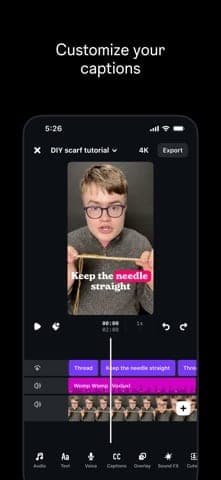
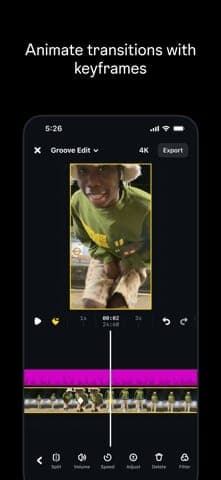
Per the App Store and Google Play descriptions, the app exports 4K video with no watermark, captures clips up to 10 minutes, edits at single-frame precision, and offers automatic captions, noise removal, green screen, cutouts and AI image animation. Beyond editing it has an ideas section, a feed of reels using trending audio and a Reels insights dashboard. The Mac version, per the official page, adds a multi-track timeline, keyframes, colour wheels and curves, custom LUTs and fonts, and unlimited automatic captions.
Pricing and requirements
Every page we checked lists Edits as free. Google Play shows an in-app purchases label without naming any item, so this review has no price table. The Mac version needs an Apple silicon Mac (M1 or later) and an Instagram account.
More analysis
Versus alternatives
MacRumors wrote that Edits fills the gap CapCut left when it was pulled from the US App Store. Its strengths are being free, watermark-free and tightly linked to Instagram; CapCut and Canva have their own template libraries and tools, so the choice depends on need. Creators posting mainly elsewhere can still use it: the App Store listing says exports can be shared to any platform, and MacRumors mentions TikTok.
Screenshots
Plans & pricing
Prices last verified Nov 12, 2026
Free
PersonalFree
Free to download on iPhone, Android and Mac. Exports in 4K with no watermark. The Mac version needs an Apple silicon Mac (M1 or later) and an Instagram account. Google Play shows an in-app purchases label, but the pages we checked list no paid item.
- Free plan limits
- No paid plan appears on the pages we checked; the app is listed as free, with 4K, watermark-free export.
- Free trial
- No free trial
Cancellation & refunds
Not applicable: the pages we checked list no paid plan.
Privacy
Edits falls under Meta's general privacy policy (effective July 23, 2026). The policy says Meta collects content and activity, device information and data from partners, and lists interactions with AI at Meta features among the information that may be used to personalise features, content and ads. Meta offers tools to download or delete your information. The Google Play Data safety label says the app may share personal info and device or other IDs with third parties, that data is encrypted in transit and that deletion can be requested. The Mac version requires an Instagram sign-in to save projects and share.
Edits (Instagram) alternatives


Controversies & incidents
Issues documented by the press, regulators, courts or the vendor itself. Every item is sourced; unproven claims are labelled as allegations. Last researched: Nov 12, 2026
No significant controversies or incidents found in the sources we checked.
Frequently asked questions
Is Edits free?
Yes. The App Store and Google Play list it as free with 4K, watermark-free export, and the official page says the Mac version is free to download. Google Play shows an in-app purchases label without naming an item.
Does Edits have a desktop version?
Yes, but only for macOS: it needs an Apple silicon Mac (M1 or later) and an Instagram account. The official page says the desktop version is currently macOS-only.
Does Edits support Vietnamese?
Yes. The US App Store language list includes Vietnamese among 31 language codes, and the app is available on the Vietnam App Store.
Do I need an Instagram account?
For the Mac version, yes: the official page says signing in keeps projects saved and lets you share from the app. For the mobile apps, the pages we checked do not state this requirement.
Review evidence & sources8
Scores
- Ease of use
- 8.0
- Features
- 7.5
- Value for money
- 8.5
- Performance
- 7.0
- Support
- 6.0
- Privacy & security
- 5.5
Why this score
The App Store lists 31 interface language codes (English, Vietnamese, Japanese, Chinese, Korean…). The official site has tutorials (captions, keyframes, teleprompter, templates), the app publishes straight to Instagram and keeps ideas and drafts in one place. The deduction: the Mac version requires an Instagram sign-in.
Why this score
It offers frame-precise editing, automatic captions, noise removal, green screen, AI image animation and 4K export; the Mac version adds a multi-track timeline, colour wheels, curves and LUTs. There is no Windows version, and collaboration, listed as planned by MacRumors in April 2025, does not appear on the pages we checked.
Why this score
Free with 4K, watermark-free export, and no paid plan on the pages we checked. Google Play shows an in-app purchases label without saying what it covers.
Why this score
Store ratings are high (4.8/5 App Store, 4.7/5 Google Play) and updates are frequent; the latest release notes cite fewer crashes and smoother exports. A prominent Google Play review (September 2026) reports crashes, failed exports and lost projects after reinstalling, so the score stays moderate.
Why this score
The official site links to Instagram's Help Center and offers tutorials, but lists no chat, contact form or community specific to Edits.
Why this score
Meta's policy lists AI-feature interactions among the data that may personalise ads, includes data from partners and, in some cases, manual review. The Google Play label says personal info and IDs may be shared with third parties, though data is encrypted in transit and deletion can be requested.
What users say
- Apple App Store (US)4.8/5 · 103,459
- Google Play4.7/5 · 2,020,000
Sources
- Vendor-providedEdits official websiteNov 12, 2026
- Vendor-providedEdits for Mac official pageNov 12, 2026
- Vendor-providedMeta Privacy PolicyNov 12, 2026
- storeEdits: Video Editor on the App StoreNov 12, 2026
- storeEdits: Video Editor on Google PlayNov 12, 2026
- pressMacRumors: Instagram Launches 'Edits' App (2025-04-22)Nov 12, 2026
- pressMacRumors: Instagram Unveils 'Edits' App (2025-01-20)Nov 12, 2026
- storeApple iTunes lookup API (US) for EditsNov 12, 2026
Specs & compatibility
- Developer
- Instagram, Inc. (Meta)
- Headquarters
- United States
- Launched
- 2025
- Category
- Productivity
Capabilities
- AI features
- Mobile app
Platforms
- iOS
- Android
- macOS
Interface languages
- English
- Vietnamese
- Japanese
- Chinese
- Spanish
- French
- Korean
- German
- Portuguese
- Russian
- Thai
- Indonesian
Integrations
Support
- Help center
Change history
- Update.iOS version 455.0 is released; its notes cite better stability, fewer crashes and smoother exports.
- Feature.The official site says Edits is now available on macOS: multi-track timeline, direct Instagram publishing and 4K watermark-free export; it requires an Apple silicon Mac.
- Launch.Edits launches on the App Store as a free download.
Full change history (5)
- Feature.The first release has capture and editing, AI image animation, cutouts, an ideas section and Reels insights; keyframes, collaboration, more fonts and effects were listed as planned.
- Launch.Adam Mosseri announces Edits, Instagram's standalone video editor, per MacRumors.
About the author
Reviews & comments
Written by readers with a verified email address.
No reviews yet. Have you used Edits (Instagram)? Share your real experience.
Reader reviews are counted separately and do not affect the Editorial Team’s score.
No comments yet. Be the first to share your experience.
Comments are readers’ opinions, not content from the AppDuo Editorial Team.