Source-backed analysis7
Review basis
Research-based review: the AppDuo Editorial Team compiled it from official pages, documentation, app stores, press and user feedback, without hands-on testing. Every claim links to a source with the date it was checked.
7 reference sourcesInformation updated Nov 10, 2026
How we review
Google Play Games Review
Google's Android game profile and library, now playable on Windows PCs too
By AppDuo Editorial Team · Updated
- Android
- Windows
On this page
Decide at a glance
Our verdict
Google Play Games suits people who already play Android games and want to continue on a PC with the same account at no cost. The trade-offs: Google still calls the PC version a beta, it needs specific hardware (an SSD, hardware virtualization) and runs only supported Android titles.
Best for: Android gamers who want to continue on PC with the same progress and Google account
Skip it if: Users with low-end PCs or machines where hardware virtualization cannot be enabled
Pros
- Free to use; you pay only for games or in-game items
- Profile, library and progress sync between phone and PC
- For select paid titles, one purchase unlocks both mobile and PC versions
Cons
- Google's help pages still call the PC version a beta, and it is Windows-only
- Requires Windows 10 (v2004) or later, 10 GB free SSD space, 8 GB RAM, 4 physical CPU cores, an admin account and hardware virtualization
All pros and cons · Who is it for?
Pros
- The official page cites over 200,000 games across mobile and PC, with Play Points in select markets
Cons
- Rated 4.0/5 on Google Play (Vietnam) across more than 13 million ratings, middling for a core Google app
Best for
- People who want a free, first-party option without installing a third-party emulator
Skip it if
- Those looking for a native PC game catalogue like Steam or Epic Games Store
Problems it solves
Experience & key features
What it is
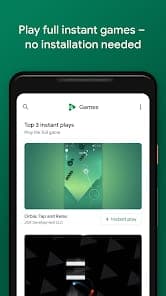
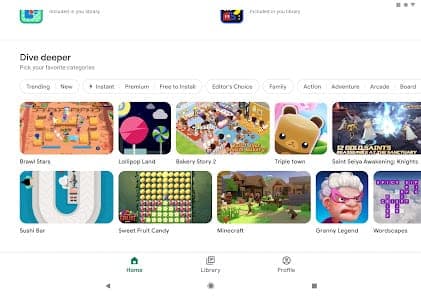
Google Play Games is Google's gaming service tied to a Google account. According to Wikipedia the Android app launched on 24 July 2013, and it later grew a Windows PC version. The official page now describes one gamer profile shared across phone and PC, plus a library of over 200,000 games across both.
The PC version
The PC version opened a public beta on 24 August 2022 in South Korea, Hong Kong, Taiwan, Thailand and Australia, according to TechCrunch. Google's help page now lists Vietnam among the places where the beta is available. Current requirements are Windows 10 (v2004) or later, 10 GB free SSD space, 8 GB RAM, 4 physical CPU cores, a Windows admin account and hardware virtualization. Progress syncs, so you can start on PC and continue on a phone.
Pricing and value
Google states that using Google Play Games on mobile or PC is free. Only some games and in-game items cost money, and for select paid titles one purchase unlocks both the mobile and PC versions. Play Points earn credit toward game purchases, but only in select markets and under separate terms.
More analysis
Compared with alternatives
It is not a native PC game store. It serves supported Android games running on Windows, which sets it apart from Steam or Epic Games Store and from cloud gaming such as GeForce NOW. On Google Play in Vietnam the app is rated 4.0/5 across more than 13 million ratings, a fair but unremarkable score.
Screenshots
Plans & pricing
Prices last verified Nov 10, 2026
Google Play Games
PersonalFree
Using Google Play Games on mobile or PC is free. Some games and in-game items cost money, and select paid games offer trials on mobile.
- Free plan limits
- The app itself is free; costs arise only from buying games or in-game items.
- Free trial
- No free trial
Cancellation & refunds
The Google Play Games page does not state a separate refund policy. Refunds for games and in-game items should be checked against Google Play's policy for each purchase.
Privacy
Google Play Games falls under Google's general Privacy Policy (effective 16 October 2026). It lists account data, content, device identifiers, IP addresses, crash reports, activity history and location. Google says it does not share personal information outside the company except with consent, via a domain administrator, with service providers or for legal reasons. Users can review and delete activity in My Activity, export data through Google Takeout, or set auto-delete. The Play Points programme has its own terms.
Google Play Games alternatives


Frequently asked questions
Is Google Play Games free?
Yes. Google says using it on mobile and PC is free. Only some games and in-game items cost money.
Is Google Play Games on PC available in Vietnam?
Google's developer help page lists Vietnam among the places with the beta. The general page only says it is in more than 140 regions without naming each, and availability also depends on device and account eligibility.
What PC specs are needed?
Windows 10 (v2004) or later, 10 GB free SSD space, an Intel UHD 630-class GPU, 4 physical CPU cores, 8 GB RAM, an admin account and hardware virtualization enabled.
Does progress sync between phone and PC?
Yes. Google says the library and progress sync across devices so you can pick up where you left off.
Review evidence & sources7
Scores
- Ease of use
- 7.0
- Features
- 7.0
- Value for money
- 8.5
- Performance
- 6.5
- Support
- 6.0
- Privacy & security
- 6.0
Why this score
One Google account across phone and PC, but the PC setup has several hardware prerequisites, including enabled hardware virtualization. The interface is English-only.
Why this score
Gamer profile, progress sync, Play Points and one-purchase-two-platforms for some titles. Some features, such as the You tab on PC or Sidekick with Gemini Live, are not available everywhere yet.
Why this score
Free on both phone and PC with no subscription tier of its own; costs sit only in games and items.
Why this score
Google Play shows 4.0/5 over more than 13 million ratings. The PC version relies on virtualization so it needs adequate hardware, and it remains in beta.
Why this score
Only Google Play help documentation for players and developers is evident; the sources reviewed list no dedicated chat or phone channel for Google Play Games.
Why this score
Covered by Google's general policy with broad data scope (activity, location, device) but with My Activity, Takeout and auto-delete controls.
What users say
- Google Play (Vietnam) - Google Play Games app4.0/5 · 13,123,425
Sources
- Vendor-providedGoogle Play Games official pageNov 10, 2026
- Vendor-providedGoogle Play Games on PC help (availability by country)Nov 10, 2026
- Vendor-providedCheck if your PC can run Google Play Games on PC (requirements)Nov 10, 2026
- Vendor-providedGoogle Privacy PolicyNov 10, 2026
- storeGoogle Play listing (Vietnam)Nov 10, 2026
- pressTechCrunch (2022-08-24)Nov 10, 2026
- Community-reportedWikipedia - Google Play GamesNov 10, 2026
Specs & compatibility
- Developer
- Google LLC
- Headquarters
- United States
- Launched
- 2013
- Category
- Entertainment
Capabilities
- Mobile app
- Integrations
Platforms
- Android
- Windows
Interface languages
- English
Integrations
- Google Play Store
- Google Play Points
- Google Account
Support
- Help center
Change history
- Feature.Google retires the instant play feature, according to Wikipedia.
- Feature.The PC beta opens to everyone without a waitlist in South Korea, Hong Kong, Taiwan, Thailand and Australia. Requirements drop to a four-core CPU and 10 GB of free storage.
- Feature.Google announces the PC beta at The Game Awards, planned for early 2022.
Full change history (5)
- Feature.Real-time and turn-based multiplayer services end support, having been deprecated in September 2019.
- Launch.The Google Play Games Android app launches, after the service was introduced at Google I/O in May 2013.
About the author
Reviews & comments
Written by readers with a verified email address.
No reviews yet. Have you used Google Play Games? Share your real experience.
Reader reviews are counted separately and do not affect the Editorial Team’s score.
No comments yet. Be the first to share your experience.
Comments are readers’ opinions, not content from the AppDuo Editorial Team.