Source-backed analysis9
Review basis
Research-based review: the AppDuo Editorial Team compiled it from official pages, documentation, app stores, press and user feedback, without hands-on testing. Every claim links to a source with the date it was checked.
9 reference sourcesInformation updated Nov 10, 2026
How we review
Google Flow (Veo) Review
Google's AI studio for video and images with Veo and Gemini Omni
By AppDuo Editorial Team · Updated
- Web
- iOS
- Android
On this page
Decide at a glance
Our verdict
Flow suits people who already use or plan to buy a Google AI plan and want one place for video with audio, scene-building tools and an agent. The trade-offs are that benefits are tied to Google AI plans, prices jump sharply at the Ultra tier, and independent assessments of output quality are scarce.
Best for: Creators who want to try video with audio for free using 50 daily credits
Skip it if: People who want a standalone video tool with its own plan and published per-clip pricing
Pros
- A free tier with 50 daily credits including Veo 3.1 Lite and Flow tools
- Veo 3.1 has native audio; Flow adds Scenebuilder, Ingredients, video extension and an agent
- Ready-made tools such as Storyboard Studio, Video Resizer and Type Overlays, plus custom tools built from plain-language prompts
Cons
- Credits come bundled with Google AI plans, so heavier use means buying the whole bundle
- Pricing jumps from $19.99 (1,000 credits) to $99.99 (10,000) and $199.99 (25,000)
All pros and cons · Who is it for?
Pros
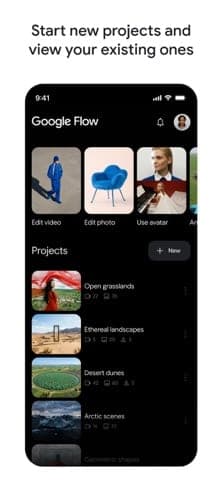
- Android (4.1/5 on Google Play, 10M+ downloads) and iPhone apps that sync projects with the web version
Cons
- The iPhone app sits at 3.7/5 from 146 ratings, clearly below the Android app
- The privacy policy is unclear on whether prompts and uploads are used for training
Best for
- Existing Google AI Pro subscribers who bought for storage, Gemini and YouTube Premium Lite and get Flow on top
Skip it if
- Anyone under 18, as the Flow page states 18+
Problems it solves
Experience & key features
Google Flow is Google's AI creative studio for video and images. Google announced it at I/O on May 20, 2025 as a filmmaking tool built on Veo, Imagen and Gemini, evolving from the VideoFX experiment in Google Labs. The current page describes Flow as the place to use Gemini Omni, Nano Banana and Veo 3.1 to create and edit content.
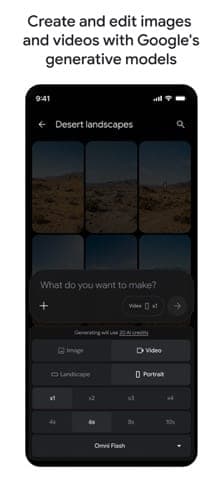
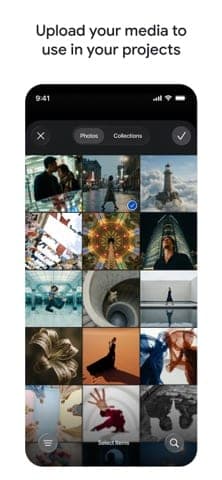
Per the official page, Veo 3.1 offers expanded creative controls and native audio, and Google describes it as strong on physics, realism and prompt adherence. Flow includes an agent, text, frames and Ingredients to video, video editing, Scenebuilder and tools such as Storyboard Studio, Video Resizer and Type Overlays. Users can also build their own tools from natural language.
Pricing and credits
Flow is free with 50 daily credits. Google AI plans add monthly credits: Plus at $7.99 has 200, Pro at $19.99 has 1,000, Ultra at $99.99 has 10,000 and Ultra at $199.99 has 25,000, with prices possibly varying by market. Pro and above can also buy AI credit top-ups. The Vietnam Google AI plans page lists Plus at 132,000 VND, Pro at 489,000 VND and Ultra at 2,250,000 or 5,500,000 VND per month.
Points to weigh
Because Flow ships with Google AI plans, it fits people who want the whole bundle of Gemini, storage and YouTube Premium Lite rather than video alone. On mobile, the Android app arrived in beta on May 19, 2026 and now rates 4.1/5 on Google Play (about 41K reviews, 10M+ downloads), while the iPhone app scores only 3.7/5 from 146 ratings; Google says the web version remains the place for every feature. On privacy, read Google's activity settings and policy carefully before uploading photos of real people.
More analysis
Versus alternatives
Direct rivals include Kling AI, Sora, Runway, Hailuo AI and Luma Dream Machine. Those services typically sell dedicated video plans, while Flow is folded into Google AI plans. Before choosing, compare cost per second of video, maximum length, commercial rights and how credits are treated on failed generations.
Screenshots
Plans & pricing
Prices last verified Nov 10, 2026
Free
PersonalFree
Per the official pricing section: 50 daily Flow credits, with Omni 1.2 Flash (up to 10s), Nano Banana Pro, Nano Banana 2.1, Veo 3.1 Lite, the agent, Text, Frames and Ingredients to Video, video-to-video editing, Scenebuilder and 2K image upscaling.
Google AI Plus
Personal$7.99/mo
$7.99/month (prices may vary by market). Adds 200 monthly Flow credits on top of the 50 daily ones; Omni 1.2 Flash for 11-15s videos, video extension with Ingredients, 720p and 1080p video upscaling, higher image limits.
Google AI Pro
Personal$19.99/mo
$19.99/month (prices may vary by market). 1,000 monthly Flow credits plus 50 daily, with AI credit top-ups available. Bundled with Gemini 3.1 Pro, 5 TB storage and YouTube Premium Lite.
Google AI Ultra (10.000 credit)
Personal$99.99/mo
$99.99/month (prices may vary by market). 10,000 monthly Flow credits plus 50 daily; 4K image and video upscaling, highest image and agent limits. Bundled with YouTube Premium and 20 TB storage.
Google AI Ultra (25.000 credit)
Personal$199.99/mo
$199.99/month (prices may vary by market). 25,000 monthly Flow credits plus 50 daily, with everything in the $99.99 Ultra tier and 30 TB storage.
- Free plan limits
- Free users get 50 daily Flow credits with Veo 3.1 Lite and Omni 1.2 Flash (up to 10 seconds).
- Free trial
- No free trial
Cancellation & refunds
The Google AI plans page says you can cancel at any time. Refunds follow Google One's own policy, which this review has not checked.
Privacy
Flow falls under Google's Privacy Policy (effective October 16, 2026). The policy says Google may use public information to help train its AI models, but the page does not say whether prompts and uploads are used for training. You can review and delete activity in My Activity, export data through Takeout or delete your account. The Flow page states 18+. On the App Store, the developer-reported privacy label lists purchases, location, contact info, user content and identifiers as data linked to you, while the Google Play data safety section says the app collects and shares no data. Google's older generative AI additional terms (August 9, 2023) warn the service may produce inaccurate or offensive content and stopped applying on May 22, 2024 when the main terms were updated.
Google Flow (Veo) alternatives


Frequently asked questions
Is Google Flow free?
Yes. Per the official page, users without a Google AI plan get 50 Flow credits per day, with Veo 3.1 Lite and Omni 1.2 Flash (up to 10 seconds).
Which plan gives more credits?
Google AI Plus adds 200 credits a month, Pro adds 1,000, Ultra at $99.99 adds 10,000 and Ultra at $199.99 adds 25,000, on top of the 50 daily credits.
Does Flow work on a phone?
Yes. Google Flow has apps on Android (Google Play) and iPhone (iOS 16 or later). Google says the web version still offers every feature.
Is there an age limit?
Yes. The Flow page states 18+, and the App Store rating is 18+.
Review evidence & sources9
Scores
- Ease of use
- 8.0
- Features
- 8.6
- Value for money
- 7.6
- Performance
- 7.8
- Support
- 6.0
- Privacy & security
- 6.2
Why this score
Google account sign-in, web plus Android and iPhone apps, and plain-language editing. Google Play rates it 4.1/5 (about 41K reviews) but the App Store only 3.7/5 (146 ratings), pointing to an uneven experience across platforms.
Why this score
The official page lists Veo 3.1 with native audio, Omni, Nano Banana, Scenebuilder, Ingredients, video extension, an agent, 4K upscaling (Ultra) and many custom tools.
Why this score
A free tier, Plus at $7.99 and Pro at $19.99 with storage and Gemini make it good value if you use the bundle. Ultra from $99.99 is steep.
Why this score
Google says Veo 3.1 excels in physics, realism and prompt adherence, but that is the vendor's claim. There is not enough independent evaluation to justify a higher score.
Why this score
Docs and an FAQ exist on the Flow page; no Flow-specific reviews of support were found, so the score is middling.
Why this score
My Activity, Takeout and account deletion exist, but the policy is unclear on training use of prompts and uploads, and the App Store label lists location and user content as linked to you.
What users say
- App Store (United States)3.7/5 · 146
- Google Play (United States)4.1/5 · 41,200
Sources
- Vendor-providedOfficial Flow page and pricing sectionNov 10, 2026
- Vendor-providedGoogle AI plans page (Vietnam prices, Flow credits)Nov 10, 2026
- Vendor-providedGoogle blog: Meet Flow (2025-05-20)Nov 10, 2026
- Vendor-providedGoogle blog: Flow agents, mobile apps and Gemini Omni (2026-05-19)Nov 10, 2026
- Vendor-providedGoogle Privacy PolicyNov 10, 2026
- Vendor-providedGoogle generative AI additional termsNov 10, 2026
- storeApp Store listing (United States)Nov 10, 2026
- storeGoogle Play listing (United States)Nov 10, 2026
- pressTechCrunch: Google debuts Flow (2025-05-20)Nov 10, 2026
Specs & compatibility
- Developer
- Google LLC
- Headquarters
- United States
- Launched
- 2025
- Category
- AI
Capabilities
- AI features
- Mobile app
- Templates
- Integrations
Platforms
- Web
- iOS
- Android
Interface languages
- English
- Vietnamese
- Japanese
- Chinese
- Spanish
- French
- Korean
- German
- Portuguese
- Russian
- Thai
- Indonesian
Integrations
- Veo 3.1
- Gemini Omni
- Nano Banana
- Google AI subscriptions
Support
- Help center
- Community forum
Change history
- Launch.The Google Flow iPhone app shows a September 9, 2026 release date in App Store data.
- Feature.Google releases the Flow app in beta on Android and brings the Gemini Omni Flash model and Google Flow Agent to Flow.
- Launch.Google announces Flow at I/O, an AI filmmaking tool built on Veo, Imagen and Gemini and evolved from VideoFX; initially for Google AI Pro and Ultra subscribers in the US.
Full change history (5)
- Limits.At launch, AI Pro included 100 generations per month; AI Ultra had higher limits and early access to Veo 3 with native audio.
- Feature.Launch features include camera controls, Scenebuilder, asset management and Flow TV.
About the author
Reviews & comments
Written by readers with a verified email address.
No reviews yet. Have you used Google Flow (Veo)? Share your real experience.
Reader reviews are counted separately and do not affect the Editorial Team’s score.
No comments yet. Be the first to share your experience.
Comments are readers’ opinions, not content from the AppDuo Editorial Team.