Source-backed analysis11
Review basis
Research-based review: the AppDuo Editorial Team compiled it from official pages, documentation, app stores, press and user feedback, without hands-on testing. Every claim links to a source with the date it was checked.
11 reference sourcesInformation updated Nov 10, 2026
How we review
Affinity by Canva Review
Vector, photo and layout in one app, free for individuals
By AppDuo Editorial Team · Updated
- macOS
- Windows
- iOS
On this page
Decide at a glance
Our verdict
Affinity by Canva suits designers, photo editors and layout artists who want an all-in-one app with no subscription and support for opening PSD, AI and IDML files. The trade-offs are a required Canva account, AI tools that need a paid Canva plan, and a small pool of public reviews.
Best for: Designers, illustrators, photo editors and layout artists looking for a free replacement for paid tools.
Skip it if: People who do not want a Canva account or need Linux or Android, as no builds for those are listed.
Pros
- Individuals get the full Vector, Pixel and Layout toolsets free, with no paid plan required.
- One .af file holds vector, pixel and layout work; PSD, AI, IDML and DWG import with layers preserved, per the homepage.
- Available on Mac (native on Apple silicon and Intel), Windows and iPad, installable on as many of your own devices as you like.
Cons
- A Canva account is required to download and activate, with an online step for activation.
- AI tools unlock only with a paid Canva plan (from 18 USD a month as an iPad in-app purchase), and the Affinity pages do not publish a price.
All pros and cons · Who is it for?
Pros
- Non-destructive editing and ten interface languages.
Cons
- At launch the iPad app lacks some desktop features, such as Books, Batch, Data Merge, macro recording and the Astrophotography Studio.
- Few and mixed public reviews: App Store 4.6/5 on 211 ratings, Trustpilot 2.0/5 on 14 reviews.
Best for
- iPad and Apple Pencil users who want one file format across desktop and tablet.
Problems it solves
Experience & key features
What is Affinity by Canva?
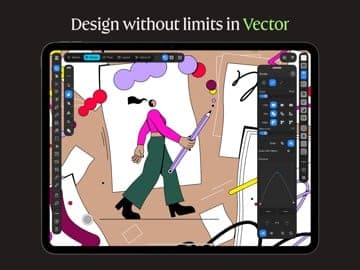
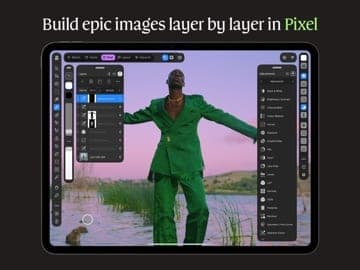
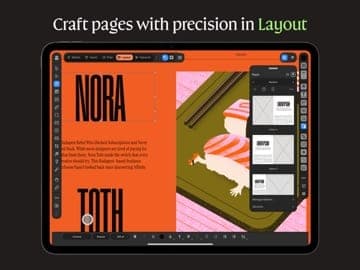
Affinity was previously Serif's trio of Designer, Photo and Publisher. Per MacRumors, Canva acquired Serif in 2024 and on 31 October 2025 announced a rebuilt version: a single app with Vector, Pixel and Layout tabs, free, on Mac and Windows. The iPad version followed on 2 November 2026, by which point MacRumors reported more than seven million desktop sign-ups. The homepage describes it as professional design, photo editing and page layout in one app using the .af file format.
Features and platforms
The homepage cites non-destructive editing, PSD, AI, IDML and DWG import with layers preserved, one-step export to Canva for collaboration and Cavalry integration for motion. The download page adds Image Trace, ePub support, mesh gradients and hatch fills. It ships on Mac, Windows and iPad; the iPad version adds a Sketch Studio for freehand drawing and supports Apple Pencil Pro barrel roll, squeeze, hover, pressure and tilt. The interface covers English, French, German, Italian, Spanish, Portuguese, Japanese, Chinese, Indonesian and Turkish.
Pricing and value
Individuals use every Vector, Pixel and Layout tool free with a Canva account and receive free updates. AI tools such as Generative Fill or Generate Image/Vector unlock only with a paid Canva plan (Pro, Business, Enterprise or Education). The Affinity pages list no price for these; in the iPad app on the US App Store, Canva Pro is 18 USD a month or 143.99 USD a year. Enterprise and education customers contact Canva for SSO and organisation plans.
More analysis
Who it fits, and alternatives
Affinity fits people who want a professional toolset without a monthly subscription, compared with Adobe Photoshop and Illustrator. Those mostly making quick designs from templates may prefer Canva, while app interface designers often choose Figma or Sketch. Weigh the conditions: a required Canva account, AI tied to a paid Canva plan and Canva's privacy policy.
Screenshots
Plans & pricing
Prices last verified Nov 10, 2026
Free
PersonalFree
Individuals get every tool in the Vector, Pixel and Layout studios (plus Sketch on iPad), with exports at no cost. A free Canva account is needed to download and activate, and you can install it on all your own devices.
Canva Pro
Personal$18/mo
$12/mo billed yearly
Only needed for the AI tools (Generative Fill, Generative Expand, Generate Image/Vector, upscaling, noise reduction). The Affinity pages list no price; as an in-app purchase on the US App Store, Canva Pro is 18 USD a month or 143.99 USD a year and Canva Business 25 USD a month or 250 USD a year. Enterprise and Education plans also unlock AI.
- Free plan limits
- The core vector, pixel and layout tools are free for individuals. AI tools are unavailable without a paid Canva plan. You must be online to download and activate the licence; after that there is no requirement to be online, even for extended periods.
- Free trial
- No free trial
Cancellation & refunds
The core software is free, so there is nothing to refund. The Affinity pages say nothing about refunds for paid Canva plans.
Privacy
Affinity falls under Canva's privacy policy (updated 2 November 2026); the data controller is Canva Pty Ltd, with a registered address in Surry Hills, Australia. The policy says Canva may analyse activity, content and uploads to train its algorithms and AI models, lets you manage this in privacy settings, but does not state whether the default is on or off; Canva Education content is not used for AI training. Per dpreview, Canva's CEO said Canva AI runs on the user's device and does not access work to train AI; that is a press quote, not something stated in the policy pages opened. The right to use Affinity is tied to a Canva account and may require an online entitlement check.
Affinity by Canva alternatives
 7.7/10
Canva
Drag-and-drop design with a large template library, a free tier and AI tools
 7.2/10
Adobe Photoshop
The industry-standard photo editor, now with Firefly AI, sold by subscription
Frequently asked questions
Is Affinity by Canva really free?
Per the download page, individuals can use every Pixel, Vector and Layout tool and all export features at no cost with a free Canva account. Only the AI tools need a paid Canva plan.
Do I need to be online?
You only need to be online to download and activate the licence; after that there is no requirement to be online, even for long periods. AI tools, stock libraries, lessons and Canva integrations need a connection, and the company recommends connecting from time to time for updates.
Which platforms does Affinity support?
Windows, macOS and iPadOS (the iPad app needs iPadOS 18 or later). The download page does not mention Linux or Android. The Mac build runs natively on both Apple silicon and Intel.
What happens to the older V2 apps?
Per MacRumors, existing V2 licence holders can keep using their purchased software, without the Canva integrations. Press reports say Canva no longer sells the standalone apps.
Review evidence & sources11
Scores
- Ease of use
- 7.3
- Features
- 8.3
- Value for money
- 8.8
- Performance
- 7.4
- Support
- 6.3
- Privacy & security
- 6.2
Why this score
Three tools merge into one app and a Help Center exists, but users must learn the Studios and set up a Canva account. App Store 4.6/5 on 211 ratings and Trustpilot 2.0/5 on 14 reviews: small and mixed samples.
Why this score
Vector, pixel, layout, PSD/AI/IDML import, Image Trace, ePub, a Blend Tool, and export to Canva and Cavalry. Deductions: AI sits behind a paid Canva plan, the app only launched in October 2025 and the iPad version still lacks some desktop features.
Why this score
All core tools are free for individuals with free updates and multi-device installs, a strong position against subscription design software. Kept below 9 because a Canva account is required and AI costs extra via a Canva plan.
Why this score
The homepage claims speed with thousands of layers and 1,000,000% zoom, but this is the vendor's own claim. No independent benchmarks were found on the pages opened, so the score is moderate.
Why this score
A topic-based Help Center covers account, billing and enterprise topics. No chat or phone channel was found for free users, so it scores below Adobe (6.8).
Why this score
Canva's policy allows AI training on content and does not state the default; Affinity use is tied to a Canva account and an online entitlement check. Positives: offline work after activation, and the CEO's statement that work is not used for AI training (a press quote only).
What users say
- App Store (US, Affinity for iPad)4.6/5 · 211
- Trustpilot (affinity.studio, unclaimed profile)2.0/5 · 14
Sources
- Vendor-providedOfficial Affinity homepageNov 10, 2026
- Vendor-providedOfficial Get Affinity pageNov 10, 2026
- Vendor-providedOfficial Affinity download page and FAQNov 10, 2026
- Vendor-providedOfficial Affinity Help CenterNov 10, 2026
- Vendor-providedCanva Affinity TermsNov 10, 2026
- Vendor-providedCanva Privacy PolicyNov 10, 2026
- storeApp Store listing (Affinity for iPad)Nov 10, 2026
- pressMacRumors (2025-10-31)Nov 10, 2026
- pressMacRumors (2026-11-02): Affinity for iPadNov 10, 2026
- pressDPReview: Affinity is now one appNov 10, 2026
- review-siteTrustpilot reviews of affinity.studioNov 10, 2026
Specs & compatibility
- Developer
- Canva Pty Ltd
- Headquarters
- Australia
- Launched
- 2025
- Category
- Productivity
Capabilities
- AI features
- Works offline
- Integrations
- Mobile app
Platforms
- macOS
- Windows
- iOS
Interface languages
- English
- French
- German
- Spanish
- Portuguese
- Japanese
- Chinese
- Indonesian
Integrations
- Canva
- Cavalry
- Photoshop (PSD)
- Illustrator (AI)
- InDesign (IDML)
Support
- Help center
Change history
- Feature.Affinity for iPad launches free on the App Store with a new Sketch Studio and Apple Pencil Pro support; some desktop features are not yet included.
- Update.Canva's privacy policy, which covers Affinity, is updated.
- Update.Affinity Terms updated; use is linked to a Canva account and may require an online entitlement check.
Full change history (4)
- Launch.Canva announces the new Affinity: Designer, Photo and Publisher merged into one free app on Mac and Windows, requiring a Canva account.
About the author
Reviews & comments
Written by readers with a verified email address.
No reviews yet. Have you used Affinity by Canva? Share your real experience.
Reader reviews are counted separately and do not affect the Editorial Team’s score.
No comments yet. Be the first to share your experience.
Comments are readers’ opinions, not content from the AppDuo Editorial Team.